PostFast MCP Server for Claude, ChatGPT and Cursor
An official MCP server and a REST API on every plan, including the 7-day trial. Hosted connector https://mcp.postfa.st/mcp over OAuth for ChatGPT and the Claude app (27 tools); npx -y postfast-mcp for Claude Desktop, Claude Code, VS Code and Cursor (25 tools).
Drive PostFast from Cursor, VS Code, Claude Code, and any MCP client, in natural language. Schedule across 11 platforms, then work the comment inbox without leaving the assistant.
Working in Claude Code specifically? See the Claude Code integration guide for terminal-first setup through either the hosted connector or the npm package, example prompts, and the tools each one gives you.
Using ChatGPT or the Claude app instead of an IDE? Use the hosted connector for ChatGPT or Claude, which exposes 27 tools with nothing to install. In ChatGPT you can install it in one click from the plugin directory.
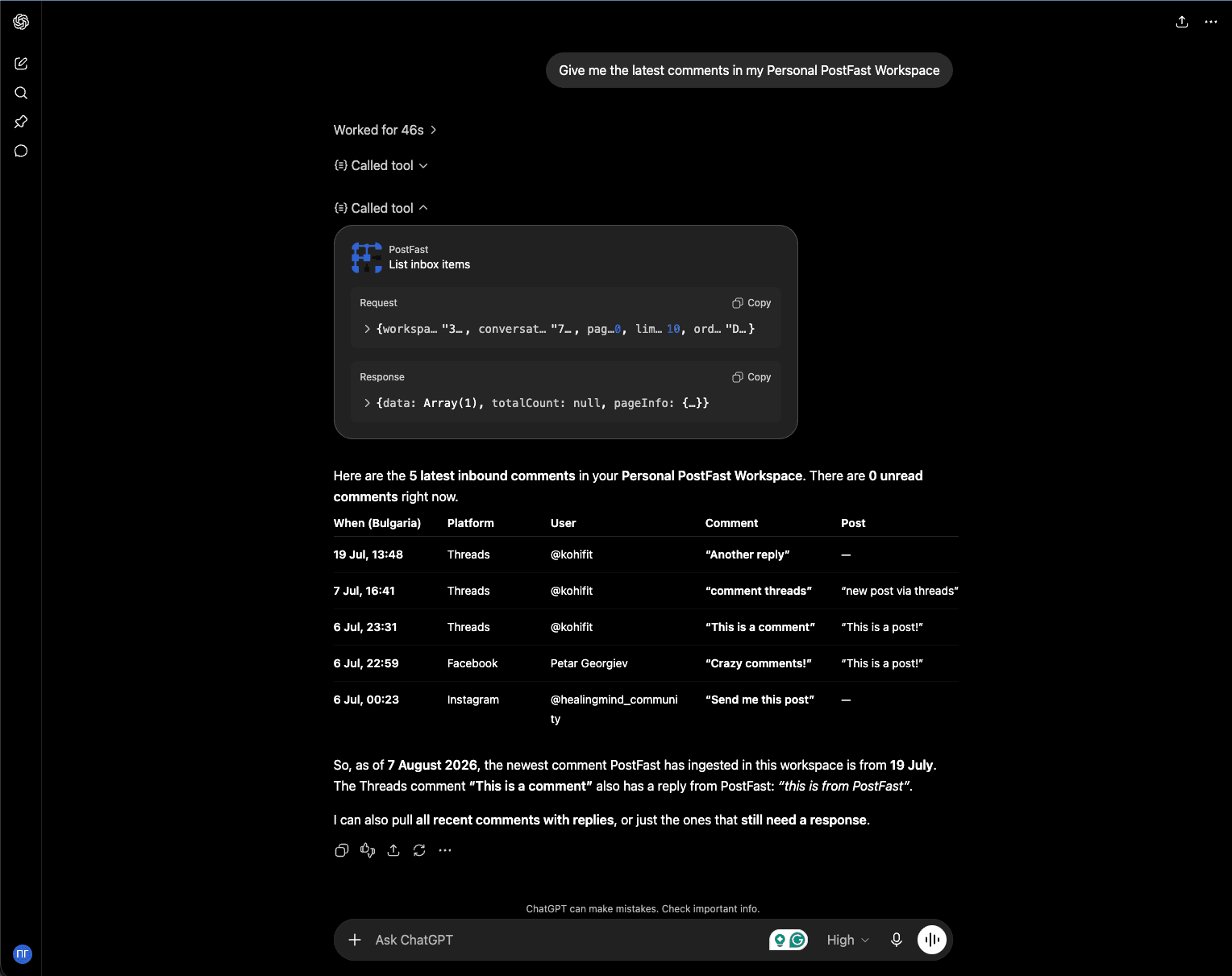
list_inbox_items through the hosted connector, with the request and response visible above the answer. The comments are real threads on connected TikTok, Threads, Instagram and Facebook accounts, pulled live rather than pasted in.What You Can Do
These are jobs, not demos. Each one is a single request in a normal conversation, and each one ends with something changed in your PostFast account rather than a block of text you still have to act on.
“Take this changelog entry, write a launch post for LinkedIn, X and Threads, and schedule all three for 9am tomorrow.”
The assistant drafts three platform-appropriate versions, calls create_posts once with all three, and comes back with the post IDs and scheduled times. You end up with three scheduled posts, not three drafts to copy and paste.
“Upload this video, schedule it as a TikTok for Friday at 6pm, and put a trending sound on it.”
upload_media handles the signed URL and the file, list_tiktok_sounds returns pre-cleared Commercial Music Library tracks, and create_posts attaches the sound and the schedule. Three tools, one sentence.
“Which comments from the last three days still need a reply? Draft answers for the ones that are questions.”
list_inbox_conversations filters to unread, list_inbox_items reads each thread, and the assistant proposes replies that already fit each platform’s character limit because the limit came back with the conversation. You approve, and it sends them with reply_to_inbox_item on the stdio server, or with prepare_inbox_action and confirm_inbox_action on the hosted connector.
“Compare last month to the month before across all accounts and tell me what changed.”
get_post_analytics pulls both windows and get_follower_history adds the audience trend underneath. The answer is an explanation with the numbers attached, which is the part a CSV export never gives you.
“Set up the new client: generate a connect link, then show me what they connected.”
generate_connect_link produces a link the client opens themselves, so their credentials never touch your inbox. list_accounts confirms what landed and flags anything that came back DISABLED before it silently fails to publish.
“Anything in the queue this week that has not been approved yet?”
list_posts filters by status and date range. On the hosted connector, approve_posts then moves the ones you name from pending approval to approved, so a review pass happens in the same conversation as the review.
How to schedule social media posts with MCP
From an empty chat to a scheduled post. Only the first step depends on which assistant you use.
- 1Start your 7-day free trial (no credit card), or sign in if you already use PostFast, and connect a social account. The hosted connector and API keys work while a trial or plan is running.
- 2Connect PostFast to your assistant. In ChatGPT or the Claude app, add the hosted connector
https://mcp.postfa.st/mcpand sign in with OAuth, no API key. In an IDE or terminal such as Claude Code, Cursor or VS Code, addnpx -y postfast-mcpwith an API key from your PostFast dashboard. - 3Check your accounts. Ask “List my PostFast accounts”.
list_accountsshows what is connected and flags any account that came back DISABLED before it silently fails to publish. - 4Add media if the post needs it.
upload_mediareturns a media key to attach, and on the hosted connectorupload_from_urldoes the same from a public URL. - 5Ask for the post and its time. The assistant writes a version per platform and calls
create_posts, up to 15 posts in one call, with any platform controls set in the same call. - 6Confirm what was scheduled. The assistant comes back with the post IDs and scheduled times, and
list_postsshows the queue by status and date. On the hosted connector, new posts are created on hold and publish only after you say yes.
Connect in two minutes
Nothing to install and no API key. Both clients take the same hosted endpoint over OAuth. In ChatGPT the quickest route is a one-click install from the plugin directory; in Claude, add PostFast from Claude’s connector directory. New to PostFast? Start your 7-day free trial (no credit card) and connect a social account first. The connector works once your trial is running.
Claude app
Quickest route: add PostFast from Claude’s connector directory, then sign in to PostFast when Claude asks.
- Start your 7-day free trial at app.postfa.st (no credit card), or sign in if you already use PostFast, and connect at least one social account.
- Open PostFast in Claude's connector directory at https://claude.ai/directory/postfast, or in Claude go to Customize, then Connectors, and search for PostFast.
- Add it and sign in to PostFast when Claude asks. No client secret, no API key.
- In the composer, click the plus, choose Connectors, and turn PostFast on for the chat.
To add it by URL instead, after step 1: in Customize, then Connectors, click Add, hover over Custom and choose Web. Name it PostFast, paste https://mcp.postfa.st/mcp, keep the authentication settings Claude detects (sign in, with Claude’s published identity), click Add, and sign in to PostFast when Claude asks.
ChatGPT
Quickest route: install PostFast from the ChatGPT plugin directory in one click, then sign in to PostFast when ChatGPT asks. No Developer mode needed. To add it by URL instead:
- Start your 7-day free trial at app.postfa.st (no credit card), or sign in if you already use PostFast, and connect at least one social account.
- Open ChatGPT, go to Settings, then Connectors (it may read “Apps and Connectors”).
- Scroll to Advanced and turn on Developer mode.
- Choose Create, give the connector a name, and paste https://mcp.postfa.st/mcp.
- Approve the OAuth sign-in. No client secret, no API key.
- Ask: “List my PostFast accounts and schedule a post to LinkedIn for tomorrow 9am.”
Adding a connector by URL needs Developer mode. OpenAI says whether you can install a plugin from the directory depends on your plan, workspace settings, role, and region.
Longer walkthroughs, with the prompts worth trying first, live on the Claude app page and the ChatGPT page.
Quick Setup
Add the following to your .mcp.json configuration file (works with Claude Desktop, Claude Code, VS Code, Cursor, and more):
{
  "mcpServers": {
    "postfast": {
      "type": "stdio",
      "command": "npx",
      "args": ["-y", "postfast-mcp"],
      "env": {
        "POSTFAST_API_KEY": "your-api-key-here"
      }
    }
  }
}Opens Cursor with this server ready to install. Afterwards, replace your-api-key-here in ~/.cursor/mcp.json with your API key from step 1 below.
1. Log in to your PostFast dashboard, go to API in the sidebar, and generate a key. New to PostFast? Start your 7-day free trial first: keys work while a trial or plan is running
2. Add the config above to your AI tool
3. Start chatting. Ask it to list your accounts or schedule a post
No local process to run? The hosted connector at mcp.postfa.st authenticates over OAuth instead of an environment variable, which is what ChatGPT and the Claude app use.
Test with MCP Inspector
Want to verify everything works before using it with your AI tool? Run the MCP Inspector:
This opens a web UI where you can connect, list all available tools, and test each one individually. If you see 25 tools listed, the server is wired up correctly.
Available Tools
25 tools ship with the stdio server and 27 with the hosted connector, grouped below by the job they do. 21 are common to both, plus an upload_media on each side; the rest exist only where their transport makes sense.
Accounts, posts, media, analytics, follower history and the comment inbox are all here, on every plan, with no per-seat and no per-conversation charge. Editing a post after creation and connecting accounts still happen in the app.
Publishing
(6)Everything between a draft and a published post, including batching and approval.
create_postsCreate and schedule posts, batching up to 15 at a timelist_postsList posts with filters (IDs, accounts, platform, status, date range)delete_postDelete a post by IDdelete_postsDelete up to 100 posts by ID in one callapprove_postsMove posts from pending approval to approved so they publish (hosted connector only)list_tiktok_soundsBrowse TikTok's trending, pre-cleared Commercial Music Library tracks to attach to a photo carousel or videoAccounts and connections
(7)What is connected, which workspace it lives in, and the per-platform lookups a post needs before it can be built.
list_accountsList connected social media accounts, including connection status (CONNECTED / DISABLED)list_workspacesList the workspaces the key can act in, so an assistant can target the right client (hosted connector only)generate_connect_linkGenerate a shareable link for external clients to connect their own accountslist_pinterest_boardsList Pinterest boards for a connected accountlist_youtube_playlistsList YouTube playlists for a connected accountlist_gbp_locationsList Google Business Profile locationssearch_placesSearch real-world places to geotag Facebook & Instagram postsMedia
(3)Get an image, a video, a caption file or a LinkedIn document into PostFast and back out as a key a post can carry.
upload_mediaUpload an image, video, caption file (.srt, .vtt) or LinkedIn document (PDF, Word, PowerPoint) and get back a key ready to attach to a postget_upload_urlsGet signed URLs for a manual upload flow (stdio server only)upload_from_urlPull media, a caption file or a document straight from a public URL, no local file needed (hosted connector only)Analytics
(2)Per-post performance and day-by-day audience growth, so an assistant can answer questions instead of exporting a CSV.
get_post_analyticsImpressions, reach, likes, comments, shares, and video watch-time for published postsget_follower_historyDaily follower/subscriber snapshots for an account, with current count and net change over a rangeSocial Inbox
(12)Read, answer, moderate and triage the comments on your own TikTok, Instagram, Facebook Page and Threads posts.
list_inbox_conversationsList comment conversations, filtered by platform, account, status, assignee or unread onlyget_inbox_conversationRead one conversation, including whether a reply is allowed and how long it can belist_inbox_itemsList the comments in a thread, plus the replies you sentget_inbox_unread_countTotal unread comments across the whole workspacereply_to_inbox_itemReply publicly under a comment (stdio server only)send_inbox_private_replyInstagram only: answer a comment privately, once per comment and within 7 days (stdio server only)set_inbox_item_stateHide, unhide or delete a comment on the platform (on the hosted connector, deleting goes through prepare_inbox_action)mark_inbox_conversation_readMark a conversation read and clear its unread countset_inbox_conversation_statusTriage a conversation as OPEN, SNOOZED or CLOSEDassign_inbox_conversationAssign a conversation to a workspace member, or unassign itprepare_inbox_actionPreview a public reply, an Instagram private reply or a comment deletion without doing it (hosted connector only)confirm_inbox_actionCarry out a prepared reply or deletion after you say yes (hosted connector only)The Social Inbox covers comments on your own TikTok, Instagram, Facebook Page and Threads posts. Whether a reply is allowed and how long it can be is decided by PostFast per conversation, so an assistant never has to guess a platform’s rules. See the Social Inbox feature page or the REST reference. On the hosted connector, in ChatGPT and Claude alike, replies, Instagram private replies and comment deletions go through prepare_inbox_action and confirm_inbox_action, so each one is previewed and confirmed first. The stdio server keeps the direct reply_to_inbox_item and send_inbox_private_reply.
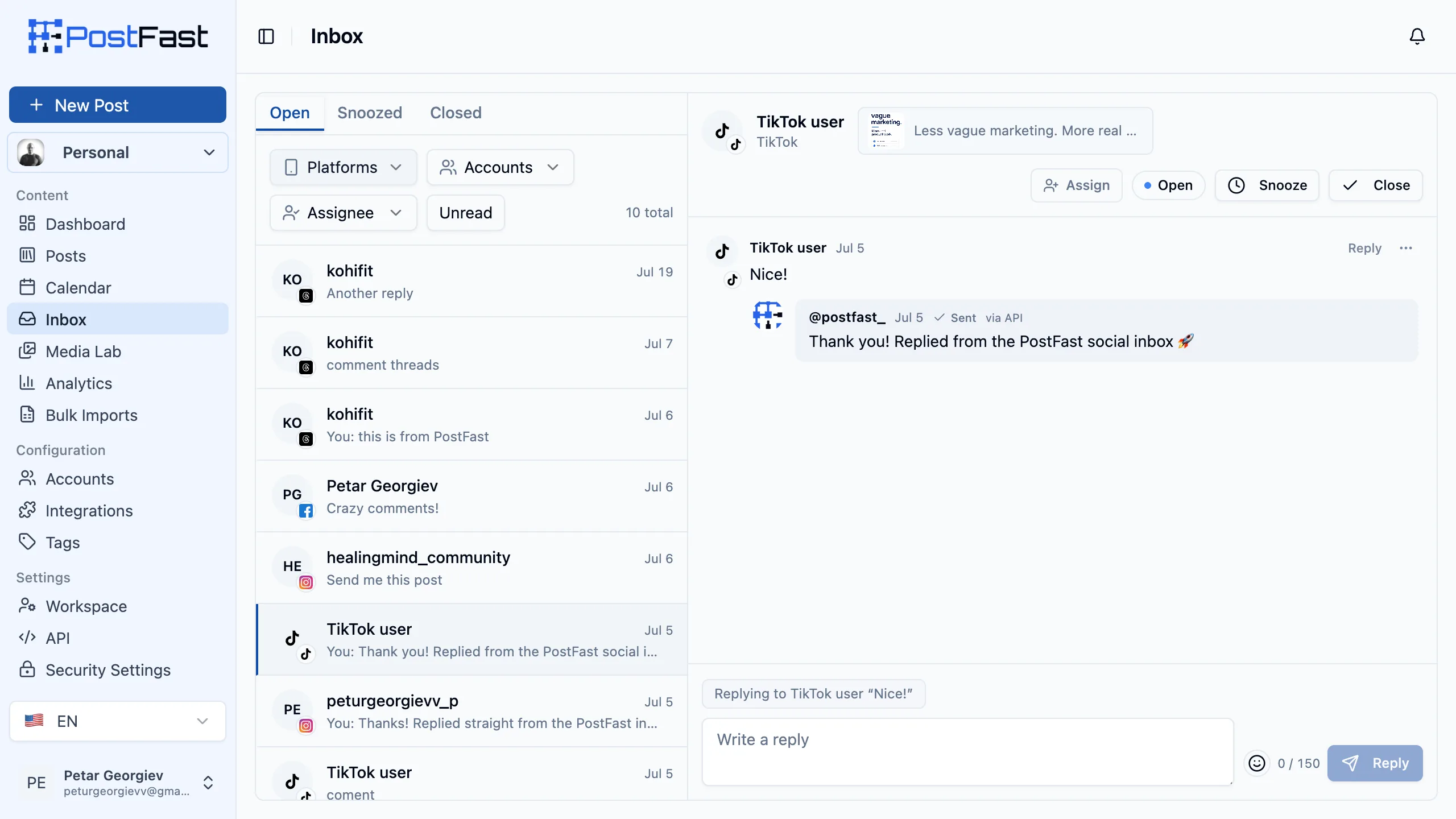
reply_to_inbox_item, or confirm_inbox_action on the hosted connector) lands in the same inbox your team works from, badged via API, with the platform’s character cap already applied. More on the workflow in the AI-operable inbox write-up.Works With Your Favorite AI Tools
The split that matters is transport, not brand. IDE and terminal clients run the npm package locally over stdio; chat clients use the hosted connector over OAuth. Everything below works with the same PostFast account.
Claude Desktop
Anthropic's desktop app. The usual home for non-developers: add the config once, then work in plain conversation.
Claude Code
CLI coding agent. Add PostFast with claude mcp add and schedule from the same terminal you ship from.
ChatGPT
Uses the hosted connector rather than the npm package, so there is nothing to install locally.
VS Code (Copilot)
Copilot agent mode. Turn a changelog entry in the editor into a scheduled launch post without switching apps.
Cursor
AI-first editor with built-in MCP. Same workflow as VS Code, configured in .cursor/mcp.json, or installed with the Add to Cursor button under Quick Setup.
Windsurf
AI IDE with an MCP marketplace, so the server can be added without hand-editing JSON.
JetBrains IDEs
IntelliJ, WebStorm, PyCharm and the rest, from 2025.1 onward.
Cline
Autonomous coding agent with an MCP marketplace. Good fit for unattended, multi-step content runs.
Zed
High-performance editor with MCP extensions.
Hermes Agent
Self-hosted agent with native MCP and ClawHub skills, for teams that want the loop running on their own box.
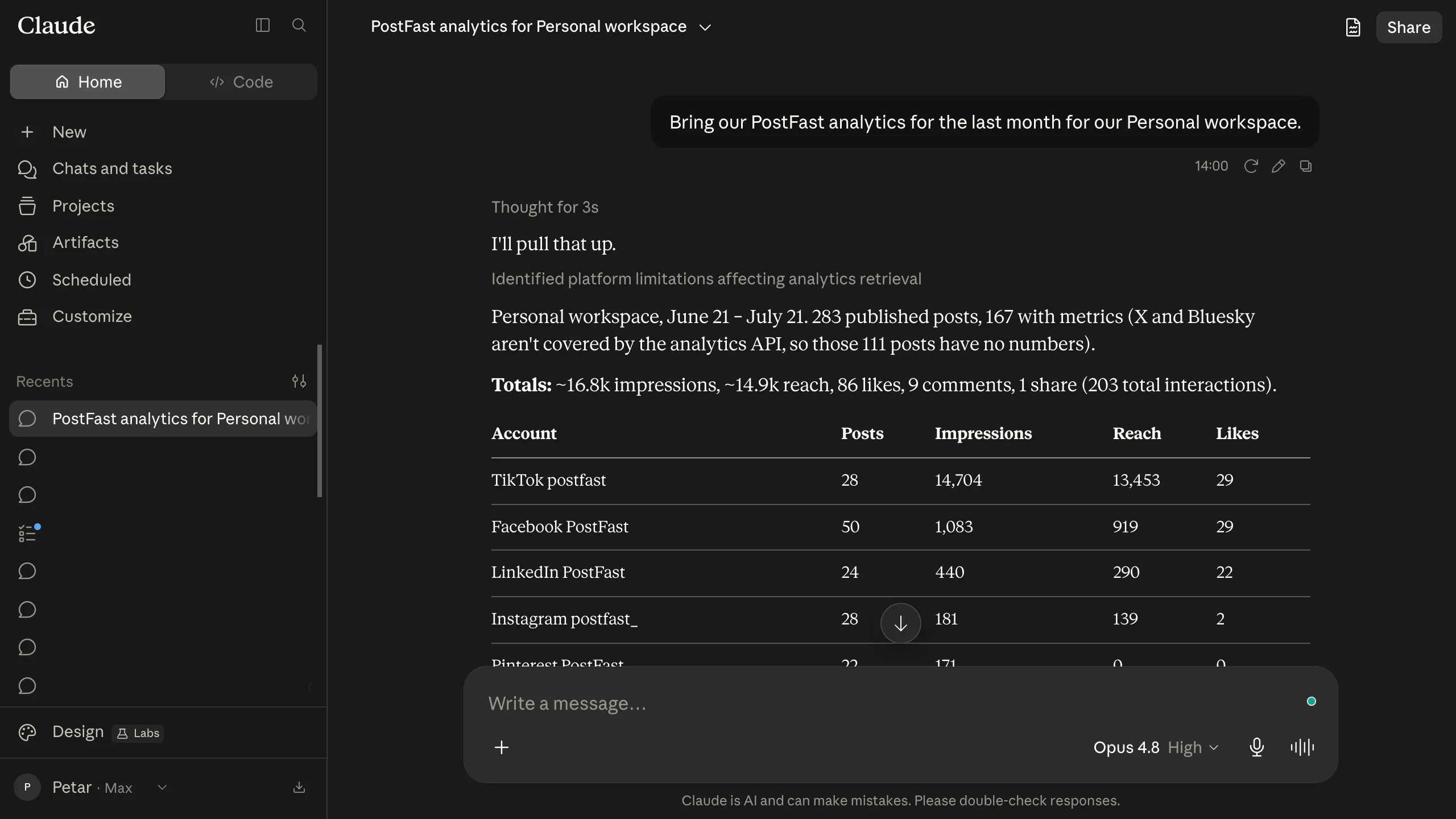
get_post_analytics. Note that it reports which networks are outside the analytics API rather than quietly returning a smaller number.Natural Language
No APIs to learn, no code to write. Just describe what you want in plain English and your AI assistant handles the rest.
Batch Scheduling
Schedule up to 15 posts in a single command. Set different platforms, times, and content for each post, all via conversation.
Media Support
Upload images and videos directly from your local machine. The MCP server handles signed URLs and the full upload flow automatically.
Developer Friendly
Open source npm package. Works with stdio transport out of the box. Simple one-line config in any MCP-compatible client.
Platform-Specific Controls
Fine-tune your posts with granular controls for each platform, all configurable through natural language:
These live on the controls object of create_posts, so an assistant sets them in the same call that creates the post. Full field reference in the API docs.
Supported Platforms
Example Workflows
Longer jobs, end to end. Each one starts with a request and ends with the account in a different state.
Ship a feature and announce it in the same session
You finish a change in Cursor or Claude Code and ask the assistant to announce it. It reads the diff it just wrote, drafts a version per platform, uploads a screenshot with upload_media, and batches all of them into one create_posts call scheduled for the morning. The outcome is a queued launch announcement that never became a separate task, written while the context was still in the session.
Clear the comment backlog before standup
Ask for everything unread across TikTok, Instagram, Facebook and Threads. The assistant calls get_inbox_unread_count, then list_inbox_conversations filtered to unread, reads the threads, and sorts them into questions, praise and spam. It drafts replies for the questions, hides the spam with set_inbox_item_state, assigns anything that needs a human to a teammate with assign_inbox_conversation, and snoozes the rest. You approve a list rather than opening twenty threads.
Plan a week of content against last month’s numbers
The assistant pulls get_post_analytics for the last 30 days, finds which formats and times actually performed, then writes a week of posts against that evidence and schedules them in a single batch. Because get_follower_history returns daily counts, it can also tell you whether a spike was one good post or a real trend before you plan around it.
Onboard an agency client without touching their passwords
Ask for a connect link and send it to the client. They connect their own accounts, and list_accounts confirms what arrived and whether anything is DISABLED. On the hosted connector, list_workspaces lets the assistant switch into that client’s workspace by name, so the next twenty requests land in the right place without you selecting anything.
Run the approval loop inside the conversation
A junior drafts the week and leaves everything pending approval. You ask what is waiting, the assistant lists it with list_posts, you read the ones you care about, and approve_posts releases them. Nothing publishes until it is approved, and the review happened in the same place as the reading.
What is actually different here
Not the protocol. MCP support is common across the category now, and we are not going to claim we got there first. The questions worth asking are how much of the product a server can actually reach, and which plan you need to reach it.
Most schedulers’ servers are publishing-only: draft a post, schedule it, look at the queue. Here, 27 tools sit in one server and reach past publishing, so an assistant can moderate comments, geotag a post, browse TikTok sounds and pull follower history rather than only pushing a caption into a queue.
The comment inbox is where the surface is widest. Ten of the tools cover it end to end: read a conversation, reply publicly, send an Instagram private reply, hide, unhide or delete, mark read, set status, and assign to a teammate, across TikTok, Instagram, Facebook Pages and Threads. Reply eligibility and length are computed per conversation by PostFast, so an assistant never guesses a platform’s rules. All of it is included on every plan including the 7-day trial, with no per-seat and no per-conversation charge.
Frequently Asked Questions
What is MCP (Model Context Protocol)?
MCP is an open standard created by Anthropic that lets AI assistants connect to external tools and data sources. It allows tools like Claude, ChatGPT, Cursor, and VS Code Copilot to interact with services like PostFast using natural language, with no coding required.
How many tools does the PostFast MCP server expose?
The stdio server (npx postfast-mcp) exposes 25 tools and the hosted connector at mcp.postfa.st exposes 27. 21 are common to both, and each side has its own upload_media: a local file on stdio, a chat attachment or base64 bytes on the hosted connector. The stdio server adds get_upload_urls, which needs a local file to be useful, and the direct reply tools reply_to_inbox_item and send_inbox_private_reply. The hosted connector adds approve_posts, list_workspaces and upload_from_url, which only make sense over a remote transport, plus prepare_inbox_action and confirm_inbox_action: every hosted session holds new posts until you approve them and previews each comment reply or deletion first. The difference is about transport and that review step, not about your plan.
How do I get my PostFast API key?
Log in to your PostFast dashboard, go to API in the sidebar, and generate a new key. This key is used to authenticate the MCP server with your PostFast account. The API is included on every plan, including the 7-day trial, so there is no tier to upgrade to first. The key works while a trial or plan is running.
Should I use the npm package or the hosted connector?
Use the npm package (npx postfast-mcp) if you work in an IDE or terminal: Claude Code, Cursor, VS Code, Windsurf, Zed, JetBrains. It runs locally over stdio and reads your key from the environment. Use the hosted connector at mcp.postfa.st if you work in ChatGPT or the Claude app, where there is no local process to run. The hosted connector authenticates with OAuth instead of an environment variable and adds workspace switching. Claude Code can use either one: the Claude Code page covers both.
Can I schedule posts to multiple platforms at once?
Yes. The create_posts tool supports batch creation of up to 15 posts at once. You can schedule to different platforms, set different times, and include media, all in a single command using natural language.
Does the MCP server support media uploads?
Yes. The upload_media tool handles the full upload flow: it gets a signed URL, uploads your local file, and returns the media key ready to use in your posts. It supports images and videos. On the hosted connector, upload_from_url does the same job starting from a public URL, which is what an assistant reaches for when the image was generated or found rather than saved locally.
Which AI tools support MCP?
MCP is supported by Claude Desktop, Claude Code, ChatGPT, VS Code (GitHub Copilot), Cursor, Windsurf, JetBrains IDEs (2025.1+), Cline, Zed, Hermes Agent, and many more. Any tool that supports the Model Context Protocol can use the PostFast MCP server.
Can an assistant reply to comments, not just post?
Yes. Ten of the tools cover the Social Inbox: list and read comment conversations, reply publicly, send an Instagram private reply, hide, unhide or delete a comment, mark read, set status, and assign to a teammate. It covers comments on your own TikTok, Instagram, Facebook Page and Threads posts. Whether a reply is allowed and how long it can be is computed by PostFast per conversation and returned on the conversation, so the assistant never has to guess a platform's rules.
Can I see how my posts are performing?
Yes. The get_post_analytics tool returns impressions, reach, likes, comments, shares, and total interactions for your published posts. Filter by date range or specific accounts. Analytics are currently available for Facebook, Instagram, Threads, LinkedIn Pages, TikTok, YouTube, and Pinterest. get_follower_history adds day-by-day follower counts with the net change over a range.
Is the MCP server free to use?
The postfast-mcp npm package is free and open source. You need an API key from a PostFast account with a running trial or plan. The API and the MCP server are included on every PostFast plan, including the 7-day free trial, with no separate charge and no per-call metering.
Do other social media tools have MCP servers?
Yes. Most established schedulers now ship one, and a few include it on a free tier, so MCP support on its own is not a reason to pick a tool and we are not going to claim we were first. The useful questions are how much of the product the server can reach and which plan you need to reach it. Most competitor servers are publishing-only. This one also covers analytics, follower history, media and comment moderation, on every plan including the 7-day trial.
So what is actually different about the PostFast MCP server?
Scope and price, not the protocol. Many competitor servers are publishing-only: draft a post, schedule it, check the queue. PostFast puts all 27 tools in a single server, covering accounts, posts, media, analytics, follower history and comment moderation on TikTok, Instagram, Facebook Pages and Threads, with reply eligibility and length computed per conversation so an assistant never guesses a platform's rules. It is included on every plan including the 7-day trial, with no per-seat and no per-conversation charge.
Changelog
What changed and when, dated from the npm publish history of postfast-mcp. Full notes ship with each release on GitHub.
- postfast-mcp 0.13.0
LinkedIn document posts: the upload tools take PDF, Word and PowerPoint files, and create_posts attaches one with linkedinAttachmentKey, so an assistant can publish a document LinkedIn shows as pages to swipe through. A document post can't also carry images or video, and without linkedinAttachmentTitle it shows "Document".
- hosted connector
The hosted connector takes .srt and .vtt caption files too, through upload_media and upload_from_url, so an assistant on the hosted connector can add your captions to a YouTube post.
- postfast-mcp 0.12.0
create_posts gains youtubeLanguage and youtubeCaptionKey, so an assistant can set a YouTube video's language and add your own SRT or VTT caption file in that language. On the npm server, upload_media and get_upload_urls take .srt and .vtt files. A caption needs the language, and if adding it fails, the video still publishes.
- postfast-mcp 0.11.0
delete_posts deletes up to 100 posts in one call, and list_posts filters by account. Deleting removes posts from PostFast only, never from the social platform, and on the hosted connector it waits for your yes.
- hosted connector
A calendar view on the hosted connector, in clients that can show it: posts from the last 2 days through the next 14 plus undated drafts, with a workspace switcher and an account filter. It never approves, publishes or deletes; those go back to the conversation.
- postfast-mcp 0.9.0
Every hosted connection, ChatGPT included, now works the way Claude has since 0.7.0: new posts are created on hold and publish only after you say yes, and comment replies, Instagram private replies and deletions are previewed with prepare_inbox_action and carried out with confirm_inbox_action. Deleting a post waits for your yes too. The stdio server is unchanged.
- postfast-mcp 0.8.0
create_posts takes threadsTopicTag, so an assistant can give a Threads post its topic, and list_posts returns each post's settings: the Threads topic, the Instagram and Facebook post type, the TikTok draft flag and the YouTube privacy.
- hosted connector
Listed in Claude's connector directory (https://claude.ai/directory/postfast), so Claude users add the hosted connector without pasting a URL.
- postfast-mcp 0.7.0
In Claude, the hosted connector creates new posts on hold, to publish only after the user says yes, and routes comment replies, Instagram private replies and deletions through prepare_inbox_action and confirm_inbox_action, so each is previewed first. ChatGPT and other clients are unchanged.
- postfast-mcp 0.6.2
list_tiktok_sounds and tiktokMusicSoundId now cover TikTok videos as well as photo carousels, so an assistant can put a trending sound on a video. The track plays at 50% volume over the video's original sound, which also plays at 50%.
- postfast-mcp 0.6.0
generate_connect_link gains platforms, redirectUrl and externalId, so a connect link can be limited to specific platforms and can return the client to your own app with the connected account id on the query string.
- postfast-mcp 0.5.3
Tool annotations and descriptions corrected against real behaviour, and output schemas dropped from every tool: the SDK rendered them as JSON Schema draft-07, so clients that validate against the 2020-12 dialect were rejecting the whole tool list before any call.
- postfast-mcp 0.5.0
AI disclosure controls on create_posts (instagramIsAiGenerated, youtubeContainsSyntheticMedia) plus instagramTrialReelStrategy. All three are set at creation, because there is no post update route.
- postfast-mcp 0.4.0
list_tiktok_sounds, with the tiktokMusicSoundId and tiktokMusicSoundName controls, so an assistant can attach a pre-cleared Commercial Music Library track to a TikTok photo carousel.
- postfast-mcp 0.3.0
The ten Social Inbox tools land on both bindings, so an assistant can read, answer, moderate and triage comments on your own TikTok, Instagram, Facebook Page and Threads posts, not only publish.
- postfast-mcp 0.1.19
get_follower_history, plus video watch-time metrics on get_post_analytics.
- postfast-mcp 0.1.18
search_places, and the Facebook and Instagram geotag controls that consume it.
- hosted connector
Hosted connector live at https://mcp.postfa.st/mcp over OAuth, for ChatGPT and the Claude app. No local process to run and no API key in an environment variable.
- postfast-mcp 0.1.0
First public release of the stdio server on npm.
Ready to schedule posts with AI?
Start your 7-day free trial, generate an API key, and connect PostFast to your favorite AI tool in under 2 minutes.