




See what actually works
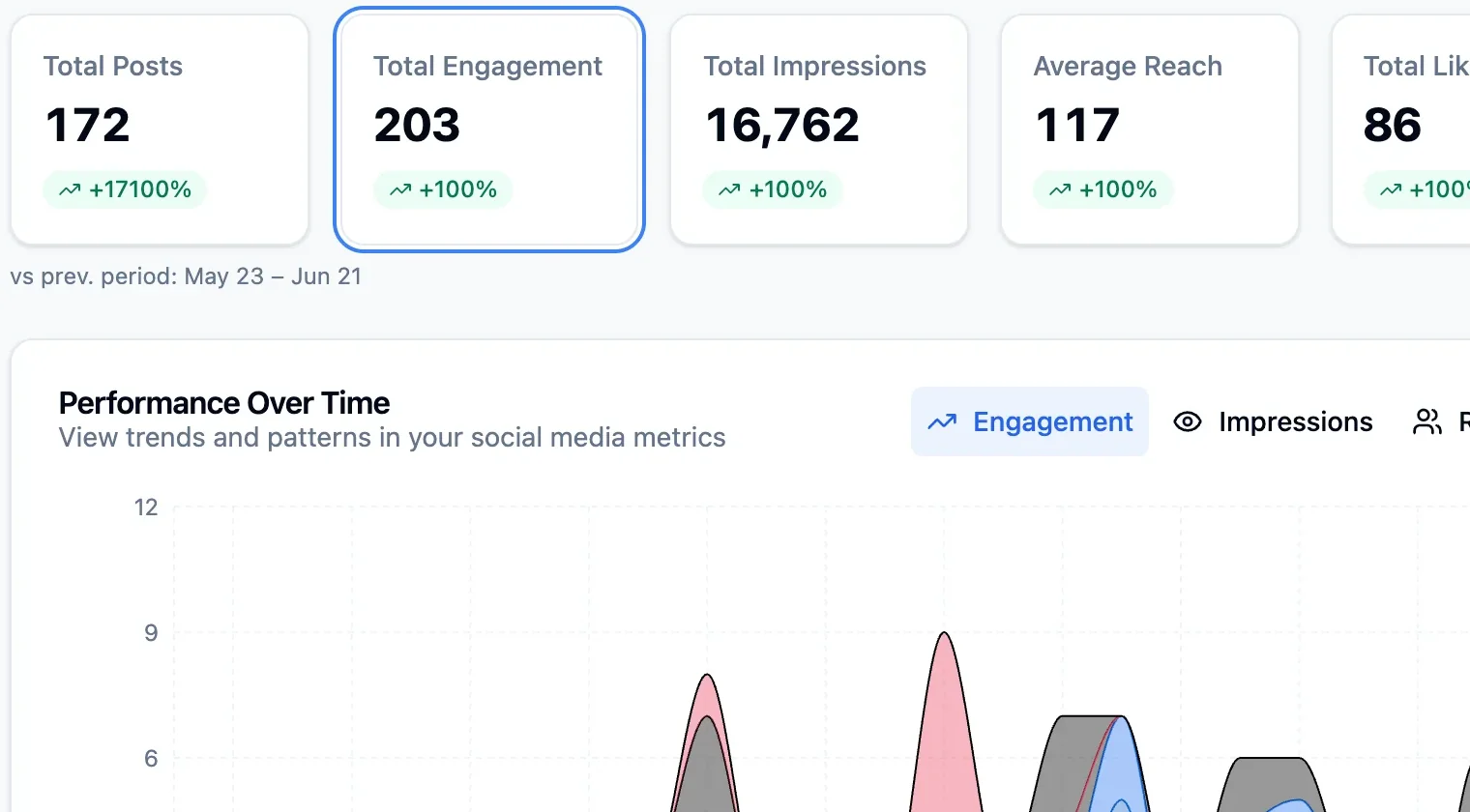
Track engagement on TikTok, Instagram, Facebook, Threads, YouTube, LinkedIn and Pinterest and turn the numbers into your next post.
Write once, publish to all 11 platforms. Do it yourself, or let your AI agent drive PostFast from Claude or ChatGPT.
7-day free trial · No credit card
Teams that run on PostFast









4,500+ creators · 280+ paying teams · 5.0 on G2 · Reviews
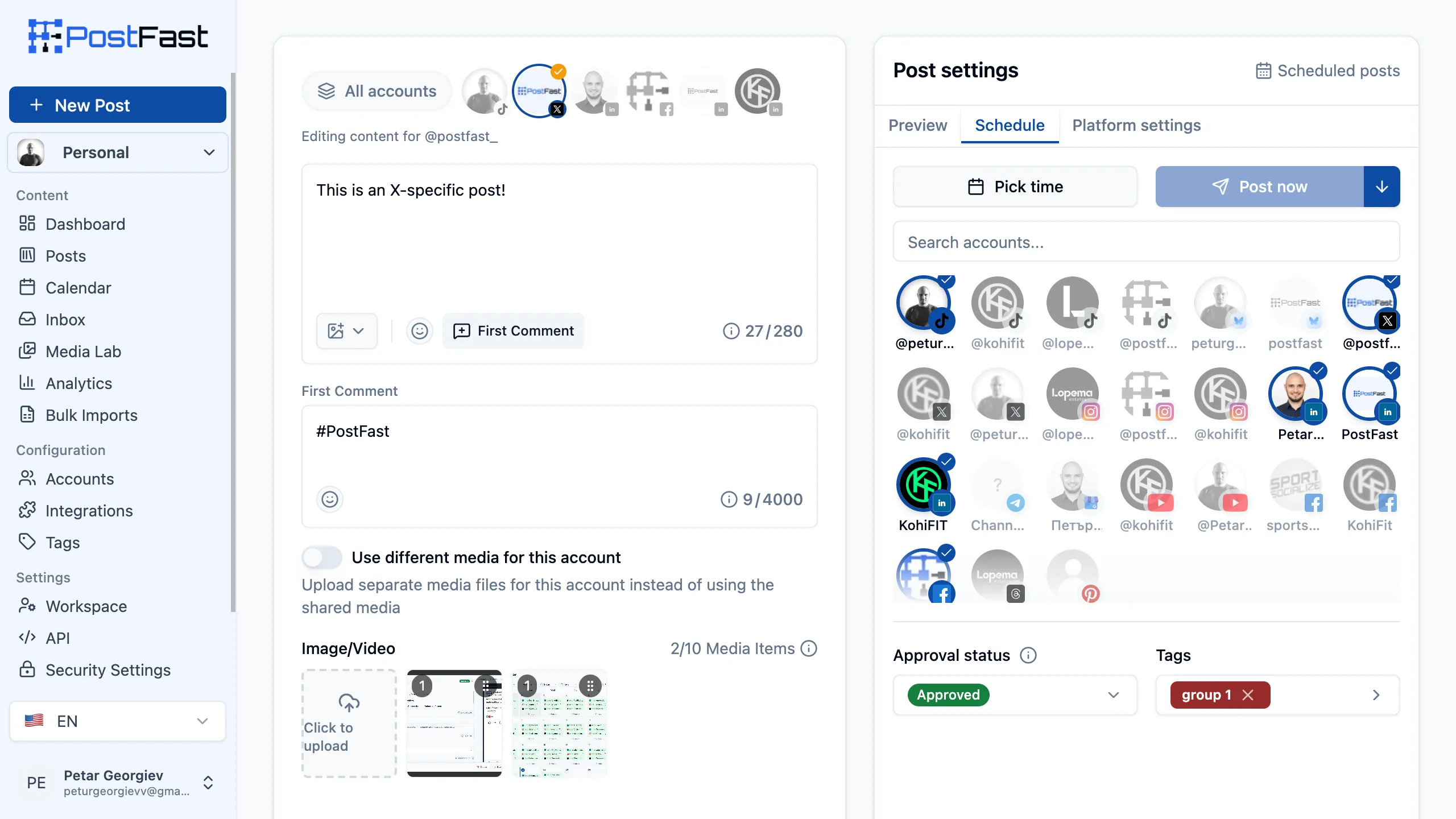
One composer
Preview every platform before you schedule, edit per account, and import a month in one go.
Composer v2 is live. Write once, preview every platform, schedule the week in one pass. 🚀
Composer v2 is live. Write once, preview every platform, schedule the week in one pass. 🚀
12 reposts · 48 likes
postfast Composer v2 is live…
Reel · 0:24
Composer v2 is live.
Write once, preview every platform, schedule the week in one pass. 🚀
63 · 9 comments
Composer v2 is live
Content calendar
Pin · postfa.st
Composer v2 is live. Write once, preview every platform, schedule the week in one pass. 🚀
431
Write once, tailor each network if you want, and preview every post before it goes live.
Give each account its own caption and media, and a first comment where the platform supports it.
Schedule up to a year ahead on every plan.
AI agents
PostFast is listed in Claude’s connector directory and the ChatGPT plugin directory, ships an MCP server for Claude Code, Cursor and any MCP client, and has a full REST API.
Schedule my three product updates this week on LinkedIn, X and Threads. Mornings, 9:00 Sofia. Add the Reel to Instagram on Thursday evening.
Done. 10 posts are in PostFast, held for your approval:
| When | Post | Where |
|---|---|---|
| Mon 09:00 | Composer v2 is live | |
| Wed 09:00 | Case study: 100 accounts, one team | |
| Thu 19:00 | Reel: desk tour (media attached) | |
| Fri 09:00 | Friday roundup |
Nothing publishes until you approve. Review in the calendar →
Add PostFast from Claude’s connector directory and sign in: no API key, no client secret.
How to connect ClaudeSchedule my three product updates this week on LinkedIn, X and Threads. Mornings, 9:00 Sofia. Add the Reel to Instagram on Thursday evening.
Done. 10 posts are in PostFast, held for your approval:
| When | Post | Where |
|---|---|---|
| Mon 09:00 | Composer v2 is live | |
| Wed 09:00 | Case study: 100 accounts, one team | |
| Thu 19:00 | Reel: desk tour (media attached) | |
| Fri 09:00 | Friday roundup |
Change or reschedule any of them in your PostFast calendar.
Install PostFast from the ChatGPT plugin directory and sign in: no API key.
How to connect ChatGPT> Schedule my three product updates this week on LinkedIn, X and Threads, mornings at 9:00 Sofia.
postfast - create_posts (MCP)
└ 9 posts scheduled across 3 accounts
Done: Monday, Wednesday and Friday at 09:00 on LinkedIn, X and Threads. Want the Reel on Instagram too?
>
Add postfast-mcp to your .mcp.json with a PostFast API key.
Set up Claude Code{
"mcpServers": {
"postfast": {
"type": "stdio",
"command": "npx",
"args": ["-y", "postfast-mcp"],
"env": {
"POSTFAST_API_KEY": "your-api-key-here"
}
}
}
}One config for Cursor, VS Code and any other MCP client.
MCP server setupSchedule tomorrow’s launch post on LinkedIn and X for 9am.
Scheduled in PostFast for tomorrow at 09:00 on LinkedIn and X. Want a version for Threads too?
Install the PostFast skill from ClawHub, then message OpenClaw from your chat app.
Set up OpenClawSchedule tomorrow’s launch post on LinkedIn and X for 9am.
Scheduled in PostFast for tomorrow at 09:00 on LinkedIn and X. Want a version for Threads too?
Install the PostFast skill from ClawHub, or add postfast-mcp, then message Hermes.
Set up Hermes AgentSchedule tomorrow’s launch post on LinkedIn and X for 9am.
Scheduled in PostFast for tomorrow at 09:00 on LinkedIn and X. Want a version for Threads too?
Add postfast-mcp to the group’s .mcp.json, then message the agent.
Set up NanoClawcurl -X GET "https://api.postfa.st/social-media/my-social-accounts" \ -H "pf-api-key: YOUR_WORKSPACE_API_KEY"
200 OK
[
  {
    "id": "f1a2b3c4-d5e6-7890-1234-567890abcdef",
    "platform": "INSTAGRAM",
    "platformUsername": "postfast_app",
    "displayName": "PostFast Official",
    "connectionStatus": "CONNECTED",
    "followerCount": "12480",
    "followerCountUpdatedAt": "2026-06-11T00:00:00.000Z",
    "inboxCapable": true
  },
  …
]
Posts, media uploads, connected accounts and the Social Inbox over HTTP, with a workspace API key.
Read the API docs7-day free trial · No credit card
Customers
4,500+ creators signed up · 220,000+ posts published · 280+ paying teams in 50 countries
“PostFast is a brilliant tool for us at SEN, as a company with well over 100 social accounts, having the ability to post all of our content from one place is a life-saver. This platform genuinely saves us countless hours on a daily basis.”

“It's been great to be on the PostFast journey, seeing the product develop and importantly improve our output as a business”
“PostFast has become an important part of the infrastructure behind Larsen Automations. It gives us a reliable and efficient way to manage social media publishing at scale, while allowing us to focus on building great automation workflows for our clients.”
From creators and teams on X and G2
PostFast has been a total game-changer for us. We've scheduled and published over 200 videos across TikTok and Instagram with ease. The platform is incredibly intuitive, reliable, and saves us a huge ...
Postfast's made things way easier for me. I just line up my posts, hit schedule, and that's it. Super simple to use and saves me a ton of time.
PostFast is the fastest and easiest to use platform I've tried from all on the market, and I've tried most of them!
5.0 on G2 from 13 reviews · 9 reviews on Trustpilot · All reviews
Features
Plan, schedule, and analyze content for all 11 platforms from a single dashboard. Less time managing, more time creating.
Track engagement on TikTok, Instagram, Facebook, Threads, YouTube, LinkedIn and Pinterest and turn the numbers into your next post.
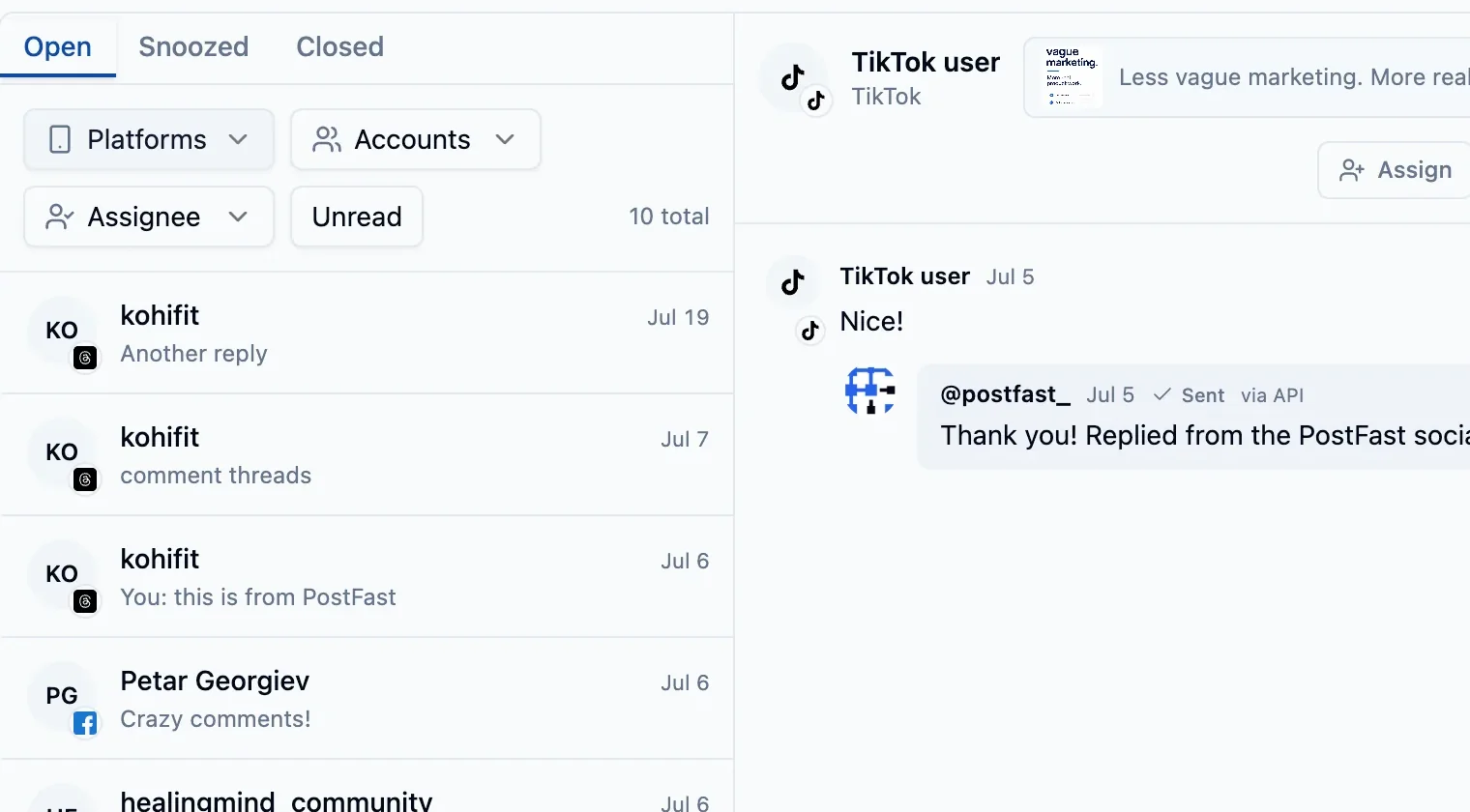
Reply to, hide, and assign the comments on your TikTok, Instagram, Facebook and Threads posts without leaving PostFast. Included on every plan, so a post that takes off never costs extra.
Queue a month of content across every platform and let PostFast publish it for you, automatically, at the right time.
Write once, tailor each network if you want, and preview every post before it goes live.
Mix images and video in one carousel on Instagram and Threads, and post image carousels to Facebook, LinkedIn and TikTok.
Upload a CSV to queue hundreds of posts at once. Perfect for migrations and campaigns.
Connect a Facebook Page, Instagram, Threads or TikTok account and PostFast imports its last 60 days of posts, including ones published elsewhere, so your analytics are not empty on day one.
Schedule straight from ChatGPT, Claude, Cursor, and IDEs, or build custom workflows with our REST API.
See every scheduled post at a glance.
Review past posts and what performed.
Reels, Stories, and more, hands free.
Platforms
Connect and manage all your social media accounts in one place. Explore what we offer for each platform.
Schedule video content and photo carousels
Content types
Best for
Key features
Fully automated posts, stories, and reels
Content types
Best for
Key features
Automate posts, Stories, Reels and carousels
Content types
Best for
Key features
Schedule text, images, videos and carousels
Content types
Best for
Key features
Schedule tweets, images, videos and community posts
Content types
Best for
Key features
Upload Shorts and full-length videos
Content types
Best for
Key features
Professional content for pages and personal profiles
Content types
Best for
Key features
Visual discovery platform for ideas and inspiration
Content types
Best for
Key features
Decentralized social network for text, images, and video
Content types
Best for
Key features
Schedule posts to channels and groups
Content types
Best for
Key features
Publish updates, events, and offers to Google
Content types
Best for
Key features
Schedule video content and photo carousels
Content types
Best for
Key features
Integrations
Bring in media from Canva, Dropbox and Google Drive, and connect PostFast to workflow platforms and 7,000+ apps.
Browse and import your Canva designs directly into your posts without leaving PostFast.
Import files directly from your Dropbox account into your posts without leaving PostFast.
Pull images and videos from your Google Drive, including Shared drives, straight into your posts.
Verified n8n node for n8n Cloud and self-hosted. 400+ app connections.
Connect to 7,000+ apps with no-code automation.
Create complex scenarios with visual automation.
Demo
Learn how to schedule and manage all your social media content in minutes with our powerful yet simple platform.
Want to see more detailed examples of how to use PostFast?
Watch detailed walkthroughDownload the app and manage your social media from anywhere.


For teams & agencies
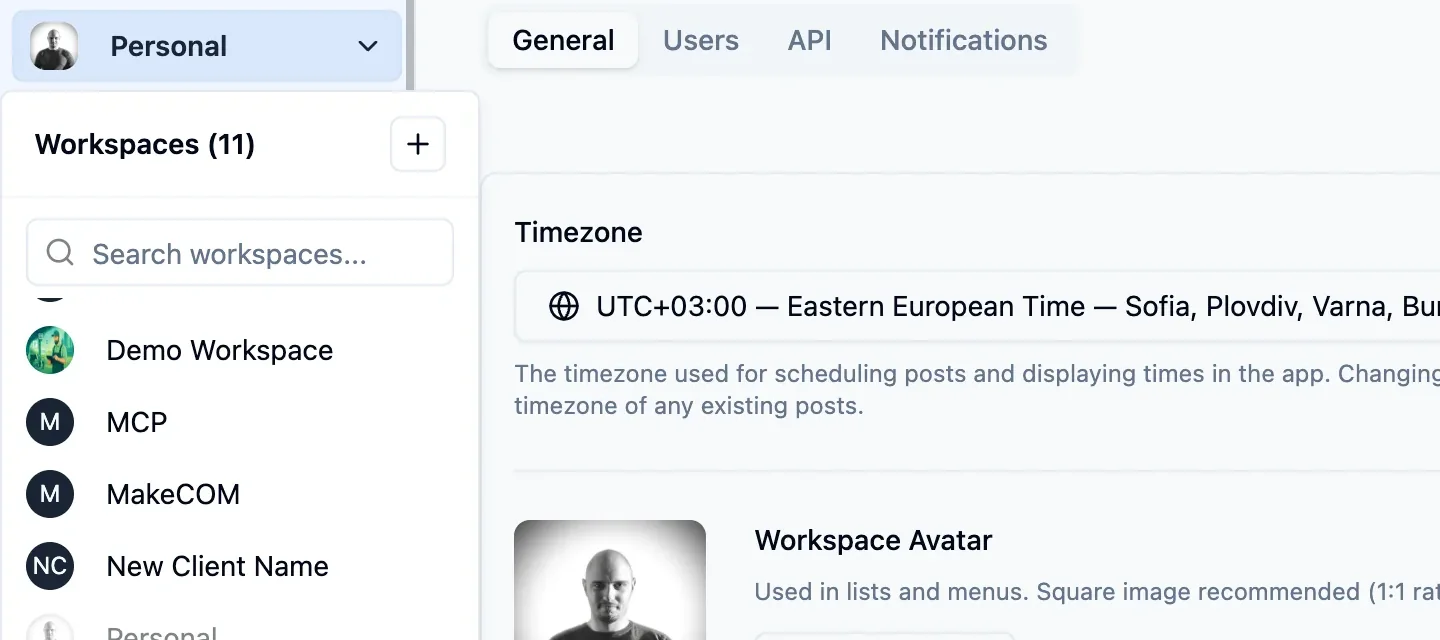
Give every client its own workspace, hold posts until they are approved, and send reports in the client’s brand. One flat price per plan, with no per-seat fees.
On the Pro (Agency) plan.
Each client gets its own accounts, calendar, drafts, analytics and members, and nothing crosses between them. Growth includes 10, Pro 30 and Enterprise 110.
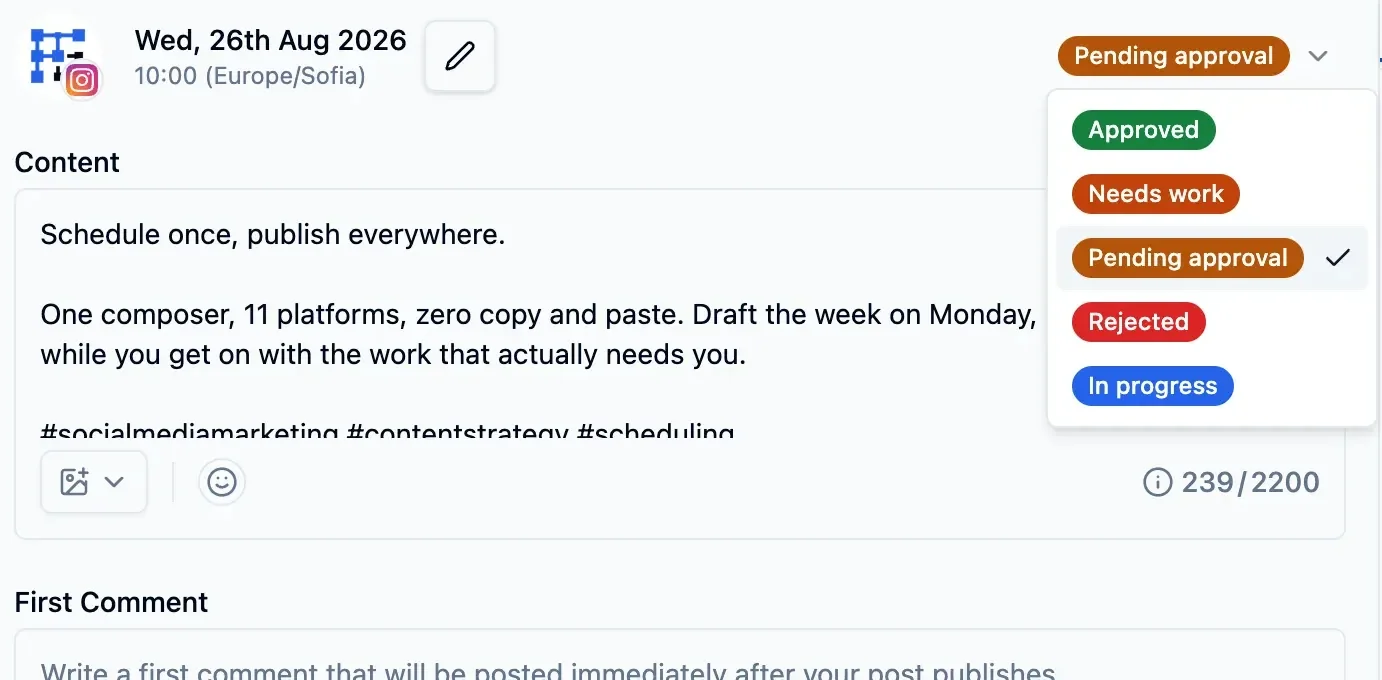
Every post carries an approval status, on every plan, and only Approved posts publish. Turn off Approve for a junior and everything they schedule waits for review.
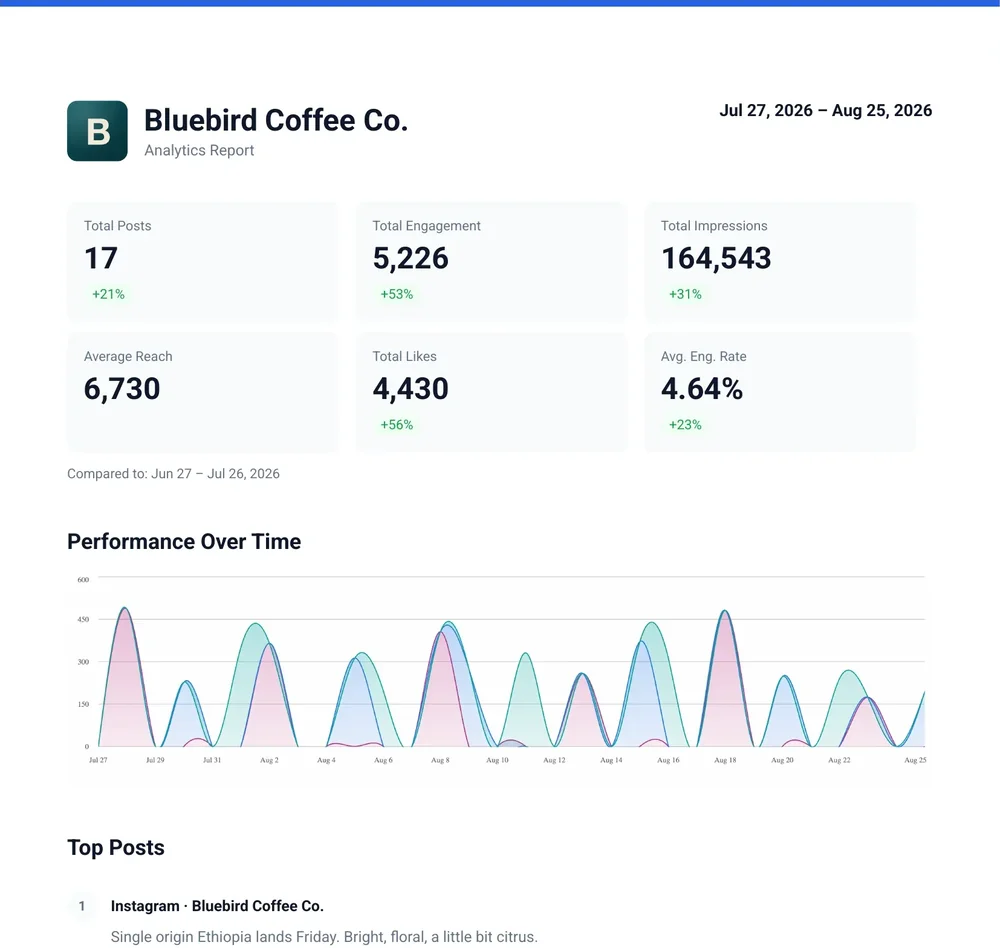
Export analytics as a PDF with the client’s logo and name in the header, and switch off the PostFast footer. On Pro and Enterprise.
The Client role sees one workspace and can view, comment on and approve its posts. No settings, no internal team comments.
Clients connect their own accounts through a link that expires in 1 to 30 days and can be limited to chosen platforms.
Invite your team, choose what each person can do, and comment directly on posts.
Everyone on the team sees what is planned and when it publishes.
Simple, transparent pricing for every team size. All plans include a 7-day free trial. Rated 5/5 by teams on G2
Save 2 months with yearly billing
billed yearly at €150 · save €30
billed monthly
Best for individual content creators.
billed yearly at €288 · save €60
billed monthly
Best for startups and small brands.
billed yearly at €480 · save €108
billed monthly
Best for growing brands and teams.
billed yearly at €990 · save €198
billed monthly
Best for agencies and organizations.
billed yearly at €2,388 · save €480
billed monthly
Best for large organizations at scale.
7-day free trial · No credit card
7-day free trial · No credit card
Got questions? We've got answers. If you can't find what you're looking for, feel free to reach out to our support team.
The number of social accounts you can connect varies by plan. Check our pricing section for detailed information. We pride ourselves on offering the most competitive and fair pricing in the market for the value provided.
A social account is any individual account from our supported social media platforms. For example, connecting one Instagram account counts as one social account, connecting one Twitter account counts as another, and so on.
Yes, you can connect multiple accounts from the same platform, depending on your plan. For example, you could connect two different X (Twitter) accounts or three Facebook Pages. Each will count towards your total social account limit for your subscription.
You can post text, images, and videos to most supported platforms. Specific content capabilities, like carousels, stories, or reels, depend on what each social media platform's API allows. We are always working to expand content type support.
Yes! PostFast supports scheduling LinkedIn posts with document attachments including PDFs, PowerPoint presentations, Word documents, and other file types. This is perfect for sharing reports, white papers, case studies, and professional resources directly to your LinkedIn profile or company page.
No, your posts will maintain their full reach potential. We use official APIs and posting methods approved by each platform, ensuring your content is treated the same as if you posted directly on the platform.
No, absolutely not. We use official and secure authentication methods (OAuth) provided by the social media platforms. This means you log in directly with the platform, granting us permission to post on your behalf without ever sharing your password with us.
ADMIN role in a workspace. You can find this option in your Workspace Settings page within the PostFast web application. For more details, please refer to the authentication section in our API Documentation.All workspaces share this pool. A post to multiple X accounts counts once per account (e.g., posting to 3 accounts = 3 posts toward your daily limit). A “link post” is any X post whose text or first comment contains a link; that monthly allowance resets on the 1st of each month (UTC).
Full details in our Fair Usage Policy.
Yes, you can cancel your subscription at any time with no questions asked. Your scheduled posts keep publishing until the end of your current billing period, and you won't be charged again. After a 2-day grace period, remaining scheduled posts are moved to Rejected status. Resubscribe anytime to re-approve them in bulk.
Your posts continue publishing until the end of your billing period. You then have a 2-day grace period to resubscribe. If you do, nothing changes. After the grace period, remaining scheduled posts are moved to Rejected status. Nothing is deleted, and you can bulk re-approve them instantly when you resubscribe.
We offer a 7-day money-back guarantee on all our plans. If you're not completely satisfied with our service within the first 7 days, we'll provide a full refund, no questions asked.


