Social Inbox
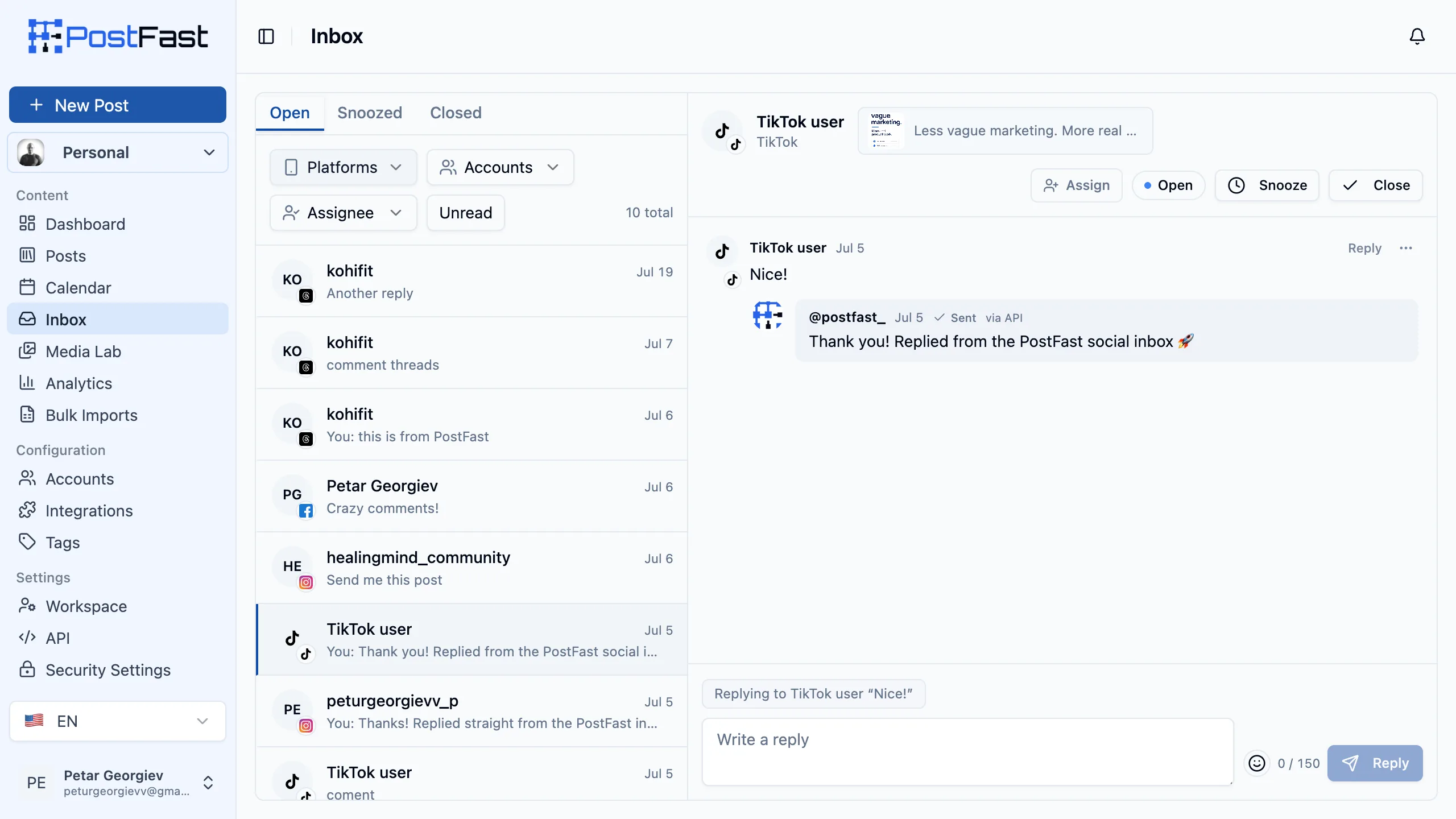
The comments people leave on your TikTok, Instagram, Facebook and Threads posts all land in one place. Read them, reply, hide the ones that do not belong, hand a conversation to a teammate, and close it out when it is done.
It is included in every plan, including the free trial. No per-conversation pricing, no per-seat inbox fee, no engagement add-on. A post that takes off costs you nothing extra.
From someone commenting to it appearing in your inbox. No polling, no refresh.
Starter through Enterprise, and the 7-day trial. No usage metering on replies.
TikTok, Instagram, Facebook and Threads, with LinkedIn coming soon.
What You Can Do
Reply in context
Answer a whole thread or a single comment, with a live character counter showing that platform's limit: 1,200 on TikTok, 2,200 on Instagram, 8,000 on Facebook, 500 on Threads.
Hide and delete
Hide a comment on the platform without deleting it, unhide it later, or delete it outright. Deleting removes it on the platform too and cannot be undone.
Private reply on Instagram
Move a question out of public view: answer one Instagram comment privately, once per comment and within 7 days of it. It may land in that person's Message Requests folder.
Triage as a team
Snooze what can wait, close what is finished, reopen what comes back, and assign a conversation to the teammate who should answer it.
Never lose your place
Unread counts per conversation and a New divider inside each thread show what arrived since you last looked. Opening a conversation marks it read.
Filter the noise
Narrow by platform, account, assignee or unread only, then clear the filters in one click. Useful when one campaign is louder than everything else.
Run It From Your AI Assistant
This is a social inbox an AI assistant can operate end to end, on every plan. Claude, ChatGPT, Cursor or any MCP client can read your conversations, draft and send replies, hide spam, and triage by snoozing, closing or assigning, all through the same permissions a human teammate gets. In PostFast, inbox access from an AI assistant is included on every plan, including the 7-day trial, with no per-seat and no per-conversation charge.
Try asking:
“Go through today’s comments, answer the easy ones, and flag the ones I should see.”
Two ways to connect
Point your assistant at the postfast-mcp server for natural-language control, or call the REST API directly if you are building your own automation.
It cannot guess wrong
Whether a reply is allowed and how long it can be is decided by PostFast per conversation, not by the assistant. An agent that tries to overrun a platform limit is refused, so it never has to second-guess the rules.
The guardrails sit in PostFast, not in the prompt. An assistant can only ever reply to comments on your own posts, because there is no way to reach anyone else's: the inbox is built from the comments the platforms deliver for the accounts you connected, and nothing else is reachable. Sending the same reply over and over is blocked too, with the assistant told to vary its wording, so the one thing platforms genuinely act on stays off the table.
Supported Platforms
Comments on your posts flow in from:
Note: LinkedIn is coming soon. X, YouTube, Pinterest, Bluesky, Telegram and Google Business Profile are not covered yet.
Note: Facebook accounts connected before 28 July 2026 and Threads accounts connected before 4 August 2026 need one reconnect before comments start arriving.
How It Works
Connect Your Accounts
The accounts you already publish with are the accounts the inbox uses. Nothing else to configure, and no separate engagement plan to buy.
Comments Arrive On Their Own
The platforms push each new comment to PostFast, usually within seconds, grouped by the post it belongs to. Hides, deletes and edits made on the platform sync back the same way.
Reply, Assign, Close
Answer from the composer, hand anything you cannot answer to a teammate, and close the conversation. Your reply shows once, even after the platform reports it back.
Your Accounts Stay Your Accounts
PostFast only ever receives comments on posts published by the accounts you connected, pushed to us by the platforms themselves. There is no scraping, and no reading of accounts that are not yours. Replying and moderating use the same permissions you granted at connect time, which is why Facebook and Threads may ask for one extra reconnect.
Key Benefits
- Included on every plan - no per-conversation or per-seat inbox pricing, so going viral never costs extra
- One place to look - TikTok, Instagram, Facebook and Threads comments in a single list instead of four apps
- Reply while it still matters - comments land in seconds, so you answer people the same hour they ask
- Built for teams - assign conversations, snooze what can wait, and let Admins and Editors moderate while Client users read along
- Nothing to set up - it works with the accounts you already connected, with no polling and no refresh button
Start Replying From One Inbox
Ready to stop hopping between apps to answer your audience? Sign up for PostFast today and the Social Inbox is there from the first post. Get a 7-day free trial with the inbox included, like every other plan.
Publishing and replying belong in the same tool. PostFast does both, at one flat price.
Social Inbox FAQs
Which platforms does the Social Inbox cover?
Comments on your TikTok, Instagram, Facebook Page and Threads posts. LinkedIn is coming soon. X, YouTube, Pinterest, Bluesky, Telegram and Google Business Profile are not covered in this release. The inbox handles comments on your own posts, not direct messages.
Does the Social Inbox cost extra?
No. It is included in every PostFast plan, including the 7-day free trial. There is no per-conversation charge, no per-seat inbox fee, and no separate engagement add-on. A post that goes viral does not change your bill.
Do I need to set anything up?
No. Comments start flowing in automatically once your account is connected, and they usually appear within seconds. There is nothing to poll and no refresh button to press. The one exception: Facebook accounts connected before 28 July 2026 and Threads accounts connected before 4 August 2026 need a single reconnect first.
Why is Facebook or Threads asking me to reconnect?
Comment management needs a permission that older connections did not grant. Reconnecting once takes a few seconds, adds that permission, and changes nothing else about your account, your scheduled posts or your analytics.
Can my team reply?
Yes. Admins and Editors can reply, hide, delete, assign and change conversation status. Client-role users can read the inbox but not reply or moderate. Permissions follow the same workspace roles you already use elsewhere in PostFast, and individual overrides work the same way too.
Can I reply privately on Instagram?
Yes. On an Instagram comment you can answer privately instead of in the public thread, once per comment and within 7 days of that comment. Instagram delivers it to that person, and it can land in their Message Requests folder. It is limited to roughly 1,000 characters, fewer if you use emoji.
Will old comments show up?
No. The inbox starts with new comments from launch and from the moment each account is connected. Comments left before that are not imported, so expect the inbox to fill up as new activity arrives rather than to arrive full.
What happens if I hide or delete a comment?
Hiding a comment hides it on the platform itself, and unhiding brings it back. Deleting removes the comment on the platform as well and cannot be undone (Threads does not support deleting). Changes you make on the platform directly, including edits and deletions, sync back into PostFast automatically.
How long can my replies be?
Each platform sets its own limit and PostFast shows a live counter as you type: TikTok 1,200 characters, Instagram 2,200, Facebook 8,000 and Threads 500. Replies you send from PostFast appear once, with no duplicate when the platform reports the reply back.
Can AI assistants use the Social Inbox?
Yes. Claude, ChatGPT, Cursor and any other MCP client can work the inbox through the postfast-mcp server, which ships ten inbox tools: list and read conversations, list a thread's comments, check the unread count, reply publicly, send an Instagram private reply, hide, unhide or delete a comment, mark a conversation read, change its status, and assign it. The same actions are available on the public REST API. Reply limits are enforced by PostFast per conversation rather than by the assistant, so an agent cannot exceed a platform's character limit or reply where replying is not allowed. An assistant also cannot reach comments on anyone else's posts, since the inbox only ever contains comments the platforms deliver for the accounts you connected, and repeated identical replies are rejected rather than sent.
How do I keep a busy inbox under control?
Every conversation has an Open, Snoozed or Closed status and can be assigned to a teammate. Unread counts sit on each conversation and a New divider marks where you left off inside a thread, so opening a conversation is all it takes to mark it read. Filters narrow the list by platform, account, assignee or unread only.