10 Best Buffer Alternatives for 2026 (Flat Pricing + API)
Buffer charges by channel, with volume discounts above ten channels. These 10 alternatives use different pricing models. Start with the comparison, then check the account limits and approval features on the plan you would actually buy. PostFast is priced per plan, not per channel and not per seat, with users included, all 11 platforms on every plan, and a REST API and MCP server on every plan from €10/mo on annual billing (€12/mo monthly). Every price on this page was re-checked against the vendor's own pricing page on September 14, 2026, with both the monthly and annual billing toggles opened, and Buffer's channel bands were read from its own calculator.
Quick comparison
All prices re-verified September 14, 2026 from each vendor's public pricing page, with both billing toggles opened where one exists. Where a tool shows both monthly and annual billing, we list the headline starting price you see on the pricing page.
| Tool | Starting price | Platforms | Free plan | Best for |
|---|---|---|---|---|
| PostFastOur pick | €10/mo annual | 11 | 7-day trial, no CC | scaling beyond Buffer's per-channel pricing |
| Publer | $4/mo (Professional, annual, 1 account) | 13 | Yes (3 accounts, 10 posts/account, no X) | a free plan that actually covers 3 channels |
| Postiz | $23/mo (Standard, annual) | 31 | Yes (self-hosted is free) | open-source fans and 30+ platforms |
| SocialPilot | $17/mo (annual) | 10 | No (14-day trial, no CC) | small agencies with client approvals |
| Later | $18.75/mo (annual) | 8 | No (14-day trial) | Instagram-first creators who want a visual grid |
| FeedHive | €15/mo | 10 | No (7-day trial) | AI-first creators with heavy automation needs |
| Loomly | $49/mo (annual) | 9 | No (trial, no CC) | marketing teams who live in a content calendar |
| Sendible | $30/mo (Core, annual) | 10 | No (14-day trial, no CC) | UK-based agencies managing many client profiles |
| Sprout Social | $79/seat/mo (Essentials, annual) | 7 | No (30-day trial, no credit card) | enterprise teams with social listening needs |
| Hootsuite | $99/user/mo | 10 | No (14-day trial, no CC) | enterprise teams that already budget for legacy SaaS |
What is Buffer?
Buffer is a social media scheduling tool founded in 2010 by Joel Gascoigne. It is one of the oldest tools in the category and popular with solo creators thanks to its free plan (3 channels, 10 queued posts per channel). Paid plans start at $5 per channel per month on Essentials, with a Team tier at $10 per channel that adds approvals and unlimited users. Buffer publishes to 11 platforms including Bluesky, Mastodon, and Threads.
Buffer does the core job well: queue a post, pick channels, schedule. What people outgrow is the per-channel pricing model. Scheduling on 10 channels on Essentials is $50 a month and 20 channels is $83.33, and that is before you add the Team tier for approvals. When teams start asking for flat pricing, a real API, or more than Buffer's 11 platforms, they end up on this list. If you are looking for a single alternative to Buffer rather than a full comparison, the default recommendation is PostFast Starter for flat pricing or Publer Free for a drop-in free replacement.
Buffer pricing explained
Buffer's pricing is per connected channel, not per user. There are three tiers plus a free plan, and each tier is priced against one channel, with the per-channel rate stepping down in volume bands above 10 channels. Here is the full breakdown, re-verified on Buffer's pricing page on September 14, 2026.
Buffer Free ($0 forever). Connect up to 3 channels, queue 10 posts per channel (refills as posts publish), 100 ideas, AI Assistant included, 1 user, Insights, and API access (1 key, 3,000 requests a month). No credit card required. This is Buffer's entry tier and the one most solo creators land on. It has no time limit.
Buffer Essentials ($5 per channel per month annual, $6 per channel per month billed monthly, for the first 10 channels). Billed yearly that is $60 per channel per year, which Buffer labels as two months free. Unlimited scheduling, advanced analytics, hashtag manager, first-comment scheduling, 1 user, and API access with 3 keys and 7,500 requests a month. A single-channel setup is $5/mo annual; 5 channels is $25/mo; 10 channels is $50/mo. Past 10 the rate steps down, so 20 channels is $83.33/mo rather than a straight double.
Buffer Team ($10 per channel per month annual, $12 per channel per month billed monthly, for the first 10 channels). $120 per channel per year on annual billing. Everything in Essentials plus unlimited team members, access levels, content-approval workflows, and API access with 5 keys and 15,000 requests a month. Single channel $10/mo annual; 10 channels $100/mo; 20 channels $133.33/mo, because channels 11 and up drop to $4 each. Team is targeted at agencies and multi-person marketing teams who need collaboration.
The per-channel model is the defining trait. A 2-channel solo creator on Essentials pays $10/mo. The same creator scaling to 12 channels pays $56.67/mo. A 5-person agency on Team running 15 channels is $116.67/mo. Compared to flat-pricing alternatives, Buffer wins at low channel counts (1-4) and loses at higher counts; PostFast Starter at €10/mo on annual covers 4 channels flat, and PostFast Growth at €40/mo on annual covers 30 channels flat. The crossover where flat pricing starts to win is typically around 5-6 channels.
One nuance worth pricing out before you move: Buffer's approvals live on Team, and the tier is charged across every channel, not just the ones a reviewer touches. A 12-channel operation that needs approvals on 3 of them pays $106.67/mo, because the whole set moves to Team. That interaction between the tier and the channel count is what turns a $56.67 bill into a $106.67 one, and it is the single most common reason a Buffer user starts reading a page like this.
1. Best for scaling beyond Buffer's per-channel pricing: PostFast
 Our pick
Flat pricing, a REST API on every plan, and 11 platforms.
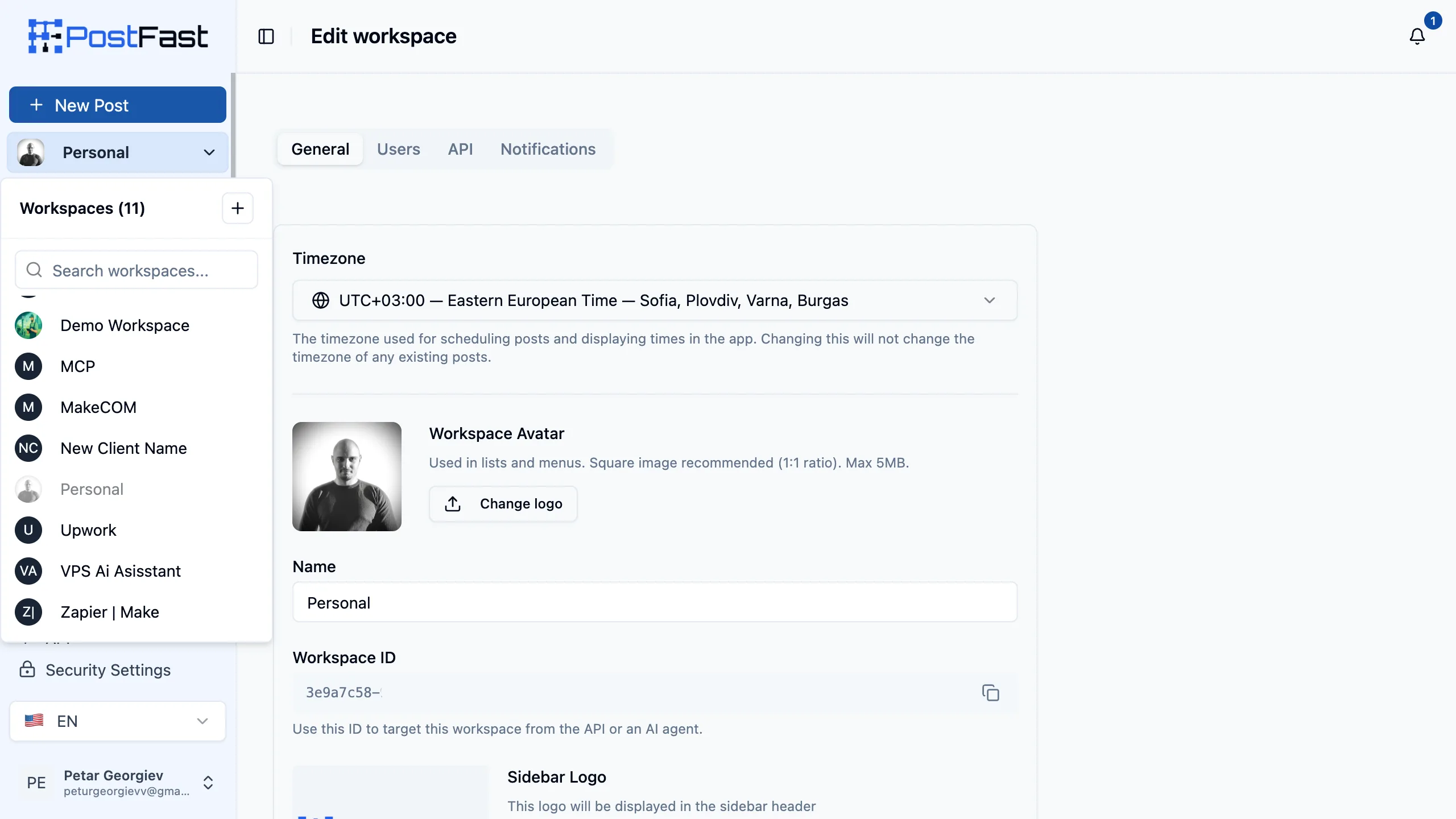
PostFast is the closest like-for-like replacement for Buffer if the pain is the price tag. Starter is €10/mo on annual, Creator €24, Growth €40, Pro €82.50, Enterprise €199 (all annual-billed; monthly is €12/€29/€49/€99/€239). Those prices stay the same whether you connect 4 channels or 30. On Buffer Essentials, moving from 4 to 30 channels takes you from $20 to $112.50 a month. On PostFast Growth you pay €40/mo on annual for the whole 30-account tier plus 10 workspaces and 8 users per workspace.
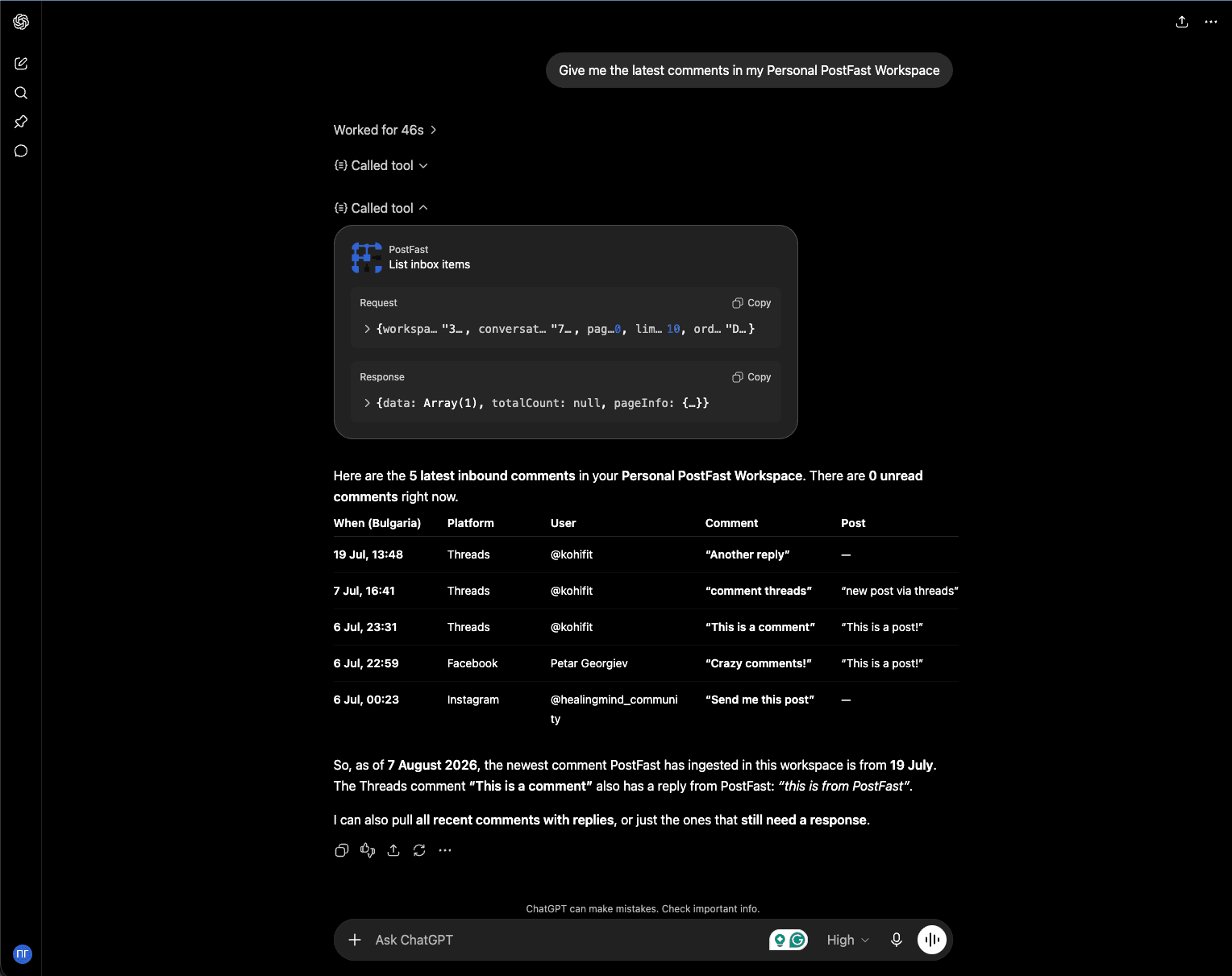
The REST API is the other reason people switch, though the gap has narrowed: Buffer's API is now generally available on every plan, including Free (1 key, 3,000 requests a month; 3 keys and 7,500 on Essentials, 5 keys and 15,000 on Team). PostFast ships an API on every plan too, including Starter and the 7-day trial, plus an MCP server so an assistant in Claude, ChatGPT, Cursor or Claude Code can do the work directly. If you are a developer who wants to run scheduling as code, both now work; PostFast adds the MCP layer and removes the per-channel bill underneath it.
Where Buffer still wins: a true free plan for 3 channels, brand recognition, and Mastodon support that PostFast does not have. If you only manage 3 channels and do not need the API, Buffer free stays a reasonable default. Everyone else should run the math on PostFast Growth against Buffer at 6 channels and up.
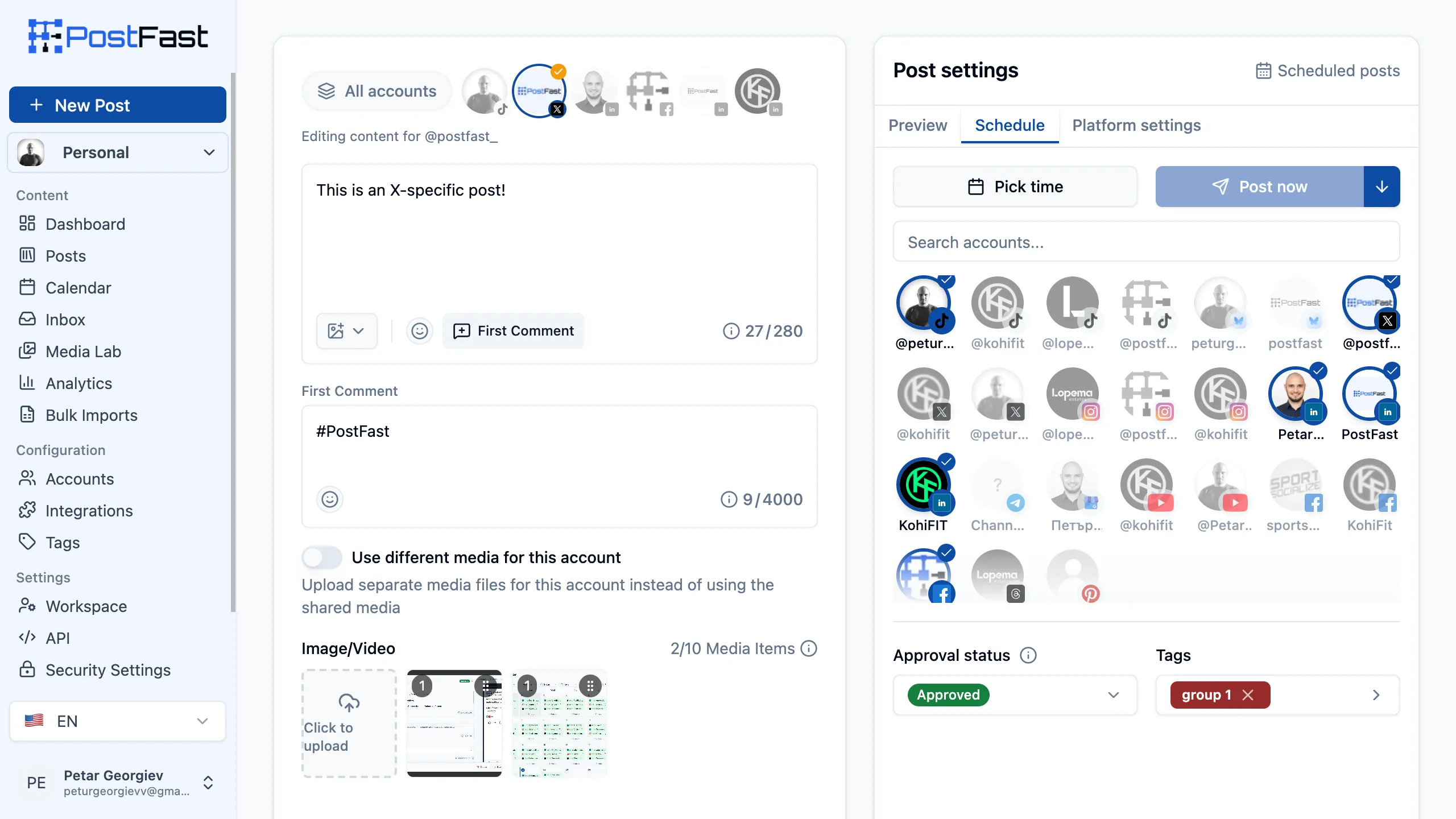
Who PostFast suits, and who it does not
PostFast fits the team that has already outgrown 5 channels and wants the number on the invoice to stop moving. A freelancer running 4 accounts on Starter, a creator on Creator with 12, a small agency on Growth with 30 across 10 client workspaces: in all three cases the bill is fixed and adding an account is a settings change, not a pricing conversation. Approvals, the comments inbox and the REST API are all in the base plan, so there is no upgrade waiting behind a feature you assumed you had. Analytics are the one thing that does scale with the tier: Starter is limited with 30 days of history, and full analytics start on Creator.
It is the wrong tool in three specific cases. There is no free tier, only a 7-day trial without a credit card, so if a permanent $0 plan is the requirement, Publer or Buffer's own free plan is the honest answer. Mastodon and Snapchat are not supported, so if either is core to your distribution, Publer (Mastodon) or Later (Snapchat) covers it and PostFast does not. And there are no webhooks today, so event-driven automations that need PostFast to call you have to poll the API instead.
The Buffer limit you are escaping
The multiplication. On Buffer Essentials the first 10 channels are $5 each and the rate steps down after that, so 12 channels is $56.67/mo and 30 is $112.50/mo; on Team the same counts are $106.67/mo and $162.50/mo. PostFast Growth is €40/mo on annual for up to 30 accounts, 10 workspaces and 8 users per workspace, with approvals included. Over a year at 30 channels that is €480 against $1,350/yr on Essentials or $1,950/yr on Team.
The second limit is quieter. Buffer's approvals sit on the Team tier, so wanting a reviewer on any channel reprices every channel. On PostFast, approval status is a field on the post rather than a tier, and the same is true of the comments inbox and the API. The practical effect for a growing team is that the reason to upgrade becomes account count and nothing else, which is a number you can forecast.
What migrating from Buffer actually involves
Connect each account through OAuth, the same permission dialogs Buffer used. On Facebook Pages, Instagram, Threads and TikTok, PostFast then backfills the last 60 days of posts published on that account automatically, including posts that never went through Buffer, so the Posted list and analytics are populated on day one rather than starting empty. The other 7 platforms connect normally but do not backfill.
The queue itself is the manual part, because Buffer has no bulk export for scheduled posts. Two paths work: bulk CSV import (up to 200 rows and 10 MB per upload, with columns for content, schedule time, target accounts and publicly hosted media URLs), or the REST API if you would rather script it against Buffer's API and move the queue programmatically. For a normal two to four week queue, the CSV route is usually an afternoon.
Budget for one thing people forget: Buffer bills annually per channel, so if you are mid-term you are moving off something already paid for. Running both in parallel for a fortnight, with new posts going into PostFast and the Buffer queue draining down, avoids a hard cutover and costs nothing extra during the 7-day trial.
- Starting price
- €10/mo annual (Starter)
- Platforms
- 11 (Facebook, Instagram, X, TikTok, LinkedIn, YouTube, BlueSky, Threads, Pinterest, Telegram, Google Business)
- Free plan / trial
- 7-day trial, no credit card
- Standout
- Flat pricing with a public REST API and MCP server on every plan
2. Best for a free plan that actually covers 3 channels: Publer

The cheapest paid tier in the category, plus a real free plan.
Publer is the closest competitor to Buffer's positioning. It offers a free plan (3 accounts, 10 queued posts, no X). Publer prices per social account: the plan card shows one account, $4/mo on Professional and $8/mo on Business on annual billing ($5 and $10 monthly), and larger rosters cost $3.20 and $5.60 per account a month on annual billing ($4 and $7 monthly), with every 10th account free, so a 10-account setup is billed as 9.
Where Publer pulls ahead: 13 platforms including WordPress and Mastodon, unlimited scheduling on the paid plans, AI image and caption tools built in, and a public REST API on Business. If Buffer's per-channel model is what bothers you but a flat plan feels like overkill for a small team, Publer hits a useful middle ground.
The trade-off is polish. Publer's composer has more options which means more clicks; Buffer is still smoother for a pure queue-and-forget workflow. For teams that outgrew Buffer's free plan and want more tools without a price shock, Publer is usually the first stop.
Who Publer suits, and who it does not
Publer is built for the operator running somewhere between 3 and 12 accounts who wants the bill to track usage rather than a tier. On Professional's annual billing, 6 accounts is $19.20/mo and 10 accounts is $28.80/mo once the tenth comes free. That is genuinely cheaper than Buffer at the same count, on a model Buffer users already understand, which is why it is the least disruptive move on this list.
It stops making sense at scale, because the per-account model that beats Buffer at 6 accounts is still a per-account model at 30. Thirty accounts on Professional is $86.40/mo on annual billing after the free-account rule, against €40/mo flat on PostFast Growth. The API is also gated to Business, so a developer with 10 accounts pays $50.40/mo on annual billing to reach it. And the free plan excludes X entirely, which catches people who assume free means Buffer-free.
The Buffer limit you are escaping
Mostly the unit price and the platform list. Publer charges $4 for the first account and $3.20 per account after that on annual billing, where Buffer Essentials charges $5 per channel for the first 10, and it publishes to 13 platforms against Buffer's 11, adding WordPress and Telegram. If the reason you are leaving is that Buffer costs slightly too much for slightly too few networks, this is the direct swap.
The free plans are worth comparing carefully rather than by headline. Both cover 3 accounts. Buffer's allows X and gives you 10 queued posts per channel with a refill as they publish, plus API access with one key. Publer's blocks X but is otherwise a fuller product. Which one wins depends entirely on whether X is in your mix.
What migrating from Buffer actually involves
Connect accounts through OAuth, then rebuild the queue. Publer offers a bulk upload flow for new content, which handles the backlog reasonably well, but as with every tool here your scheduled Buffer posts cannot be exported, so what you are really migrating is your content plan rather than your queue.
One sequencing note: if X is in your mix, do not start on Publer's free plan expecting to trial the real thing, because X is excluded there. Start the Professional trial instead, connect X first, and confirm the posting flow works before moving anything else across.
- Starting price
- $4/mo (Professional, annual, 1 account)
- Platforms
- 13 (incl. WordPress, Mastodon, Bluesky)
- Free plan / trial
- Yes, 3 accounts
- Standout
- Public API on Business plan, unlimited AI on yearly
3. Best for open-source fans and 30+ platforms: Postiz

Self-host for free, or pay for the managed cloud version.
Postiz is the open-source standout. The code lives at github.com/gitroomhq/postiz-app under the AGPL-3.0 license. You can clone it, run it on your own server, and pay zero. The managed cloud version runs $23 to $79 a month on annual billing ($29 to $99 billed monthly) depending on how many channels you need.
Postiz publishes to 31 platforms, which is the widest coverage in this list. That includes Discord, Slack, Reddit, Telegram, Mastodon, Nostr, Warpcast, and Dribbble alongside the usual mainstream networks. For developer-heavy communities or niche audiences, this breadth matters.
Trade-offs: the UI is younger than Buffer's and the managed cloud has had reliability hiccups in the past. If you are shipping mission-critical content for a client, this is a risk worth measuring. If you want to self-host to avoid per-channel or per-user fees entirely, Postiz is the clearest answer.
Who Postiz suits, and who it does not
Postiz suits teams that already run their own infrastructure and treat a scheduler as one more service in the stack. If you have somewhere to host it and someone who maintains it, the licence cost is zero forever and the channel list is the widest available. The cloud tiers suit the same audience without the ops: Standard at $23/mo on annual covers 5 channels with unlimited posts, Team at $31 covers 10 channels with unlimited team members, Pro at $39 covers 30 channels, and Ultimate at $79 covers 100.
It is the wrong pick if nobody on the team wants to own an upgrade path, or if a client is depending on a post landing at a specific hour and you have no appetite for the risk that comes with a younger managed platform. It is also worth being honest that the breadth is the point: if your distribution is four mainstream networks, 31 channels buys you nothing, and a more polished tool at a similar price is the better trade.
The Buffer limit you are escaping
Two of them. First, the platform ceiling: Buffer's 11 networks have no Discord, Slack, Reddit, Nostr or Warpcast, and for a developer-tools or community-led brand those are frequently the channels that matter most. Postiz's 31 covers them.
Second, the pricing model itself, in the strongest form on this page. Self-hosting removes per-channel, per-seat and per-workspace billing simultaneously, and even the cloud tiers ship the API and webhooks on every plan including the $23 Standard tier. Buffer, by contrast, throttles every key at 100 requests per 15 minutes regardless of what you pay (250 a day on Free and Essentials, 500 on Team) and offers no webhooks at all, so anything event-driven has to poll. Postiz and FeedHive are the two tools on this page we could confirm publish webhooks; PostFast does not have them either.
What migrating from Buffer actually involves
If you self-host, the migration is a deployment before it is a content move: stand up the app, connect each network, then rebuild the queue. Budget real time for the first step, because you are taking on the upgrade and uptime responsibility that Buffer was absorbing for you.
If you take the cloud tier, it looks like any other move on this list: OAuth per channel, then re-enter the queue. Either way, start by mapping which of your Buffer channels actually exist on Postiz and which of the extra 20 you would genuinely publish to, because the answer to the second question is what decides whether the trade is worth it.
- Starting price
- Free (self-hosted) or $23/mo (Standard, annual)
- Platforms
- 31 including Discord, Slack, Reddit
- Free plan / trial
- Self-hosted is free; 7-day trial on cloud
- Standout
- AGPL-3.0 codebase, widest platform coverage, API and webhooks on every cloud tier
4. Best for small agencies with client approvals: SocialPilot

Bulk scheduling and client approval at SMB price points.
SocialPilot starts at $17 per month on annual (Essentials, 5 accounts, 1 user, 500 AI credits) and tops out at $170 a month on Ultimate (40 accounts, unlimited users, unlimited AI credits). Standard is $34 for 10 accounts and 3 users, Premium is $85 for 20 accounts and 6 users. Pricing sits between Buffer and Hootsuite with a feature set aimed at small-to-medium agencies: bulk scheduling, content library, white-label reports on Premium and above.
The client approval flow is where SocialPilot earns its fans. You can invite a client to review drafts without giving them a full seat, which Buffer only does on the Team tier. SocialPilot also bundles 500 to 5,000 AI credits per plan and makes them unlimited on Ultimate, which Buffer's AI Assistant does not cap as cleanly.
API access is gated to the Enterprise plan, which is a real limitation if you need programmatic publishing without a sales call. For a 5 to 10-person agency that wants more than Buffer but less than Hootsuite, SocialPilot is a solid middle option.
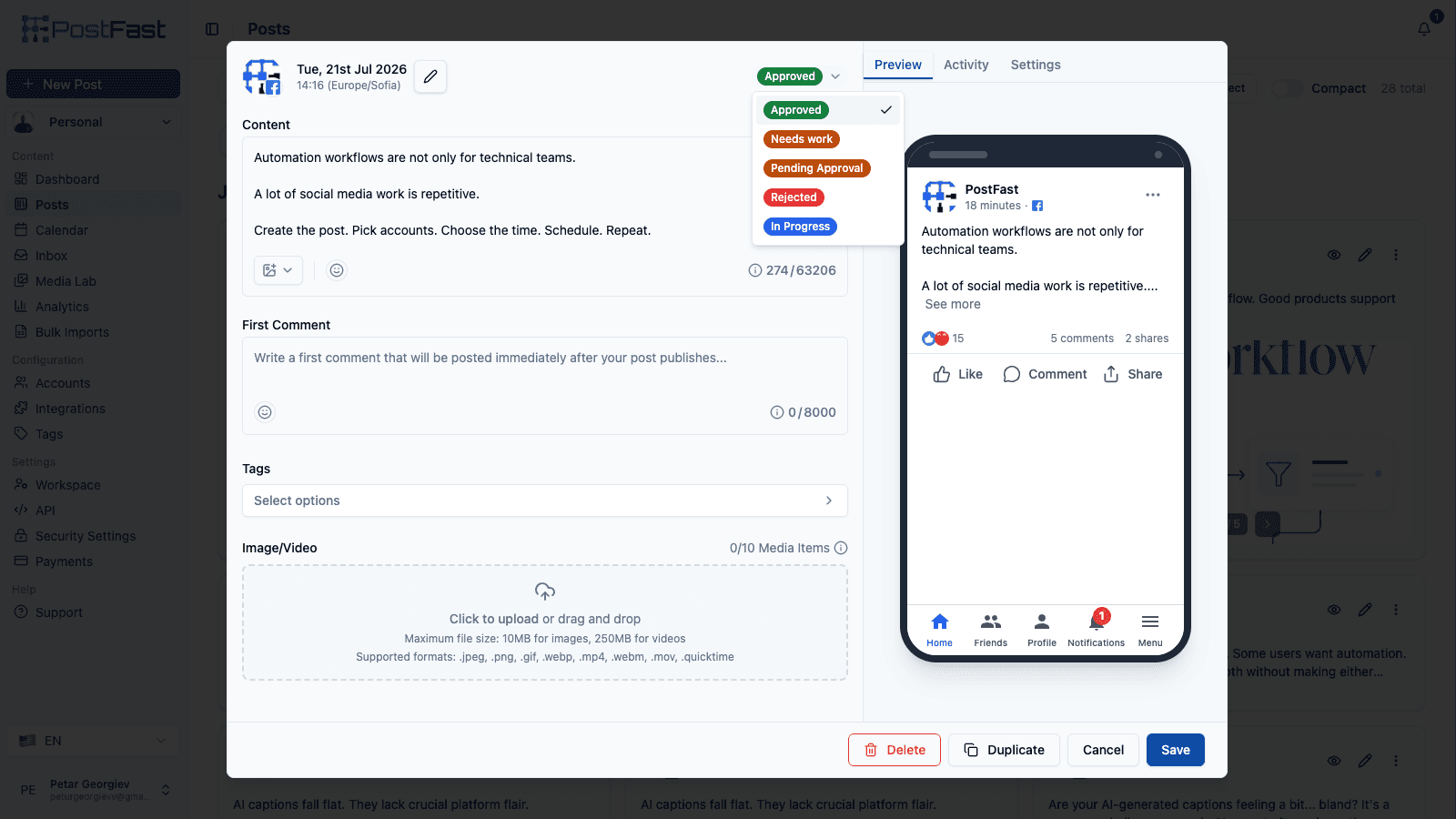
Who SocialPilot suits, and who it does not
It suits the agency that bills for reporting. Premium at $85/mo on annual is the cheapest tier in this comparison that ships white-label reports, and the client-approval flow lets a client sign off without consuming a seat. Add-ons keep it flexible at the edges: extra accounts are $4 a month each and extra users $5 a month each, so you can stay on a lower tier and top up rather than jumping a bracket.
The developer story is mixed rather than absent. The REST API still sits behind Enterprise, which means a sales conversation before you can build against it. But SocialPilot now runs a first-party MCP server that connects to Claude, ChatGPT, Cursor, Windsurf and Zapier with either a SocialPilot login or an API key, and it covers creating, scheduling, drafting and tracking posts. If your goal is an assistant that publishes for you, that route is open; if you need to build a custom integration against documented REST endpoints, Enterprise is still the gate. It is also more tool than a solo creator needs: at 3 or 4 channels, Buffer Essentials or Publer Professional is both cheaper and simpler.
The Buffer limit you are escaping
The Team-tier tax on approvals. Approvals live on Buffer's Team tier, which re-prices the whole roster, so a 20-channel agency pays $133.33/mo on annual billing to get a reviewer into the loop, against $83.33/mo on Essentials without one. SocialPilot Premium covers 20 accounts, 6 users and client approval for $85/mo on annual, and Ultimate covers 40 accounts with unlimited users for $170/mo, which is where the per-channel model stops competing.
The white-label gap matters too. Buffer has no client-facing report branding at any tier, so agencies typically end up exporting and rebuilding decks by hand. SocialPilot Premium removes that step, and Ultimate adds custom-domain white label on top.
What migrating from Buffer actually involves
The usual OAuth reconnect per account, then a queue rebuild through the bulk scheduler, which is one of the better ones in this group and takes a spreadsheet of content and times directly.
Two things to do in order. Decide the tier by user count rather than account count, because SocialPilot caps users per tier (1 on Essentials, 3 on Standard, 6 on Premium, unlimited on Ultimate) and the $5 per extra user add-on adds up faster than the account add-on does. Then set up the client approval flow before you invite anyone, so reviewers land in a working process rather than an empty one. SocialPilot lists migration and onboarding support on Ultimate if you are moving a large book of accounts.
- Starting price
- $17/mo (Essentials, annual)
- Platforms
- 10 (incl. Bluesky, Google Business)
- Free plan / trial
- 14-day trial, no credit card
- Standout
- Client approvals plus white-label reports on Premium
5. Best for Instagram-first creators who want a visual grid: Later

The Instagram-native planner, with a visual grid and link in bio.
Later started as an Instagram scheduling tool and still leads with visual planning. The Starter plan is $18.75 a month on annual billing, which gets you 1 Social Set (8 profiles), 1 user, and 30 scheduled posts per profile. Growth is $37.50 (2 Sets, 16 profiles, 2 users, 180 posts per profile) and Scale is $82.50 (6 Sets, 48 profiles, 4 users, unlimited posts), with feature unlocks like Smart Scheduling and social inbox along the way. Later's annual discount is steeper than the category norm at 25 percent, which it markets as three months free.
What Later does better than Buffer: the Instagram visual calendar and grid preview, a proper Link in Bio product, and a social inbox on Growth and above. Later also acquired Mavely for $250M in January 2025 to add creator affiliate features, which matters if you monetize through affiliate links.
What Buffer does better: per-channel flexibility, a free plan, and a public API. Later does not offer a public API for scheduling at any tier, and the Social Set model can be awkward if you run a single standout brand (you pay for 8 profile slots even if you only use 3).
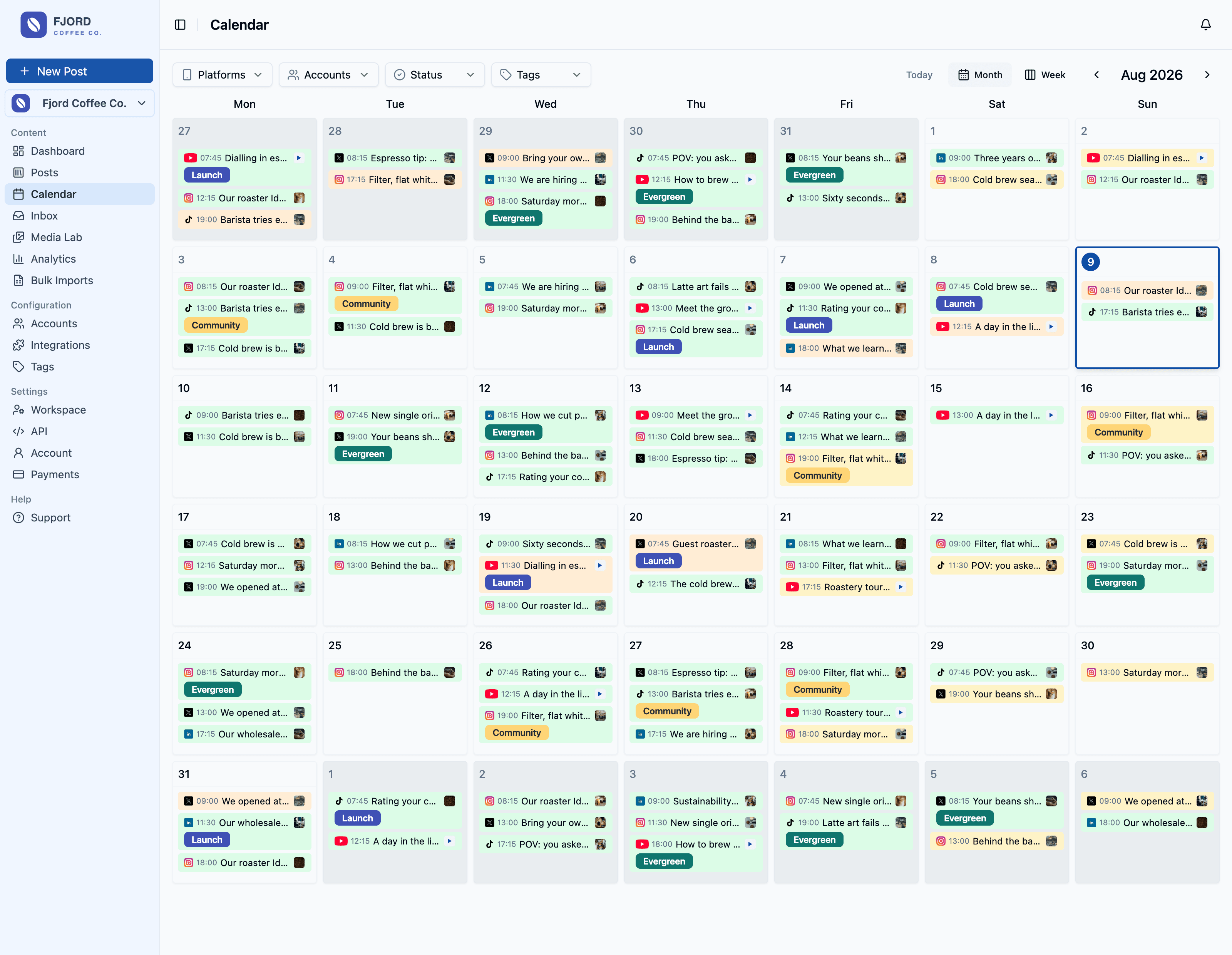
Who Later suits, and who it does not
Later suits the creator or small brand whose growth actually happens on Instagram and TikTok, where the grid preview and Link in Bio are doing commercial work rather than decorating a calendar. If you monetize through affiliate links, the post-Mavely creator tooling is a real differentiator that nothing else on this list matches.
It suits almost nobody else. Later publishes no API for its scheduling product at any tier, which rules it out for programmatic publishing entirely. The one API it does document, the Later Influence Reporting API, belongs to its influencer-marketing product and is read-only reporting, so it does not help you schedule anything. Starter caps you at 30 scheduled posts per profile and 5 AI credits a month, which is thin for a working content calendar, and the analytics window is capped at three months there. Extras are billed separately once you need them: $11.25 a month per additional Social Set, $3.75 per extra user, $3.75 per 100 AI credits.
The Buffer limit you are escaping
Visual planning and the grid, not price. Buffer's calendar is a list of scheduled items; Later's is a grid you can arrange until the profile looks right before anything publishes, which is the entire job for a visual-first brand. On engagement the two are closer than they look: Buffer includes its Community comments inbox on Free, Essentials and Team, and Later puts its social inbox on Growth at $37.50/mo.
On cost, Later is usually the more expensive move, and the Social Set model is why. A Set is 8 profiles and it is billed whole, so a brand running 3 profiles pays for 8. If your reason for leaving Buffer is the bill rather than the grid, this is the wrong direction and PostFast or Publer is the better read.
What migrating from Buffer actually involves
Connect through OAuth, then rebuild the queue against the per-profile post caps rather than against your old Buffer schedule. Starter's 30-posts-per-profile limit is the constraint most Buffer migrants hit first, because Buffer Essentials was unlimited and Later is not.
Map the Social Sets before you connect anything. A Set holds one profile of each network type, so the way your accounts distribute across Sets decides your tier more than the raw profile count does, and getting that wrong is how people end up on Growth when Starter would have covered them.
- Starting price
- $18.75/mo (Starter, annual)
- Platforms
- 8 (Instagram, Facebook, TikTok, Pinterest, LinkedIn, YouTube, Threads, Snapchat)
- Free plan / trial
- 14-day trial
- Standout
- Visual grid + Link in Bio + creator affiliate platform
6. Best for AI-first creators with heavy automation needs: FeedHive

AI-heavy, automation-forward, with credits on every plan.
FeedHive starts at €15 a month for Creator (4 accounts, 2,500 AI credits, 500 automation runs), billed €180 a year. Brand is €22 (€264 a year), Business is €69 (€828 a year), Agency is €239 (€2,868 a year). The REST API, MCP docs, Claude Code setup and CLI access arrive on Brand and up; Creator is the only tier without them. Webhooks are on every tier (10 on Creator, 100 on Brand, unlimited on Business and Agency).
FeedHive leans into AI. The Creator plan includes 2,500 AI credits for generation and automations that trigger on schedules or RSS feeds. Brand jumps to 10,000, Business to 50,000, and Agency to 100,000. If you run a content operation where AI drafting is the majority of your workflow, FeedHive's credits are among the most generous in this list per dollar.
Trade-off: FeedHive does not have a free plan and the 7-day trial is short. Support is responsive but the team is small. If you want the API plus MCP on the same tool, start the trial on Brand or above. If you want a polished consumer UX, Buffer still wins on that axis.
Who FeedHive suits, and who it does not
FeedHive suits the operator whose bottleneck is drafting rather than scheduling. If most of your posts start as an AI draft and your recycling and RSS automations do the rest, the credit allowances at €15 and €22 a month are the best value on this page for that specific workload, and the conditional posting and recycling features have no real equivalent in Buffer.
The catch is where the API sits. Creator at €15/mo does not include it, so the entry tier for programmatic access is Brand at €22/mo, which is still the cheapest API in this comparison after PostFast Starter. Webhooks are the genuine outlier: FeedHive is one of only two tools on this page that publishes them, and it does so on every tier, where PostFast has none at all. What holds FeedHive at rank 6 is not the API gate but the shape of the product: no free plan, a 7-day trial, and a feature set built around AI volume rather than around replacing Buffer's per-channel bill.
The Buffer limit you are escaping
Buffer's AI Assistant helps you write a post; FeedHive's credits power a pipeline. Automations that fire on a schedule or an RSS feed, conditional posting rules, and recycling of evergreen content are all things Buffer does not do at any tier, and they are what a high-volume single-operator content business actually runs on.
Note that on price alone FeedHive is not the escape. Creator at €15/mo covers 4 accounts, which is roughly what Buffer Essentials costs for the same 4 channels. You are paying for the AI and automation layer, not for cheaper scheduling.
What migrating from Buffer actually involves
OAuth per account, then rebuild the queue. The part that takes longer than expected is rebuilding your posting cadence as automations rather than as scheduled items, because that is where the value is and it is not a like-for-like translation of a Buffer queue.
Use the 7 days deliberately. There is no free tier to fall back on, annual billing is charged as a lump (€180 for Creator, €828 for Business), and if the API is why you are looking, trial Business rather than Creator, because the tier you can afford may not be the tier that has the feature.
- Starting price
- €15/mo (Creator)
- Platforms
- 10 (X, LinkedIn, Facebook, Instagram, TikTok, YouTube, Threads, Google Business, Pinterest, Discord)
- Free plan / trial
- 7-day trial
- Standout
- Large AI credit allowances, plus a REST API and agentic access from Brand (EUR 22/mo)
7. Best for marketing teams who live in a content calendar: Loomly

Approval workflows and calendar-first planning for in-house teams.
Loomly simplified from four paid tiers to two paid tiers (plus Enterprise) in its 2025 repricing. Starter is $49 a month on annual ($65 monthly) and covers 12 social accounts with 3 users. Beyond is $249 on annual ($332 monthly) with 60 accounts and unlimited users. Enterprise handles 61+ accounts with custom pricing.
Loomly's strength is the content calendar and the approval workflow. Marketing teams that treat scheduling as part of a larger editorial calendar often pick Loomly over Buffer because the review flow is first-class: assign statuses, track revisions, hand off to reviewers. Buffer's Team tier has approvals too, but Loomly's calendar UX is more structured.
Loomly's API is not publicly documented and integrations run mostly through Zapier. If you need direct programmatic access, this is a gap. For in-house marketing teams that care about the calendar and the review flow more than the API, Loomly is the strongest option in this list.
Who Loomly suits, and who it does not
Loomly suits the in-house marketing team where a post passes through more than one pair of hands before it publishes. Statuses, revision history and reviewer assignment are the product rather than a checkbox on a higher tier, and for a team of 3 on Starter at $49/mo covering 12 accounts, that governance is what you are buying.
It suits almost no one leaving Buffer over price. Starter is $49/mo before you have connected anything, which is what Buffer Essentials costs at 10 channels, and the jump to Beyond is a five-times increase to $249/mo. There is no public API, so automation runs through Zapier, and there is no free plan. If your review process is one person glancing at a draft, you are paying for machinery you will not use.
The Buffer limit you are escaping
Approval depth, and the way Buffer prices it. Buffer's Team tier gives you approvals but moves every channel onto the higher rate, so 12 channels is $106.67/mo on annual billing, which is more than Loomly Starter at $49/mo for the same 12 accounts and a substantially better review flow. That is the one comparison where Loomly's headline price stops looking expensive.
The second thing you leave behind is the flat list. Buffer's calendar shows what is queued; Loomly's is built around a campaign and editorial structure that a marketing calendar can actually live in, which is a different job from queue management.
What migrating from Buffer actually involves
OAuth per account and a queue rebuild, plus a step the other tools do not require: defining your approval states and who owns each one before you invite the team. Loomly's value is the workflow, and importing content into an undefined workflow just recreates Buffer with a higher bill.
One commercial point worth knowing before a long commitment. Loomly was acquired by Bending Spoons in January 2025, the same operator behind Evernote, Meetup and WeTransfer, and that portfolio has a documented pattern of post-acquisition repricing. That is not a reason to avoid the product, but it is a reason to read the annual terms rather than assume today's price is a long-term one.
- Starting price
- $49/mo (Starter, annual)
- Platforms
- 9
- Free plan / trial
- Free trial, no credit card
- Standout
- Approval workflows and structured calendar UX
8. Best for UK-based agencies managing many client profiles: Sendible

Per-profile pricing that scales cleanly for small agencies.
Sendible is a UK company. Its 2026 re-tier renamed the whole lineup: Core is $30 a month annual ($35 monthly, 6 profiles), Plus is $84 ($99 monthly, 18 profiles), Premium is $169 ($199 monthly, 42 profiles), Elite is $254 ($299 monthly, 90 profiles), and Enterprise is $638 ($750 monthly, 300 profiles), with unlimited users on every plan. The math tracks: roughly $2 to $5 per profile per month depending on tier.
Sendible has a long track record with agencies and supports USD, GBP, and EUR billing natively. The client dashboard and approvals are solid, and the Premium tier adds custom branded reports that Buffer's Team plan does not offer. Unlimited users on every plan means adding teammates never touches the bill, which is the single strongest thing about its current pricing.
Trade-off: no public API advertised. Sendible integrates through Zapier for most developer use cases. If you are a UK-based agency billing clients in GBP and want per-profile pricing, Sendible is usually the closest fit. Buffer still wins on price if you only manage a handful of channels.
Who Sendible suits, and who it does not
Sendible suits the agency whose cost problem is seats rather than profiles. Every plan now includes unlimited users, so a 10-person team on Plus at $84/mo pays the same as a 2-person team, which is the opposite of how Buffer Team, Hootsuite and Sprout all work. Native GBP and EUR billing removes an FX line for UK and EU agencies, and the client dashboards are mature.
It is a poor fit for developers, because there is no public API at any tier and Zapier is the answer to every automation question. It is also worth being precise about white label: it is available on Elite and Enterprise as a paid add-on rather than included, with Sendible listing white-label pricing from $349 a month for Elite and $800 a month for Enterprise. If branded client dashboards are the reason you are considering it, price the add-on, not the tier.
The Buffer limit you are escaping
The seat charge and the channel multiplier at the same time. On Buffer Team a 5-person agency running 18 channels pays $126.67/mo on annual billing, and every channel past the tenth adds another $4 a month on monthly billing. Sendible Plus covers 18 profiles and any number of users for $84/mo on annual. That is the comparison that makes Sendible worth a look despite its higher entry price.
Note what you are not escaping. Profiles are capped per tier and the steps are large, so an agency that needs 20 profiles pays for Premium's 42. If your profile count sits just above a bracket, the flat-tier tools price that case better.
What migrating from Buffer actually involves
Connect profiles through OAuth and rebuild the queue, then spend the real effort on client structure: dashboards, permissions and report templates are where Sendible earns its price, and none of that comes across from Buffer because Buffer has no equivalent.
Count profiles before you pick a tier, not after. The bracket steps from 6 to 18 to 42 to 90 are what determine your bill, and unlike SocialPilot there is no per-profile add-on to smooth the gap between them.
- Starting price
- $30/mo (Core, annual)
- Platforms
- 10
- Free plan / trial
- 14-day trial, no credit card
- Standout
- Native GBP / EUR billing and unlimited users on every plan
9. Best for enterprise teams with social listening needs: Sprout Social

Top-of-market pricing, top-of-market feature depth.
Sprout Social is the enterprise option in any Buffer comparison. Sprout added a new Essentials tier in 2026 at $79 per seat per month annual ($99 monthly) with 5 profiles and basic reporting. Standard is $199 per seat per month annual (5 profiles, consolidated inbox, review management). Professional is $299 per seat per month annual (unlimited profiles). Advanced is $399 per seat per month (sentiment, Sprout API, helpdesk integrations). Minimum spend at 5 seats on Advanced is roughly $24,000 a year.
Sprout earns that spend with social listening, sentiment analysis, smart inbox, Salesforce integration on Enterprise, and a public API on Advanced and above. If your scheduling needs come with brand monitoring, customer support workflows, or CRM integration, Sprout is usually the category leader.
It is also massively over-spec for most teams that currently use Buffer. If you are leaving Buffer because of per-channel pricing, Sprout is almost certainly the wrong answer. If you are leaving Buffer because you outgrew Team and need real enterprise features, Sprout is the ceiling comparison.
Who Sprout Social suits, and who it does not
Sprout suits organisations where social is a support and intelligence function, not just a publishing one. Listening, sentiment, review management and the Salesforce integration are the reason it costs what it costs, and for a brand fielding real customer volume in comments and mentions, they are not optional extras.
For anyone arriving from Buffer, the numbers are the whole story. Essentials at $79 per seat per month covers 5 profiles, which is the same 5 channels Buffer Essentials handles for $25/mo. Sprout also publishes to 7 networks against Buffer's 11, so a Buffer user with Bluesky, Mastodon or Google Business in the mix would be losing coverage while multiplying the bill.
The Buffer limit you are escaping
Analytics depth and the inbox, if either is genuinely what you need. Buffer's Insights answer what a post did; Sprout's answer what an audience is doing, across owned and unowned mentions, with sentiment attached. There is no Buffer tier that gets close.
Everything else about the move runs the wrong way. Buffer prices per channel, Sprout prices per seat, and the seat price is 8 to 16 times a Buffer channel. If the seat count is going up rather than the channel count, you have swapped one multiplier for a considerably more expensive one.
What migrating from Buffer actually involves
A procurement process rather than an afternoon. The 30-day trial does not require a credit card, which is enough time to test properly, but Sprout is bought at a seat count and the API waits until Advanced at $399 per seat per month, so scoping the tier and headcount is the actual work.
Before you start, confirm that your networks are on the list. Sprout covers 7, and Buffer users with Bluesky, Mastodon or Google Business Profile in their mix will need to keep another tool for those, which changes the cost comparison again.
- Starting price
- $79/seat/mo (Essentials, annual)
- Platforms
- 7
- Free plan / trial
- 30-day trial, no credit card
- Standout
- Social listening, sentiment, CRM integrations
10. Best for enterprise teams that already budget for legacy SaaS: Hootsuite

The veteran, priced per user starting at $99/mo.
Hootsuite re-tiered again in 2026 and now sells four tiers, all billed annually per user: Standard is $99 per user per month (up to 10 social accounts), the new Professional tier is $199 per user per month (unlimited accounts and inbox automation), Advanced is $399 per user per month (approvals and team workflows; it was $249 before the re-tier), and Enterprise is custom. Monthly-billed prices are no longer publicly listed. The per-user model is the bite. Add 3 users on Standard and you are at $297 a month, $3,564 a year. Add 5 on Advanced and you are at $23,940 a year.
Hootsuite earns its price on brand, on its Wisdom AI assistant (the 2026 rebrand of OwlyWriter) which now ships on every plan, on monitoring and listening streams, and on the Salesforce and Proofpoint integrations available on Enterprise. For global brands already standardized on Hootsuite, the sunk-cost momentum is real.
For anyone migrating from Buffer, Hootsuite is almost always a downgrade in value per dollar. PostFast Growth at €40/mo on annual flat handles 30 social accounts and 8 users per workspace; matching that on Hootsuite Professional (its cheapest tier with unlimited accounts) would be 8 seats at $199, roughly $19,100 a year. Include Hootsuite in your research, but the math rarely comes back in its favor unless your stakeholder specifically wants Hootsuite.
Who Hootsuite suits, and who it does not
Hootsuite suits large organisations that need the governance layer more than the scheduler: SSO, compliance controls, listening, and a vendor a procurement team has already approved. If your company has standardised on it, the practical value is that nobody has to justify a new tool, and Wisdom now ships on every tier rather than being an upsell.
It suits essentially no one arriving from Buffer for cost reasons. Standard at $99 per user per month covers 10 accounts, which Buffer Essentials covers for $50/mo, and every extra person on the team adds another $99. Approvals wait until Advanced at $399 per user per month, so a 4-person team that needs a review step is looking at more than $19,000 a year.
The Buffer limit you are escaping
Monitoring streams and enterprise controls. Buffer has no listening, no brand monitoring and no SSO or compliance tooling at any tier, and if any of those is a hard requirement from your security or comms team, no amount of per-channel savings resolves it. Hootsuite also covers Reddit, which Buffer does not.
On price you are escaping nothing, you are trading a channel multiplier for a seat multiplier at roughly ten times the unit cost. That is the calculation to run first, because it usually ends the conversation.
What migrating from Buffer actually involves
A 14-day trial with no credit card, then a per-seat purchase. The work is deciding who genuinely needs a login, because on a per-user model that headcount is your bill, and a viewer who only reads reports still costs a full seat.
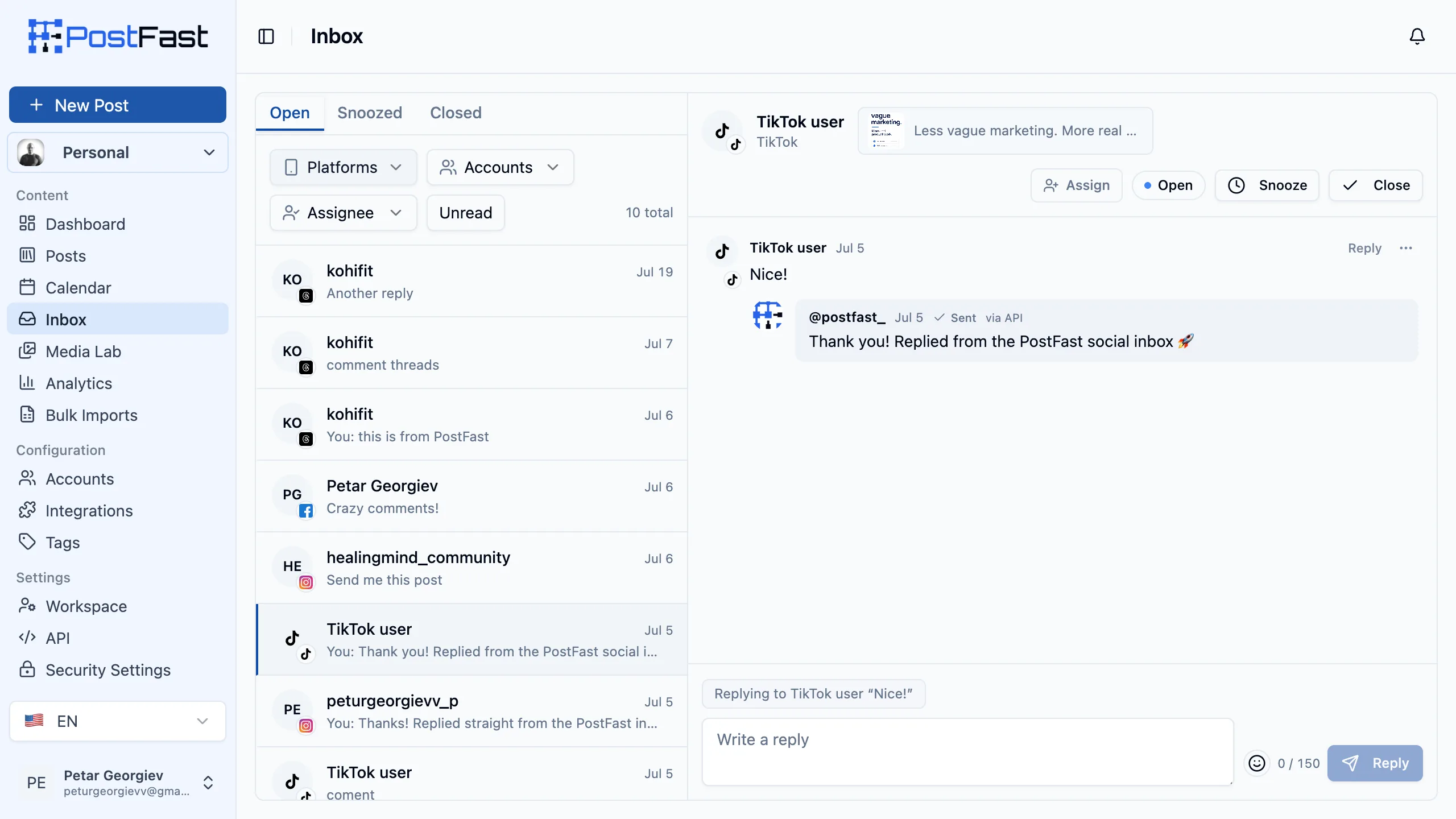
If what pulled you toward Hootsuite is the inbox rather than the listening, price the alternatives first. A comments inbox for TikTok, Instagram, Facebook Pages and Threads is included on every PostFast plan including the trial, with no per-seat or per-conversation charge, which covers a large share of what teams actually use an inbox for at a fraction of $99 per user per month.
- Starting price
- $99/user/mo (Standard, annual)
- Platforms
- 10 (Facebook, Instagram, X, LinkedIn, TikTok, Pinterest, YouTube, Threads, Bluesky, Reddit)
- Free plan / trial
- 14-day trial, no credit card
- Standout
- Wisdom AI assistant, monitoring streams, Salesforce + Proofpoint on Enterprise
How we evaluated
We compared every tool against Buffer on five axes that matter to teams looking for an alternative: starting monthly price, number of supported platforms, free-plan or trial terms, public API availability, and the pricing model (flat vs per-channel vs per-seat vs per-user). Every price on this page was re-verified on September 14, 2026 by loading each vendor's public pricing page in a browser and opening both billing toggles where one exists, so the monthly and annual figures come from the same visit rather than from memory or a cached summary. That pass confirmed every tier price in this comparison as unchanged, and re-confirmed the correction from the previous audit: Sendible's own pricing page still states that white labelling is available on the Elite and Enterprise plans for an additional fee, so it is a paid add-on rather than a feature included in the Elite price.
We excluded tools we could not verify live pricing for, and we excluded tools that market themselves as AI content generators rather than schedulers (Jasper, Copy.ai) because they do not replace Buffer's core publishing workflow. We wrote each entry with the bad parts included so you can make a real decision instead of reading a sales pitch, which is why the PostFast entry names its missing free plan, its missing Mastodon support, and its missing webhooks rather than leaving them for you to discover.
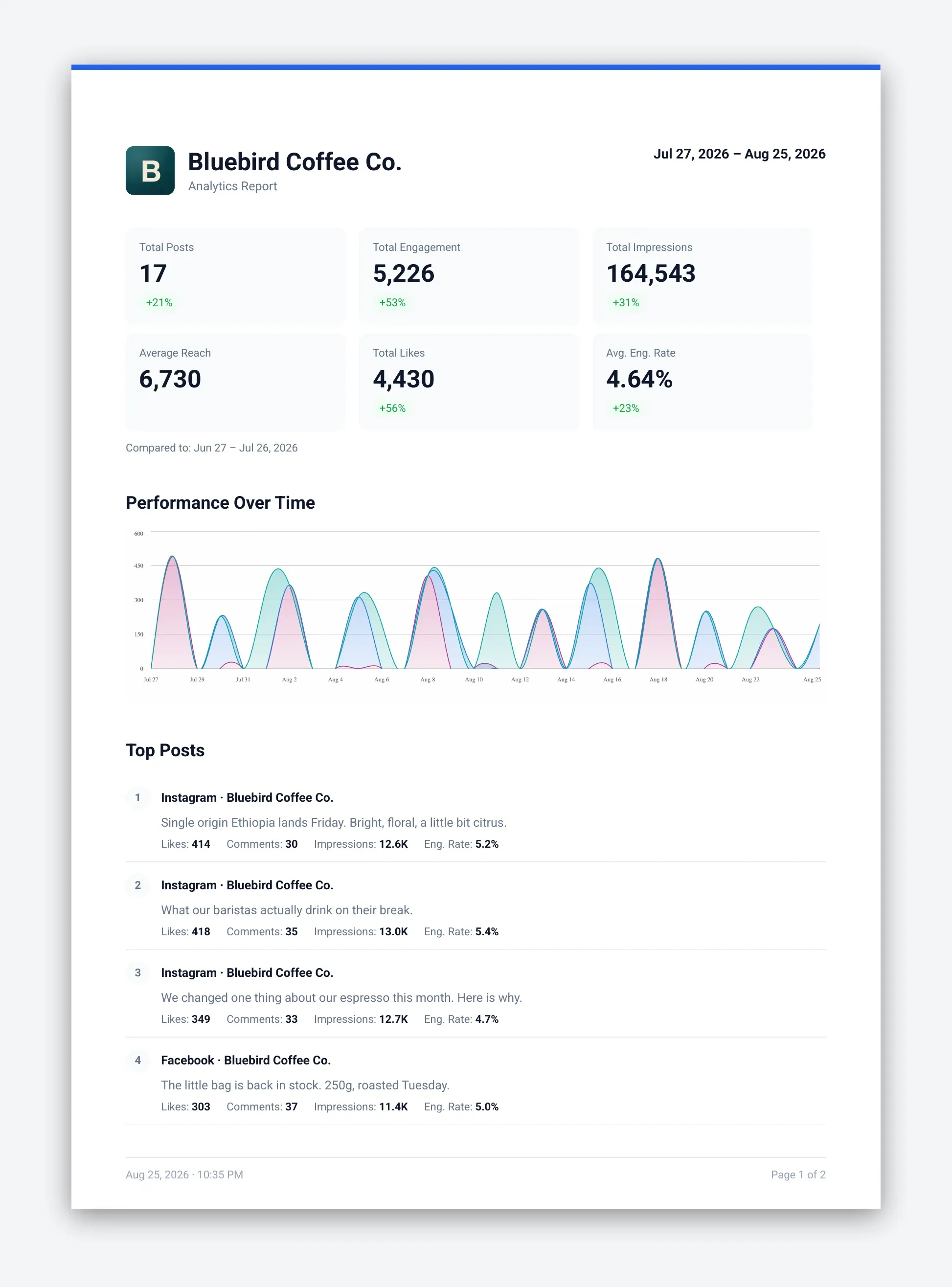
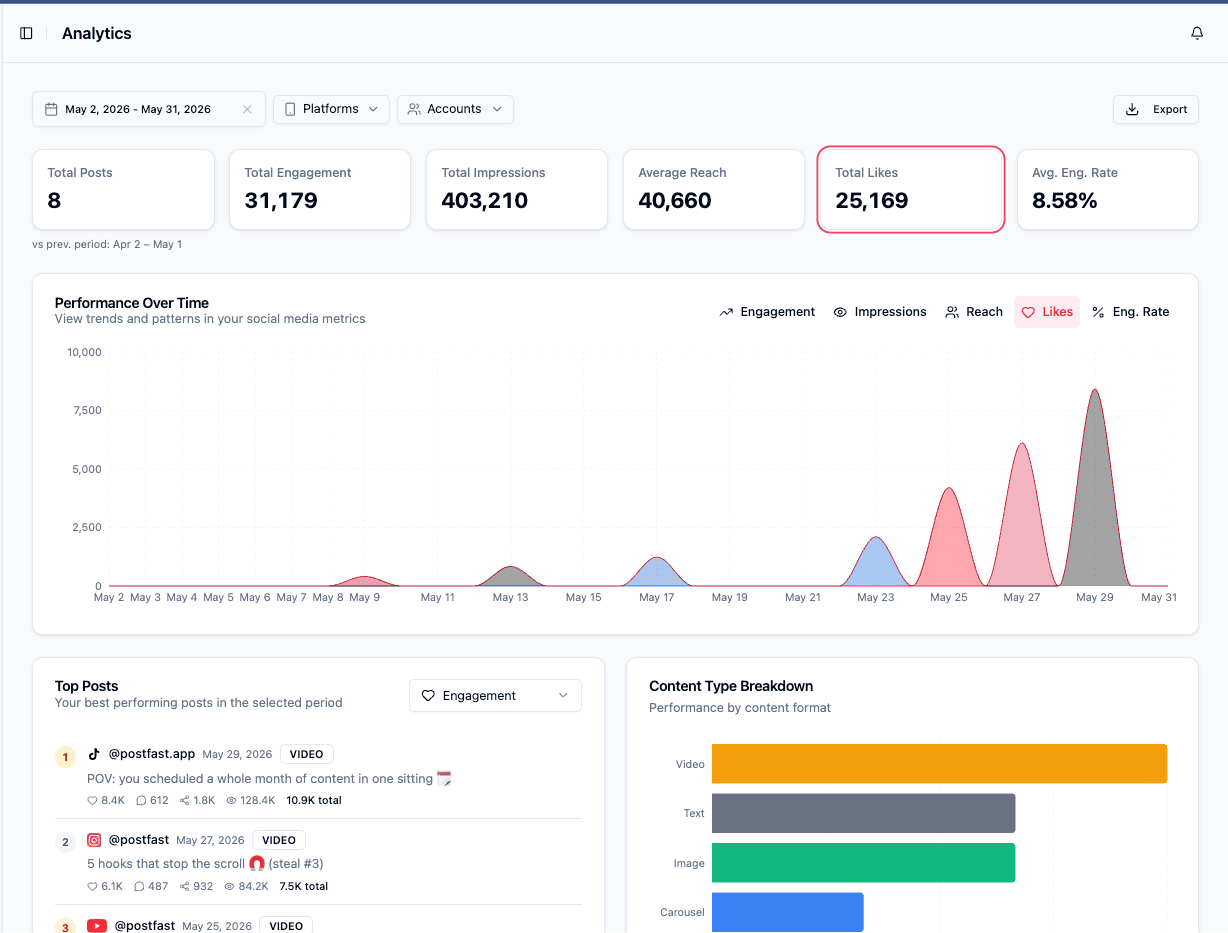
The screenshots on this page are all PostFast, and they are labelled as such. We do not publish competitor screenshots: they require an active account on each product, they go stale the moment a vendor ships a redesign, and a screenshot of someone else's dashboard tells you nothing about whether their pricing model fits you.
How to choose the right alternative
Start with your real constraint. If you are on Buffer free and never plan to go past 3 channels, Buffer free stays fine. If you are on Essentials and scheduling to 5 or more channels, run the monthly math against a flat-pricing tool (PostFast, Publer Business, Postiz cloud) before you renew.
If you need a public API for programmatic publishing, PostFast (every plan, including the trial), Publer Business, Postiz (all cloud plans, with webhooks), FeedHive Brand and up, and Sprout Social Advanced all ship one. Buffer's own API is now generally available on every plan too, so the API alone is a weaker reason to leave than it used to be; the pricing model usually decides it. Later, Loomly and Sendible have no public scheduling API at any tier, so rule them out early if this is your constraint.
If approvals matter, look at Buffer Team, Loomly Starter, SocialPilot Premium, and PostFast Creator. All four handle client or stakeholder review, but only two of them do it without repricing every channel you own.
If you are an Instagram-first creator with a visual calendar, Later is the specialist. Its grid preview is genuinely better than the generic options, and you should expect to pay more than Buffer for it rather than less.
If you want to avoid SaaS pricing entirely, self-host Postiz. It runs under the AGPL-3.0 license with an active community, and of the options here it is the one that removes per-channel, per-seat and per-workspace billing at the same time.
For a deeper head-to-head breakdown of the closest alternative, see our full PostFast vs Buffer comparison. We also ran the pricing math on Buffer vs Loomly vs PostFast if that triangulates to your use case, and the MCP integration page covers the assistant-driven workflow shown in the screenshot above if that is the part that interests you.
Moving over is the easy part
Scheduled content comes across by bulk CSV import, up to 200 posts and 10 MB per upload, with columns for post content, schedule time, target accounts and publicly hosted media URLs. If you would rather script it, the REST API and MCP server are on every plan including the trial, so an assistant can rebuild the queue for you.
Accounts are not transferred between tools by anyone, Buffer included. Each one reconnects through a hosted connect link you send: it stays valid for 1 to 30 days, can be limited to chosen platforms, and the owner authorizes it on the platform's own login screen, so no password changes hands. Connecting also backfills the last 60 days of already-published posts on Facebook Pages, Instagram, Threads and TikTok, so analytics are not empty on day one.
Write to [email protected] before you start and we will help you map it across, free.
Frequently asked questions
Why are people leaving Buffer?
The most common reason is per-channel pricing. Buffer's Essentials plan charges $5 per channel per month for the first 10, so a team scheduling to 10 channels pays $50 on annual billing, and a team on 20 pays $83.33 once the volume bands are applied. Tools like PostFast, Publer, and FeedHive use flat pricing that stays the same whether you connect 5 or 30 channels, which saves real money past the 5-channel mark. The second reason is the way approvals are priced: Buffer's content-approval workflow lives on the Team tier, which re-prices every channel you own whether or not that channel is reviewed, taking that same 20-channel roster to $133.33.
What is the cheapest Buffer alternative?
Publer has the cheapest entry point in this list, at $4/mo for one account on Professional annual billing ($5 monthly). Postiz self-hosted is free if you can run a server yourself. PostFast Starter is €10/mo on annual flat for 4 social accounts. For solo operators on 1-3 channels, Publer Professional is cheaper; at 4 channels PostFast Starter is (Publer is $12.80/mo on annual billing), and past 4 a flat plan is usually the cleaner pick.
Which Buffer alternative has a free plan?
Buffer itself has a free plan (3 channels, 10 queued posts per channel, 1 user, API access with one key). Among alternatives, Publer has a real free plan (3 accounts, 10 posts, no X), and Postiz is free if you self-host. Most premium tools (PostFast, Loomly, Sprout Social, Hootsuite, Later, FeedHive, SocialPilot, Sendible) no longer offer a free plan, only trials. If a permanent free tier is a hard requirement, the shortlist is Buffer, Publer and self-hosted Postiz.
Can I use AI caption generation without Buffer?
Yes. Buffer's AI Assistant is a small differentiator. FeedHive bundles 2,500 to 100,000 AI credits per plan and is the most AI-heavy in this list. SocialPilot bundles 500 to 5,000 credits and makes them unlimited on Ultimate. PostFast, Publer, and Loomly all ship AI caption and image generation. For workflows where AI drafting is central, FeedHive or PostFast Creator are the strongest options.
Which Buffer alternative has the best API?
PostFast ships a public REST API and an MCP Server on every plan, including Starter at €10/mo on annual and the 7-day trial, with no tier gating. Postiz includes an API and webhooks on every cloud tier from $23/mo. FeedHive ships an API from Brand (€22/mo) and publishes webhooks on every tier. Postiz and FeedHive are the two tools on this page we could confirm publish webhooks; Buffer explicitly does not, and neither does PostFast. Publer Business and Sprout Social Advanced offer APIs but either cost more or require a higher tier. Buffer's API is now generally available on every plan, including Free (1 key, 3,000 requests a month, 250 a day, 100 per 15 minutes), and it is GraphQL rather than REST. Later, Loomly and Sendible publish no scheduling API at any tier (Later's only documented API is the read-only Later Influence Reporting API, which belongs to its influencer product). Worth separating from the API question: as of August 2026 an MCP server is close to table stakes rather than a differentiator, and most of the tools on this list now run one, so choose on what the server can actually reach and which plan it needs rather than on whether MCP exists.
Can I migrate posts from Buffer to another tool?
Scheduled posts cannot be bulk-exported from Buffer, so no tool on this list can import your queue directly. The pragmatic migration path is: export your content library (CSV) from Buffer where available, then recreate scheduled posts in the new tool either via its API or by manual re-entry for small volumes. Publer, Loomly, and SocialPilot offer bulk-upload flows for new content. PostFast supports bulk CSV import for scheduled posts (up to 200 rows and 10 MB per upload, with columns for content, schedule time, target accounts, and media URLs), plus a public REST API on every plan for programmatic migration, and it backfills the last 60 days of already-published posts on Facebook Pages, Instagram, Threads and TikTok when you connect an account, so your analytics are not empty on day one. For an in-depth walkthrough, see our PostFast vs Buffer head-to-head comparison.
Is Buffer free forever?
Yes, Buffer's free plan is free forever. It caps you at 3 connected channels and 10 queued posts per channel, with 1 user, 100 ideas, the AI Assistant, Insights, and API access limited to one key and 3,000 requests a month. You refill the queue as posts publish. You can use the free plan indefinitely, but you cannot add a 4th channel or get advanced analytics without upgrading to Essentials at $5 per channel per month.
How much does Buffer cost for 10 channels?
On Buffer Essentials, 10 channels is $50/mo on annual billing ($60 monthly), because the $5 per channel per month rate applies to each of the first 10 connected channels. On Buffer Team, which is the tier that adds content approvals and unlimited users, the same 10 channels is $100/mo on annual billing ($120 monthly). Past 10 channels Buffer's rate steps down in bands, so a bigger roster is less than the entry rate times the channel count: 20 channels on Essentials is $83.33/mo, not $100/mo. For comparison at that channel count: PostFast Creator is €24/mo on annual for 12 accounts, Publer Professional is $28.80/mo on annual billing for 10 accounts once the tenth comes free, SocialPilot Standard is $34/mo for 10 accounts and 3 users, and Postiz Team is $31/mo on annual for 10 channels.
What is the single best alternative to Buffer?
The single-tool recommendation depends on what you were paying Buffer for. If the answer is flat pricing plus a public API, PostFast Growth (€40/mo on annual, 30 accounts, 8 users per workspace) is the cleanest one-tool replacement. If the answer is a free plan you can grow into, Publer Free (3 accounts, permanent) is the closest drop-in. If the answer is Instagram-led visual planning, Later Starter ($18.75/mo annual) is the specialist. If the answer is open-source self-hosting, Postiz self-hosted (AGPL-3.0) is the only viable choice. Most teams leaving Buffer land on PostFast or Publer; creators with a visual-first Instagram workflow usually land on Later instead.
Further reading
Compare other schedulers
Researching another tool? These guides cover the same ground from a different angle.
Hootsuite alternatives
12 tools that skip the seat tax
Sprout Social alternatives
11 tools with agency features at less cost
Loomly pricing + alternatives
Full tier breakdown plus 6 cheaper options
PostFast alternatives
When a different tool actually fits better
Metricool alternatives
12 tools with flat pricing and a real REST API
Later alternatives
7 cheaper tools with more platforms and a real API
SocialPilot alternatives
7 tools with an API on every plan, no seat tax
Sendible alternatives
7 tools with flat pricing and an API on every plan
Publer alternatives
7 tools with flat pricing and AI-agent connectors
Postiz alternatives
7 fully managed tools, no self-hosting needed
Agorapulse alternatives
9 tools without the per-seat inbox pricing
Cloud Campaign alternatives
8 agency tools compared on white label and client seats
Try PostFast free for 7 days
Flat pricing, a real REST API on every plan, and 11 platforms. No credit card required to start.
Start your free trial