White Label Social Media Reports
Clients do not pay for scheduling. They pay for results, and once a month somebody has to show them. Export a client’s analytics as a PDF that carries their logo and their name in the header, with the “Generated by PostFast” footer switched off.
It is part of the Pro plan rather than a reporting add-on, and it takes a date range and a download rather than an afternoon.
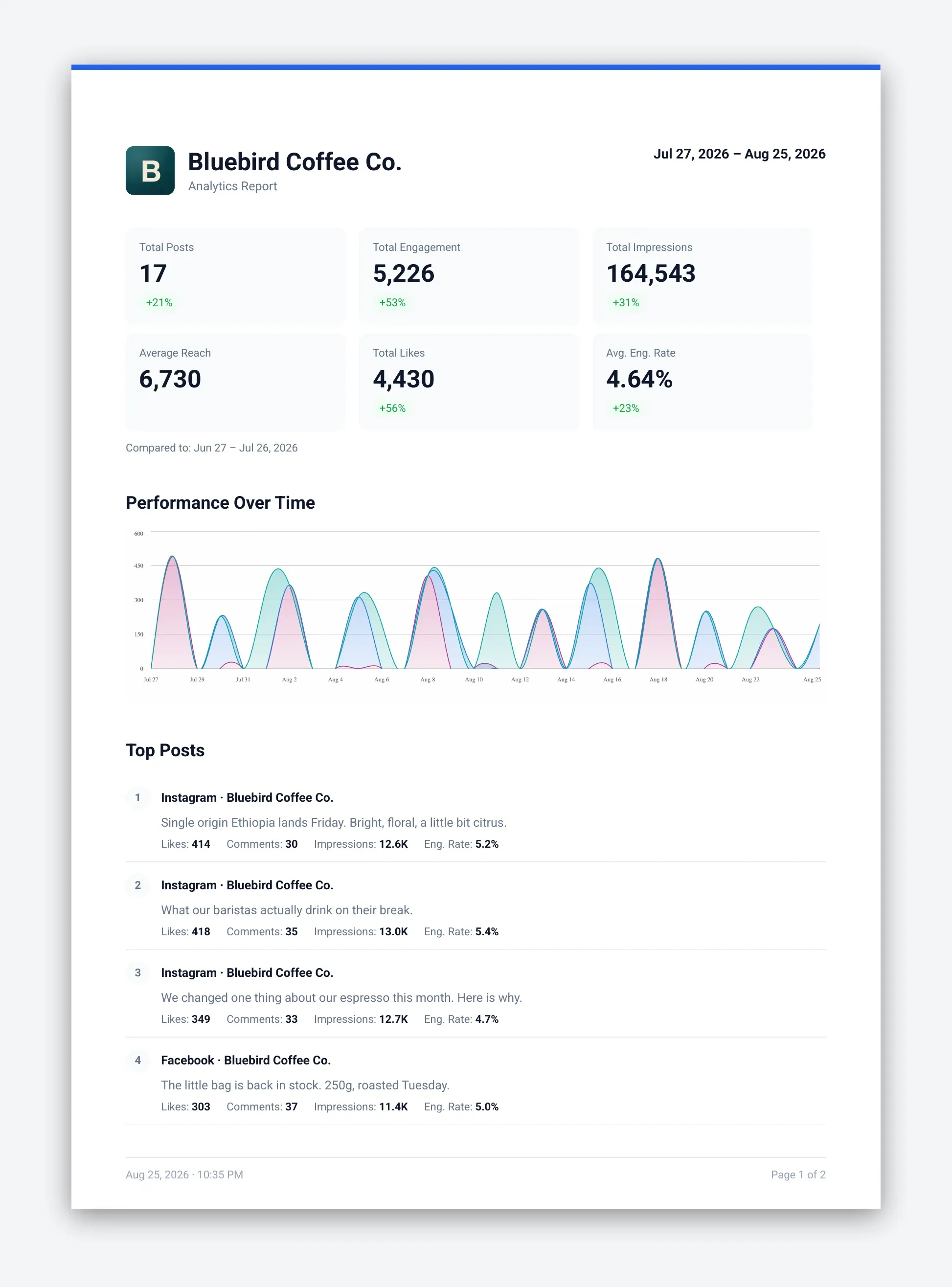
The workspace’s own logo and name in the report header, each toggled separately at export time.
The Generated by PostFast line switches off on Pro and Enterprise.
Included in the Pro plan price. There is no separate reporting product to buy.
How It Works
Set the workspace logo
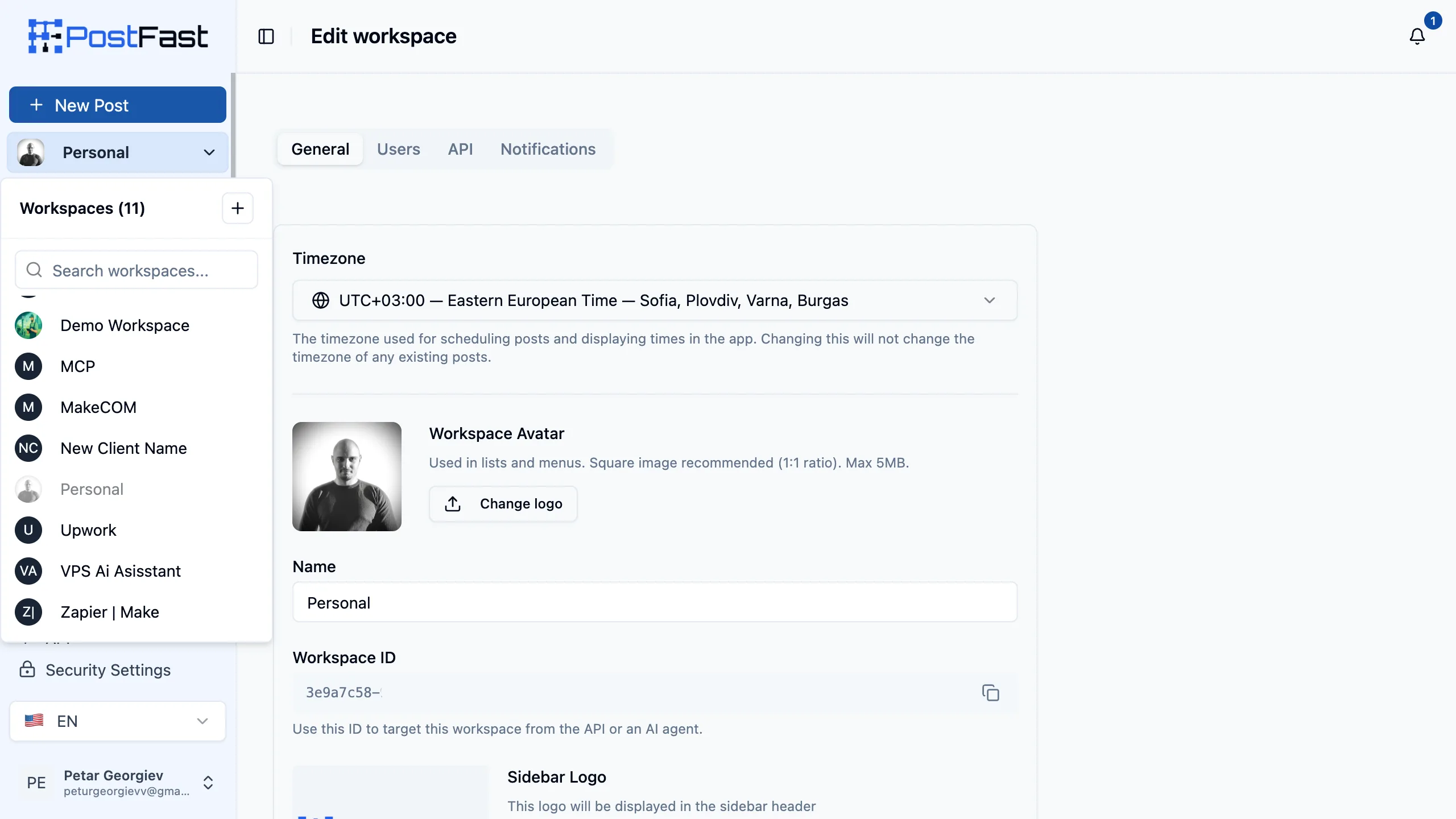
One workspace per client, each with that client’s logo and name in its settings. Upload your agency’s logo instead if the reports should go out in your branding.
Export from Analytics
Pick the date range and export to PDF. Totals, the performance chart and the top-post list come from the accounts connected to that workspace. CSV is there for clients who want raw numbers.
Switch our footer off
On Pro and Enterprise the Generated by PostFast footer is a toggle. Turn it off and the file carries no trace of the tool that produced it.
What is white labelled, and what is not
“White label” means different things to different vendors, so here is exactly where the line sits.
| Capability | PostFast |
|---|---|
| Client logo and name in the report header | Yes, on Pro and Enterprise |
| Generated by PostFast footer removed | Yes, on Pro and Enterprise |
| PDF and CSV export of the same data | Yes, on every plan |
| A separate workspace per client, with its own accounts and analytics | Yes, 30 workspaces on Pro and 110 on Enterprise |
| The app served from your own domain | No. There is no custom domain. |
| A rebranded login screen for clients | No. Clients sign in to PostFast. |
One workspace per client is the setup
The report header follows the workspace, so client-branded reporting and client separation are the same piece of setup. Each workspace holds its own connected accounts, calendar, drafts, analytics and members, and nothing crosses between them.
Who it is for
Agencies
A monthly deliverable per client that carries their name rather than your vendor’s. See how agencies run PostFast.
Freelancers
Reporting that looks like your studio rather than a tool you’re reselling, without a second subscription for a reporting product.
Multi-brand teams
One workspace per brand, each reporting under its own name, on a single subscription rather than one per brand.
Platforms in the report
Analytics cover the accounts connected to that workspace on these platforms. Full detail on the analytics page.
Key Benefits
- The client's own logo and name in the report header, not ours
- The Generated by PostFast footer switches off on Pro and Enterprise
- Included in the plan price - no reporting add-on and no per-report charge
- One workspace per client, so branding and client separation are the same setup
- A date range and a download, rather than an afternoon of rebuilding numbers
Send the next client report in your branding
White label social media reports start on Pro at EUR 82.50/mo on annual billing (EUR 99/mo monthly), which also covers 30 client workspaces and 120 social accounts. Start the 7-day free trial and export a real report before you decide. No credit card, no demo call.
See the full pricing for what each tier includes.
White Label Reporting FAQs
What does white label mean on PostFast?
It means the report, not the product. Analytics export to PDF and the report header carries that workspace's own logo and name instead of ours, and the Generated by PostFast footer can be switched off. To be precise about the limits: there is no custom domain and no rebranded login screen, so PostFast is not a white-labelled platform. If a client logs in, they log in to PostFast. What they receive each month is branded as yours or as theirs.
Which plans include white label social media reports?
Pro and Enterprise. Pro is EUR 82.50/mo on annual billing (EUR 99/mo monthly) and Enterprise is EUR 199/mo annual (EUR 239/mo monthly). Both carry the workspace logo in the report header and the removable footer. Starter, Creator and Growth export the same report with the workspace name and the PostFast footer in place. There is no separate reporting add-on to buy on any tier.
Whose logo ends up on the report?
Whichever logo that workspace uses. The header pulls from the workspace the report is exported from, so the usual agency setup is one workspace per client with that client's logo and name on it. Upload your own logo instead and every report goes out in your agency's branding. The logo and the workspace name are toggled separately at export time, so you can show one, both or neither.
What is actually in the report?
Totals for posts, engagement, impressions, average reach, likes and average engagement rate, each compared against the previous period, then a performance over time chart and a ranked list of top posts with their individual metrics. It covers the accounts connected to that workspace, over the date range you pick. The same data exports to CSV if a client would rather have the raw numbers.
How long does exporting a client report take?
It is a date range and a download. Open Analytics in the client's workspace, set the period, and export to PDF. There is no template to build first and no separate report builder to learn, which is the point: monthly reporting is unbillable work, so it should not take an afternoon.
Can I automate client reporting?
You can pull the underlying analytics programmatically. The REST API and the MCP server are on every plan including the trial, so an assistant or a scheduled job can fetch a workspace's metrics and assemble whatever your clients expect. The branded PDF itself is exported from the app.
Is this white label social media management software?
Not in the full sense that phrase is often used for, and we would rather say so than sell you a surprise. Agencies searching that term usually want two things: client-branded reporting and client separation. PostFast does both, with one workspace per client and the client's branding on the PDF. What it does not do is serve the app itself from your domain under your name. If a rebranded login is a hard requirement, this is not the tool for it.