Social media management tools for agencies, without the per-seat bill
Give every client its own workspace, with approvals, a comments inbox and API access on every plan. One flat price per plan, so winning a client costs you a workspace and not another seat. Creator includes 4 workspaces and 5 users per workspace, Growth 10 workspaces and 8 users, Pro 30 workspaces and 15 users. Post approvals are on every plan; workspace branding is on Pro and Enterprise.
Works with Facebook, Instagram, TikTok, X, LinkedIn, YouTube, Threads, Pinterest, Bluesky, Telegram and Google Business Profile.

Teams in agencies that run on PostFast




“It's been great to be on the PostFast journey, seeing the product develop and importantly improve our output as a business”
“PostFast has become an important part of the infrastructure behind Larsen Automations. It gives us a reliable and efficient way to manage social media publishing at scale, while allowing us to focus on building great automation workflows for our clients.”
What five people and ten clients actually cost
Most agency tools bill by the seat or by the social profile, so the invoice moves every time you win work. Here is the same agency on four tools: five people, ten client brands, roughly thirty social accounts, priced from each vendor's own published rates on annual billing.
| Tool | Cost per month | What that covers |
|---|---|---|
| Sprout Social Professional | $299 per seat, so $1,495 for five | Unlimited social profiles. The cheaper Standard seat is $199 but caps the whole account at 5 profiles, which will not hold ten clients. |
| Sendible Elite | $254 | 15 workspaces, 90 profiles, no per-seat charge. White labelling is a paid add-on on this tier rather than something the price includes. |
| SocialPilot Ultimate | $170 | 40 social accounts, no per-seat charge, client seats included. API access starts at the Enterprise tier. |
| PostFast Pro | EUR 82.50 annual (EUR 99 monthly) | 30 workspaces, 120 social accounts, unlimited scheduled posts. No per-seat fees: seats come with the plan, up to 15 people per workspace on Pro and 30 on Enterprise. Social Inbox, REST API and MCP on every plan, no add-ons. |
Competitor figures read from the Sprout Social, Sendible and SocialPilot pricing pages on 24 August 2026, annual billing on every row. PostFast bills in euro and the other three publish in US dollars, so read the gap as an order of magnitude rather than an exchange rate. We do not link out to competitor sites, but every number above is on their public pricing page. Longer write-ups of each: Sprout Social alternatives, Sendible alternatives and SocialPilot alternatives.
Why social media is hard for agencies
Every new client is a pricing conversation.
Per-seat and per-profile plans mean the tool bill moves the moment you win work, and again when you hire. You end up rationing logins, sharing one account across a team, or explaining a software line item to a client who only wanted their Reels posted on time.
Approvals happen in email, not in the tool.
Screenshots in a thread, a "looks good" three days later, and no record of who signed off on what. One missed approval is a published mistake on a client's brand account, and that is the kind of thing that ends retainers.
Reporting is unbillable work.
Clients do not pay for scheduling, they pay for results. Pulling numbers platform by platform once a month, then rebuilding them into something that carries the client's name, is hours nobody invoices for.
Shared logins are a liability you carry.
Passwords in a shared vault, a former contractor still in the list, and one wrong-account post away from an awkward call. Clients increasingly will not hand over credentials at all, and they are right not to.
How agencies run PostFast
- 1
Open a workspace per client. Accounts, calendar, drafts, analytics and members stay separated. Pro covers 30 workspaces and 120 social accounts, Growth covers 10 and 30 if you are earlier than that.
- 2
Send a connect link instead of asking for passwords. Generate a link that expires in 1 to 30 days, optionally scoped to specific platforms, and the client authorizes their own accounts. Nothing is shared, and you can email the link straight from the dialog.
- 3
Move their scheduled content over with bulk import. Up to 200 posts per CSV upload, 10 MB max, with columns for content, schedule time, target accounts and publicly hosted media URLs. Import moves the content; the accounts themselves are connected by the client through the link in step two. See the bulk import guide.
- 4
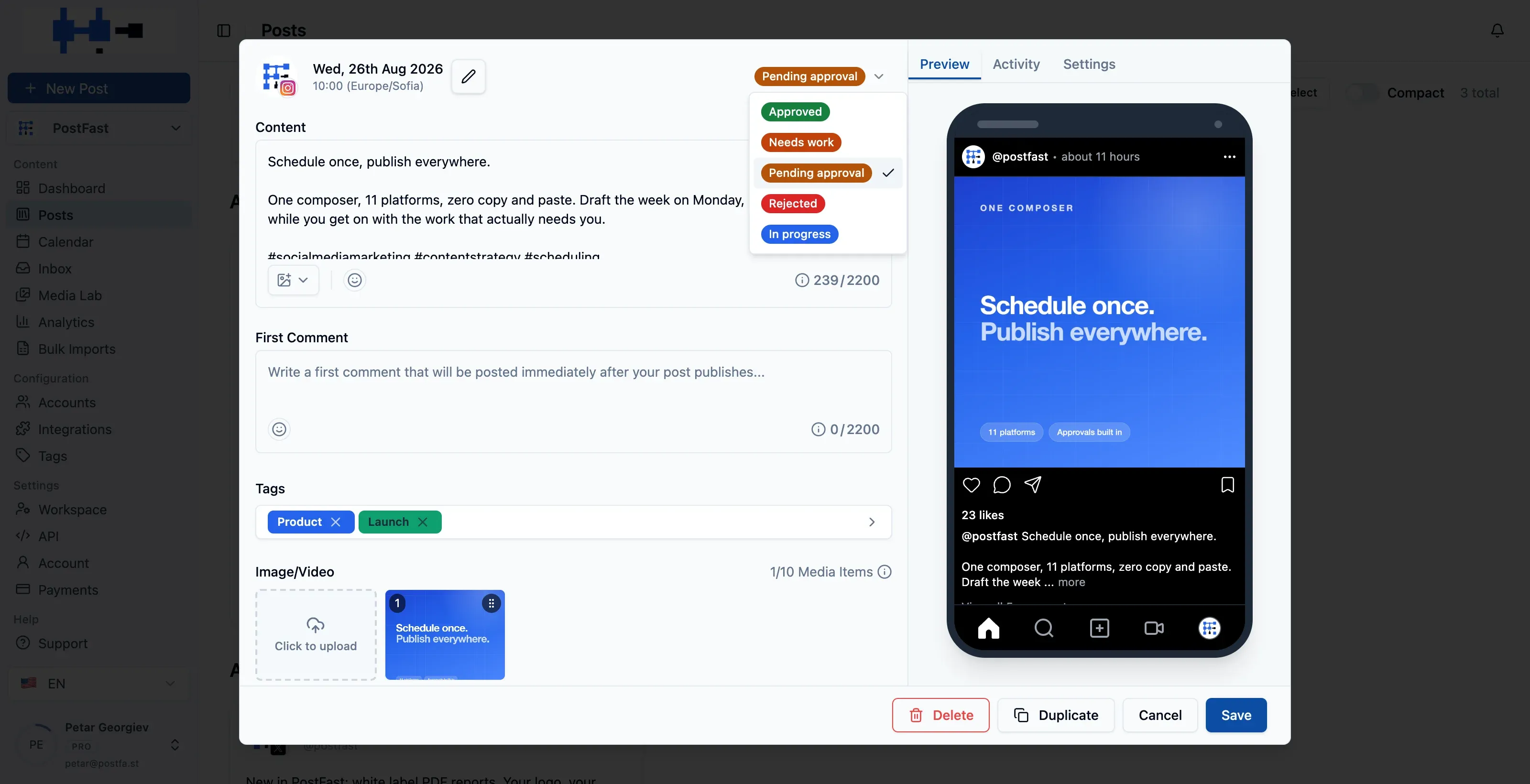
Batch the month, then hold it for sign-off. Posts sit at Pending approval until someone with the Approve permission releases them. Only Approved posts publish at their scheduled time, so nothing goes out unreviewed.
- 5
Let the client approve from their own seat. Invite them with the Client role and they see one workspace, review what is scheduled and approve it. They cannot touch workspace settings or your internal team comments. Details in roles and permissions.
- 6
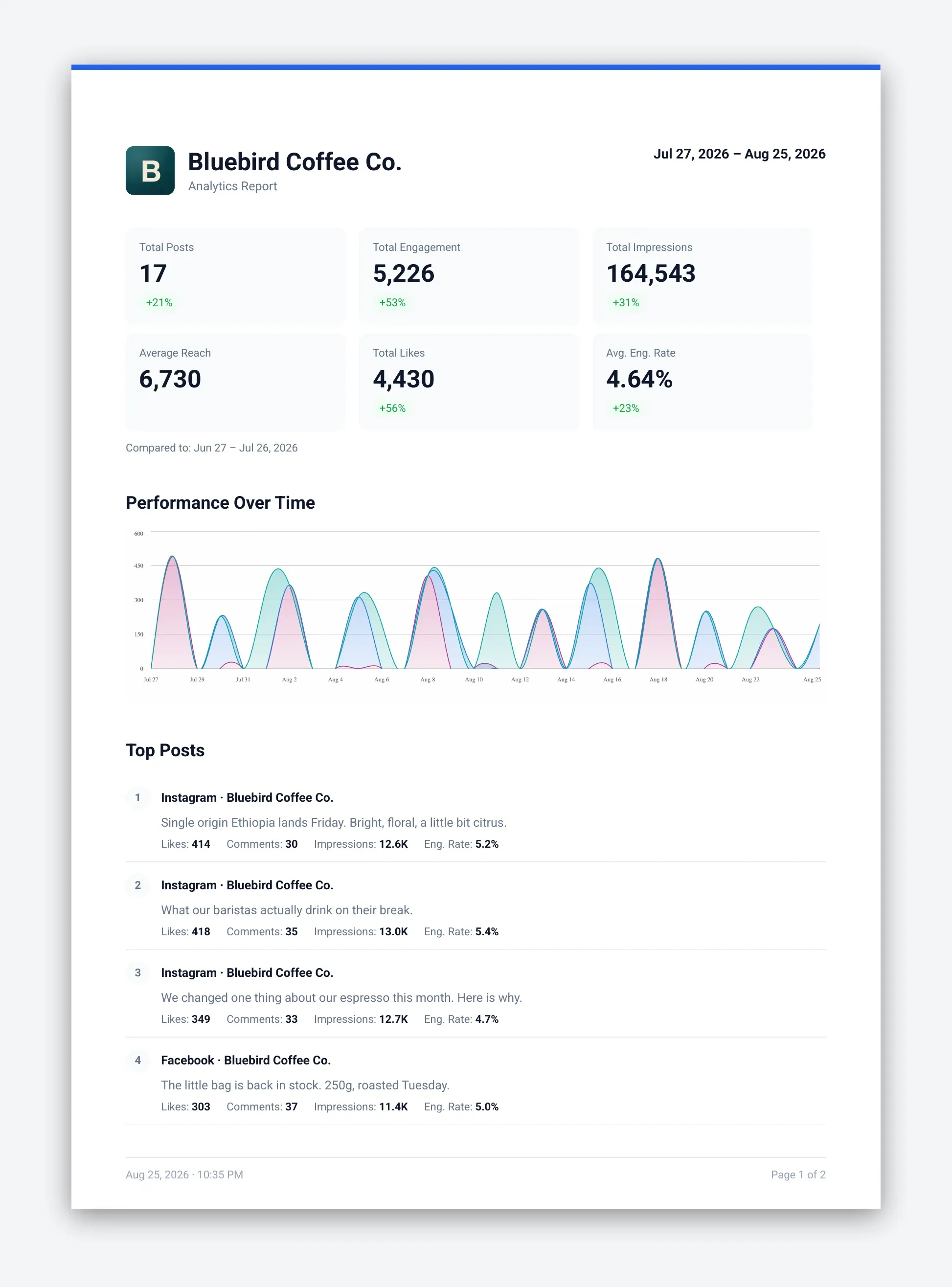
Export the monthly report as a PDF. Charts, top posts and content breakdown in one file, with the workspace's own name and logo in the header on Pro and Enterprise.
Approvals before anything publishes
Run client work through ChatGPT, Claude or your automation stack
Connect ChatGPT or Claude and client content stops starting from a blank page. Keep a short voice-and-topics prompt per client, ask for that client's week, review the drafts in the same conversation and schedule them into the client's workspace through the connector. The assistant can also generate a connect link for a new client and read the Social Inbox. Posts can land as Pending approval, so the sign-off step stays exactly where it was. For heavier pipelines the n8n, Make and Zapier integrations turn a brief in a spreadsheet into drafted, scheduled posts, and the REST API and MCP server are on every plan including the trial.
What agencies get today
| What you need | How PostFast covers it |
|---|---|
| A separate space per client | One workspace per client with its own accounts, calendar, drafts, analytics and members. 10 on Growth, 30 on Pro, 110 on Enterprise. |
| Sign-off before anything publishes | Approval workflow: only Approved posts publish. Turn Approve off for a junior and everything they schedule is held for review. |
| A client seat that shows one workspace | The Client role: view posts, comment, approve. No workspace settings, no internal team comments, no other client's calendar. |
| Client accounts without shared logins | Connect links, 1 to 30 day expiry, optionally scoped to chosen platforms, emailed from the app or generated through the API. |
| Reports that carry the client's brand | PDF analytics export. On Pro and Enterprise the header carries the workspace's own logo and name, and the Generated by PostFast footer can be switched off. |
| Moving a client in | Bulk import: 200 posts per CSV upload, 10 MB max, so a client's scheduled content moves in minutes. Their accounts reconnect through a connect link, and the last 60 days of published posts backfill automatically on Facebook Pages, Instagram, Threads and TikTok. |
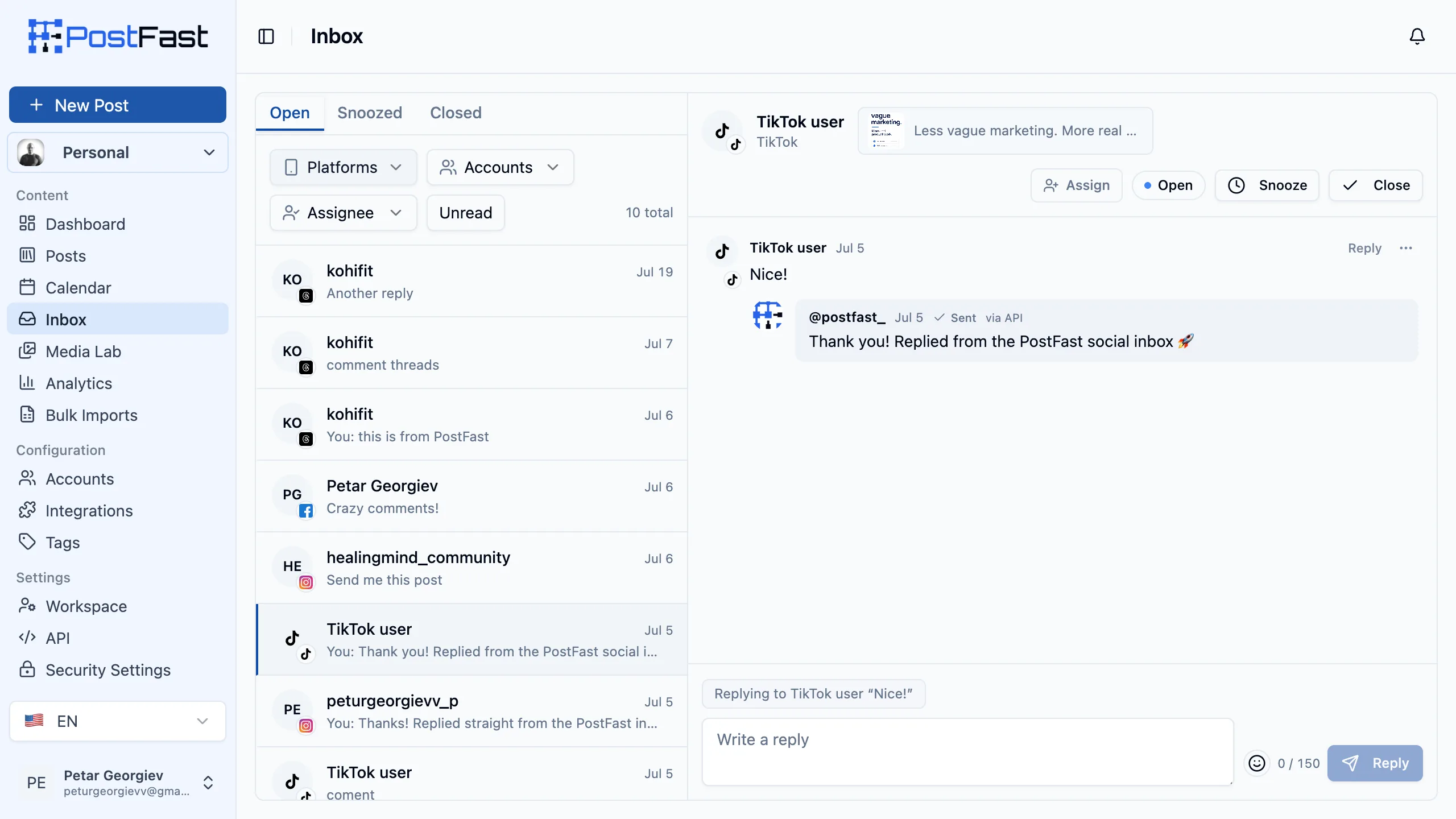
| Replying to client comments | Social Inbox on every plan, including the trial: TikTok, Instagram, Facebook Pages and Threads comments, with assignment and Open, Snoozed and Closed states. |
| Reach across a mixed client roster | All 11 platforms on every plan, including Google Business Profile, Bluesky and Telegram. |
| Automation and reporting pipelines | REST API and MCP server on every plan, plus n8n, Make and Zapier. No tier gate. |
White label social media reports
Client comments in one inbox
Moving clients from another tool?
Sign up, then reply to us and we will extend your trial to 30 days and help you move your clients over, free. Seven days is enough to test a scheduler, not enough to move a client roster. The move itself stays in your hands: generate a connect link per client from the app so nobody shares a password, bring the scheduled content in by CSV bulk import, or run the whole thing through the MCP server if an AI assistant handles your workflow. Write to [email protected] and we will map it out with you.
Lock your price for 12 months
Agencies that start now keep their plan price for 12 months, whatever happens to list pricing. No discount code, no lifetime deal, just the price you signed up at.
Pricing
Pricing is per plan, not per seat and not per social profile, so the invoice does not move when you win a client or hire. Pro is the agency plan at EUR 82.50/mo annual (EUR 99/mo monthly): 30 workspaces, 120 social accounts, 15 users per workspace and unlimited scheduled posts, plus the removable report branding. Growth at EUR 40/mo annual (EUR 49/mo monthly) covers 10 workspaces and 30 accounts while you are still building the roster, and Enterprise at EUR 199/mo annual (EUR 239/mo monthly) goes to 110 workspaces and 500 accounts. Every tier includes the Social Inbox, the REST API and the MCP server, and one subscription covers every workspace in your organization rather than billing each one separately. One agency on PostFast runs 37 client workspaces on a single subscription. See full pricing.
PostFast starts at EUR 12/mo flat. No per-user seats, no per-channel fees. All 11 platforms on every plan, and yearly billing saves 2 months.
See full pricingFrequently asked questions
What is the best social media management tool for agencies?
The one that keeps each client separated, gates publishing behind an approval, reports in the client's branding, and does not re-price itself every time you win work. PostFast covers all four from EUR 82.50/mo annual on Pro, where the per-seat suites reach four figures a month for a team of five. Start the 7-day trial and onboard one real client to compare, no card and no demo call required.
Do I need a demo call to get started?
No. Everything is self-serve. The 7-day trial has full features, including the Social Inbox, the REST API and the MCP server, and it does not ask for a credit card. If you get stuck, email support and a person answers.
How do client approvals work?
Posts carry an approval status, and only posts in the Approved state publish when their scheduled time arrives. Anyone with the Approve posts permission can release one, and you can turn that permission off for a specific user so everything they schedule waits for review. The usual agency setup is the reverse: you draft and schedule, the client approves. Full detail in roles and permissions.
Can clients connect their own accounts without sharing logins?
Yes. Generate a connect link, set how long it stays valid (1 to 30 days), optionally restrict it to specific platforms, and send it to the client. They authorize their own accounts on the platform's own login screen and nothing lands in your password manager. You can email the link from the app or generate it through the API.
Can I send white label social media reports with the client's own logo?
Yes, on Pro and Enterprise. [White label social media reports](/features/white-label-reports) are part of the plan price rather than a paid add-on: analytics export to PDF, and the report header carries that workspace's logo and name, so a workspace set up for a client reports in the client's branding. On those two plans you can also switch the Generated by PostFast footer off. Lower tiers export the same report with the workspace name and our footer. To be precise about scope: this is workspace and report branding, not a custom domain or a white-labelled login.
Do client seats cost extra?
There is no per-seat charge, but a client does take one of the workspace's user slots. Each plan sets a maximum per workspace: 5 on Creator, 8 on Growth, 15 on Pro, 30 on Enterprise. In practice one or two client reviewers per workspace leaves plenty of room for your team.
What counts as a workspace, and how many do I need?
One per client is the pattern. A workspace holds its own connected accounts, calendar, drafts, analytics and members, and nothing crosses between them. Growth includes 10, Pro 30 and Enterprise 110. Each workspace carries its own seats, up to 15 people on Pro and 30 on Enterprise, and there is no charge per person.
Can I move existing clients over from another tool?
Yes, in two parts. Scheduled content moves by bulk CSV import, up to 200 posts and 10 MB per upload, covering content, schedule time, target accounts and publicly hosted media URLs, so a client's queue is usually an afternoon of work. Accounts are not transferred between tools by anyone: each client reconnects their own accounts through a connect link you send them, which takes them a couple of minutes and means no password ever changes hands. Connecting also backfills the last 60 days of already-published posts on Facebook Pages, Instagram, Threads and TikTok, so analytics are not empty on day one. Email support before you start and we will extend your trial to 30 days and help with the mapping.
Can AI write and schedule our clients' posts?
It can draft them well if you keep a short voice prompt per client. Connect ChatGPT or Claude to PostFast, ask for that client's week in their defined voice and topics, edit what needs editing, and schedule through the connector with approval still required before anything publishes. The same connector reads the Social Inbox and generates client connect links, and it is on every plan.
Related guides
Small Businesses
Stay visible on every platform in about an hour a week: batch, schedule, and let PostFast publish.
Franchises & Multi-Location
Keep every location on-brand and locally relevant: separate workspaces, approvals and central campaign rollout.
Startups
Batch founder-led content, launch arcs and product updates across X, LinkedIn and beyond, with an API to automate it.
Start your free 7-day trial
No credit card required.
Start Your Free Trial