 Claude Code CLI
Schedule Social Posts from Claude Code
Developers live in Claude Code. Context switching to schedule a post breaks flow. Connect PostFast to Claude Code with your PostFast login, or run the open-source MCP server with an API key, and schedule Instagram, LinkedIn, and TikTok posts from the terminal while still writing code. No dashboard, no tab switching.
Last updated

What You Can Do
Connect with your PostFast login
The quickest route needs no API key. Claude Code connects to PostFast's hosted MCP server, and you sign in with your PostFast account.
Already added PostFast in Claude?
If PostFast is added to your claude.ai account (from Claude’s connector directory) and Claude Code is signed in with the same Claude account, it is already in Claude Code. Nothing to install: run /mcp and PostFast is listed with your claude.ai connectors. If it shows as needing authentication, select it and sign in.
Don't add it by hand as well. Claude Code would then hide the claude.ai copy as a duplicate (“same URL as your server”) until you remove the one you added.
Otherwise, add it by hand
Run this once. It adds the server for every project:
claude mcp add --scope user --transport http postfast https://mcp.postfa.st/mcp
Then sign in:
- In Claude Code, run
/mcp, choosepostfast, then Authenticate. - Log in to PostFast in the browser that opens, and approve the connection.
/mcpnow shows postfast connected. First thing to try: “list my PostFast accounts”.
Nothing goes out without your yes
This route gives Claude Code 27 tools, the same set as the Claude connector. New posts are created on hold: Claude shows you what will be posted, where and when, and publishes only after you say yes. Replies, Instagram private replies and comment deletions are previewed first too.
Or run the npm package with an API key
Use the open-source postfast-mcp package when you want a fixed workspace key, scripts or CI, a machine without a browser, or to upload local files by path. It runs locally, gives Claude Code 25 tools, and publishes posts as you ask, with no approval hold.
Ask Claude Code to do it for you
Already have Claude Code open? Paste this prompt. It will add the server with claude mcp add and remind you to set POSTFAST_API_KEY.
Prefer to do it by hand? Two paths. For every project, run:
claude mcp add --scope user postfast --env POSTFAST_API_KEY=your-api-key-here -- npx -y postfast-mcp
For one project, add this to .mcp.json in the project root:
{
  "mcpServers": {
    "postfast": {
      "type": "stdio",
      "command": "npx",
      "args": ["-y", "postfast-mcp"],
      "env": {
        "POSTFAST_API_KEY": "your-api-key-here"
      }
    }
  }
}
API key: Log in to your PostFast dashboard, open the API section in the sidebar, and generate a key.
To keep the key out of committed dotfiles, export it in your shell profile instead and drop the env block from the JSON:
export POSTFAST_API_KEY="your-api-key-here"
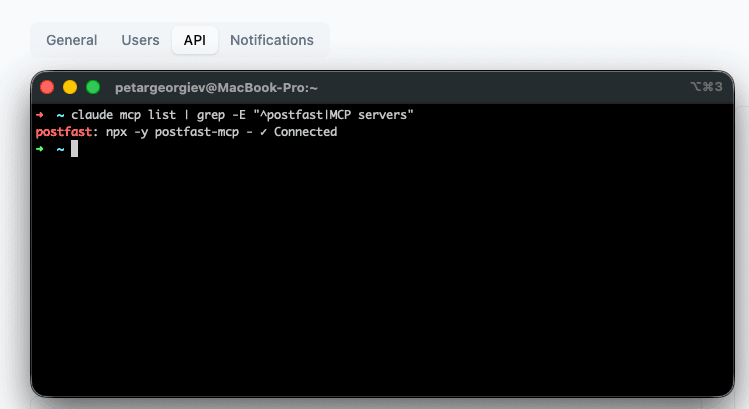
Restart Claude Code, then run claude mcp list to confirm. 25 tools become available.
Or install it as a Claude Code plugin
The postfast-mcp repository is also a plugin marketplace. Inside Claude Code, run:
/plugin marketplace add peturgeorgievv-factory/postfast-mcp
/plugin install postfast@postfast-mcp
It installs this same npm server, so it reads POSTFAST_API_KEY: export it in your shell profile or set it under env in ~/.claude/settings.json, then restart Claude Code. If you already added PostFast by hand, remove that entry first, or Claude Code shows two sets of PostFast tools. Details in the postfast-mcp README.
Available Tools
The hosted route gives Claude Code 27 tools and the npm package 25. Of those, 22 are on both routes; the rest depend on the route.
| Tool | Description | Hosted (27) | npm (25) |
|---|---|---|---|
create_posts | Create and schedule posts, batching up to 15 at a time | ||
list_posts | List posts with filters (IDs, accounts, platform, status, date range) | ||
delete_post | Delete a post by ID | ||
delete_posts | Delete up to 100 posts by ID in one call | ||
approve_posts | Move posts from pending approval to approved so they publish | ||
list_tiktok_sounds | Browse TikTok's trending, pre-cleared Commercial Music Library tracks to attach to a photo carousel or video | ||
list_accounts | List connected social media accounts, including connection status (CONNECTED / DISABLED) | ||
list_workspaces | List the workspaces the key can act in, so an assistant can target the right client | ||
generate_connect_link | Generate a shareable link for external clients to connect their own accounts | ||
list_pinterest_boards | List Pinterest boards for a connected account | ||
list_youtube_playlists | List YouTube playlists for a connected account | ||
list_gbp_locations | List Google Business Profile locations | ||
search_places | Search real-world places to geotag Facebook & Instagram posts | ||
upload_media | Upload an image, video, caption file (.srt, .vtt) or LinkedIn document (PDF, Word, PowerPoint) and get back a key ready to attach to a post | ||
get_upload_urls | Get signed URLs for a manual upload flow | ||
upload_from_url | Pull media, a caption file or a document straight from a public URL, no local file needed | ||
get_post_analytics | Impressions, reach, likes, comments, shares, and video watch-time for published posts | ||
get_follower_history | Daily follower/subscriber snapshots for an account, with current count and net change over a range | ||
list_inbox_conversations | List comment conversations, filtered by platform, account, status, assignee or unread only | ||
get_inbox_conversation | Read one conversation, including whether a reply is allowed and how long it can be | ||
list_inbox_items | List the comments in a thread, plus the replies you sent | ||
get_inbox_unread_count | Total unread comments across the whole workspace | ||
reply_to_inbox_item | Reply publicly under a comment | ||
send_inbox_private_reply | Instagram only: answer a comment privately, once per comment and within 7 days | ||
set_inbox_item_state | Hide, unhide or delete a comment on the platform (on the hosted connector, deleting goes through prepare_inbox_action) | ||
mark_inbox_conversation_read | Mark a conversation read and clear its unread count | ||
set_inbox_conversation_status | Triage a conversation as OPEN, SNOOZED or CLOSED | ||
assign_inbox_conversation | Assign a conversation to a workspace member, or unassign it | ||
prepare_inbox_action | Preview a public reply, an Instagram private reply or a comment deletion without doing it | ||
confirm_inbox_action | Carry out a prepared reply or deletion after you say yes |
upload_media reads a local file on the npm route; on the hosted route it takes the file’s bytes, and upload_from_url takes a public URL. On the hosted route, prepare_inbox_action and confirm_inbox_action stand in for the two direct reply tools and handle comment deletion, so every reply and deletion is previewed before it happens.
Example Prompts That Work
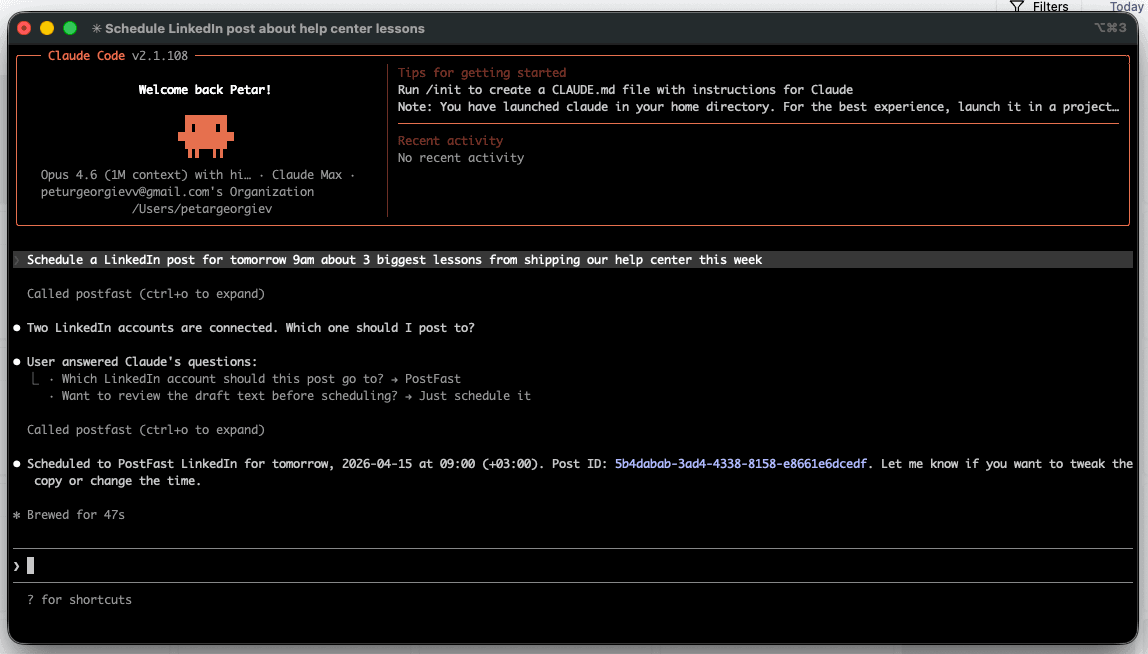
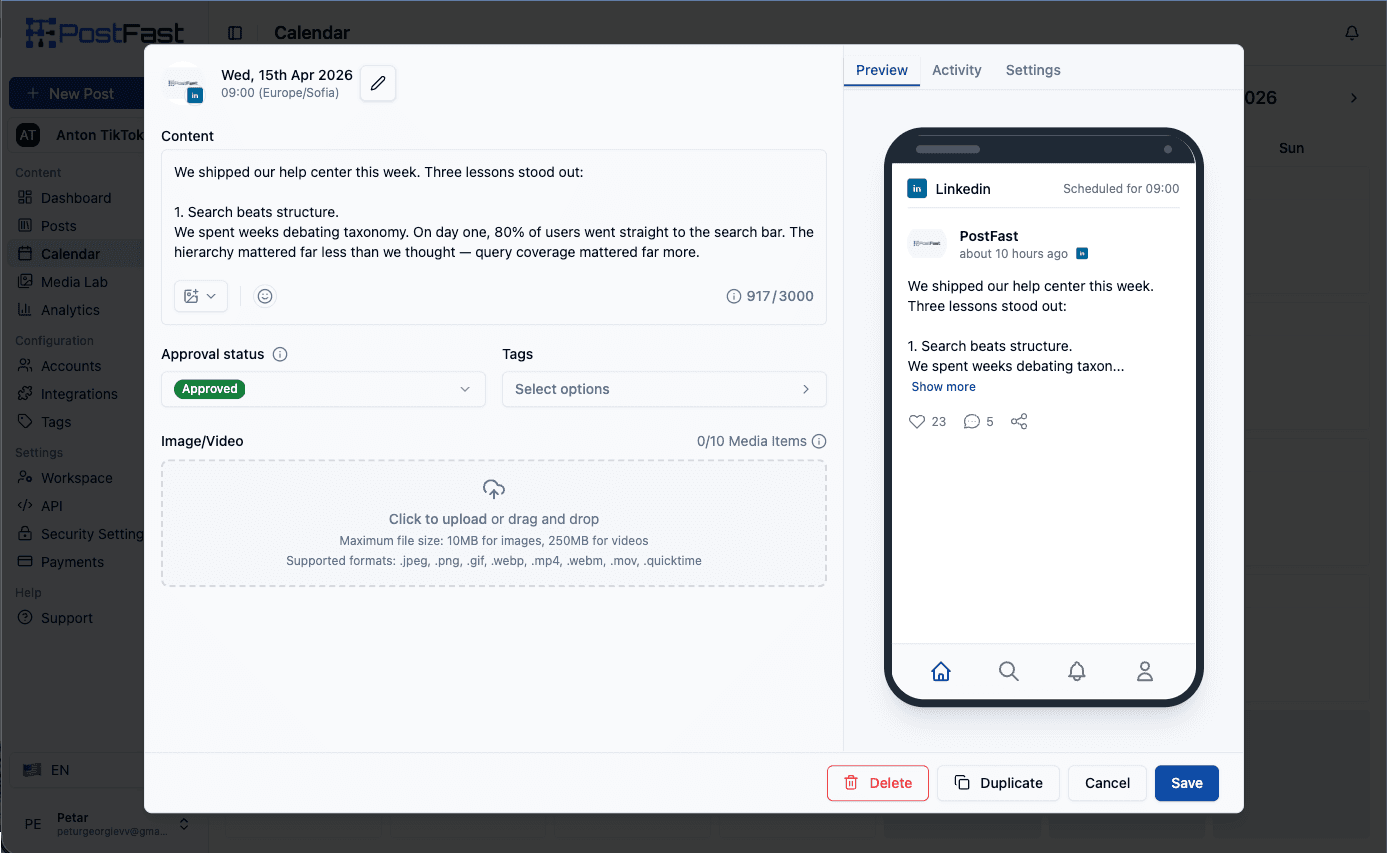
The transcripts below follow the npm route. On the hosted route, Claude creates the posts on hold and asks for your yes before they publish.
Single-platform schedule
You: Schedule an Instagram carousel for tomorrow 5pm about
     the 3 biggest lessons from our Q1 rewrite.
Claude: [calls list_accounts → create_posts]
        Done. Scheduled on @yourhandle for Apr 15 5:00 PM.
        Caption drafted, 2 hashtag variants ready.
Bulk from git log
You: Read the last 7 days of commits and draft 5 LinkedIn posts,
     one per interesting change, Mon-Fri 9am next week.
Claude: [reads git log → drafts 5 posts → create_posts]
        5 posts queued Mon Apr 21 through Fri Apr 25.
Upload + cross-post
You: Upload ./reel-final.mp4 and post it as an Instagram Reel
     and TikTok for tonight 8pm with hashtags.
Claude: [upload_media → create_posts with instagramPublishType=REEL,
        tiktokPrivacy=PUBLIC, tiktokAllowComments=true]
        Uploaded, scheduled on both platforms.
Analytics pull
You: Which of last week's LinkedIn posts got the most engagement?
Claude: [get_post_analytics filtered LinkedIn + 7d]
        Your "4 MCP gotchas" post: 2,340 impressions, 47 reactions,
        8 comments.
Agency use case
You: Generate a connect link for the client that expires in 14 days
     and email it to them.
Claude: [generate_connect_link expiryDays=14 sendEmail=true]
        Link sent. They can connect their own socials; posts will
        publish to their accounts, stay in your workspace.
Platform-Specific Controls
The create_posts tool accepts a controls parameter so you can tune every platform's nuances from one Claude prompt. Ask Claude to “post this as a TikTok draft so I can edit the music later” and it passes tiktokIsDraft: true automatically.
| Platform | Controls |
|---|---|
| X (Twitter) | xRetweetUrl |
| instagramPublishType (TIMELINE/STORY/REEL), instagramPostToGrid, instagramCollaborators, instagramIsAiGenerated | |
| facebookContentType (POST/REEL/STORY), facebookAllowComments, facebookPrivacy, facebookReelsCollaborators | |
| TikTok | tiktokTitle (carousels only, 90 chars), tiktokPrivacy, tiktokIsDraft, tiktokAllowComments, tiktokAllowDuet, tiktokAllowStitch, tiktokBrandOrganic, tiktokBrandContent, tiktokAutoAddMusic, tiktokIsAigc |
| YouTube | youtubeTitle, youtubePrivacy, youtubeTags, youtubeCategoryId, youtubeIsShort, youtubeMadeForKids, youtubePlaylistId, youtubeThumbnailKey, youtubeContainsSyntheticMedia, youtubeLanguage, youtubeCaptionKey (.srt/.vtt, needs youtubeLanguage) |
| pinterestBoardId (required), pinterestLink | |
| linkedinAttachmentKey, linkedinAttachmentTitle | |
| Google Business Profile | gbpLocationId (required), gbpTopicType, gbpCallToActionType, gbpCallToActionUrl, event + offer fields |
Supported Platforms
Test It Works
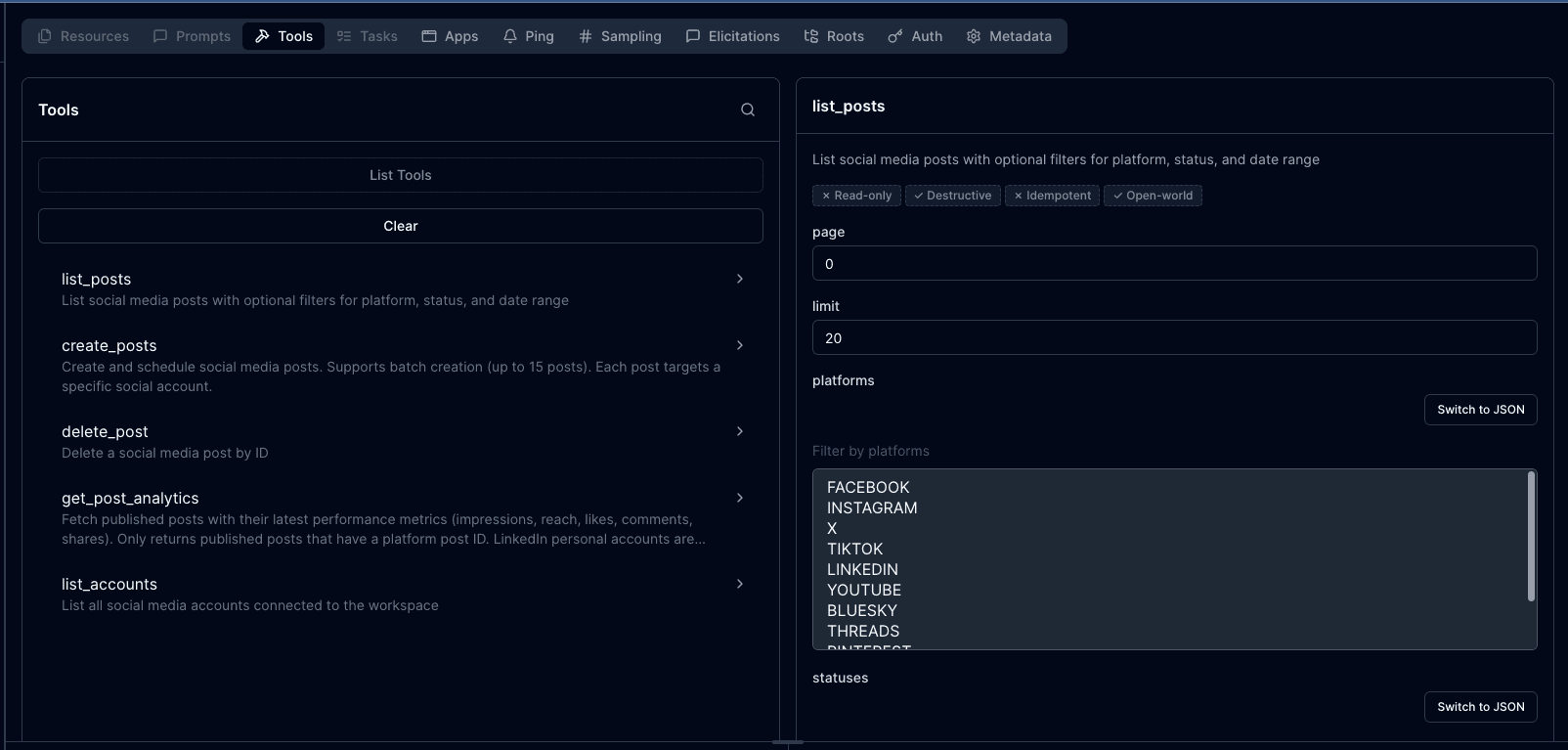
For the npm package: opens the MCP Inspector in your browser, so you can see every tool and call each one by hand before Claude does. On the hosted route, ask Claude Code to list your PostFast accounts.
Example Workflows
Dev-log → LinkedIn
Automate social media posting from your git workflow. Claude reads git log --since="1 week ago", identifies commits with engagement angle, drafts 5 LinkedIn posts, and schedules them Mon-Fri 9am.
Blog → multi-platform drops
Point Claude at a blog markdown file. It generates platform-appropriate captions, uploads the hero image once via upload_media, cross-posts with per-platform copy tweaks.
Agency onboarding
Generate a connect link for a new client (generate_connect_link), wait for authorization, then schedule their first week from a content calendar spreadsheet.
Why Claude Code Specifically
Claude Code is where developers already work: commits, file context, shell access. Scheduling becomes part of the workflow, not a sidebar task. Claude Desktop supports the same MCP server without file/repo context. Cursor, Windsurf, Zed, Cline, VS Code (Copilot), and JetBrains IDEs all work via the same config. Claude Code's natural-language-first design fits posting workflows especially well.
Protocol-neutral walkthrough: the social media MCP server. Want the in-app Claude connector instead of the CLI? See Claude. Prefer messaging your agent from your phone? See our NanoClaw integration for the chat-app setup (Docker Sandboxes + WhatsApp/Telegram/Slack). Compare all options on the API integrations hub. Non-MCP automation: n8n, Zapier. Related reading: Build a posting automation with the PostFast API, Why busy founders automate social publishing, Best OpenClaw skills for social media marketing.
Frequently Asked Questions
Is this using my Claude Code subscription or API key?
You choose whether your Claude Code session uses a subscription or API key; that is separate from how Claude Code reaches PostFast. The hosted route uses your PostFast login, not an API key. The npm package runs locally, talks to the PostFast API and reads a PostFast API key. Note: per Anthropic's April 2026 policy, third-party harnesses using Claude Code OAuth subscriptions for automated or scripted workflows are prohibited. Use an API key for CI/CD or unattended automation; subscriptions are fine for interactive use.
What platforms are supported?
Facebook, Instagram, X, TikTok, LinkedIn, YouTube, BlueSky, Threads, Pinterest, Telegram, and Google Business Profile. Eleven total.
Does Claude Code see my PostFast data?
Only what you explicitly ask it to access. The hosted route exposes 27 tools and the npm package 25; Claude only calls them when you ask. No background data flow.
Do I need to self-host anything?
No. The hosted route runs on PostFast's servers at mcp.postfa.st. The npm route pulls the server on demand with npx -y postfast-mcp, which needs Node 18+.
Can I test without publishing real posts?
Yes. On the hosted route, new posts are held until you approve them, so nothing publishes by accident. For the npm package, POSTFAST_API_KEY=your-key npx @modelcontextprotocol/inspector npx postfast-mcp opens the MCP Inspector UI, where you can see every tool and call each one by hand.
What file formats can I upload?
JPEG, PNG, GIF, WebP, MP4, WebM, MOV. Use the upload_media tool for one-shot upload + key retrieval.
Does this work with ChatGPT or the Claude app?
Yes. ChatGPT and the Claude app connect to PostFast through the hosted MCP connector (OAuth, no API key) - see the ChatGPT connector and Claude connector pages. This page covers Claude Code, which can use that same hosted connector or the local npm package. Perplexity is not supported yet. Other MCP clients that work today: Claude Desktop, Cursor, VS Code (Copilot), Windsurf, JetBrains IDEs, Zed, Cline.
Where's the source code?
Open-source at github.com/peturgeorgievv-factory/postfast-mcp. MIT license.
Start scheduling from your terminal
7-day free trial. Add the hosted server and sign in, or drop the npm config into .mcp.json, and Claude Code can publish to 11 platforms in under 2 minutes.