How to Schedule Threads Posts and Carousels in 2026: Native Scheduler vs PostFast
Schedule Threads posts two ways: the app's built-in scheduler and PostFast for text, image, video, and carousel posts from desktop, with Instagram cross-posts.
You can schedule Threads posts two ways in 2026: with the scheduler built into the Threads app (tap the three-dot menu in the composer, pick a date and time, done) or with a scheduling tool such as PostFast that queues text, image, video, and carousel posts from a desktop browser and cross-posts the same content to Instagram and nine other platforms. This guide covers both, step by step, plus the carousel format that gets saved and a weekly rhythm you can keep.
Every product fact below was checked on September 2, 2026 against Threads' own announcement and PostFast's documentation.
What you can schedule on Threads
Threads posts are capped at 500 characters, and a post can carry text, a single image, a video, or a carousel. With PostFast you can schedule all of them:
- Text posts for takes, questions, and updates
- Single image posts
- Video posts
- Carousels with up to 10 images or videos, mixed
- A first comment (up to 500 characters) posted automatically right after the post goes live
- Cross-posting to Instagram from the same editor
Threads accounts connect through Instagram: PostFast works with any Threads account linked to an Instagram Business or Creator account, and the same connection covers both platforms.
Method 1: Threads' built-in scheduler
Threads announced native scheduling on January 23, 2025. The official instructions from the Threads account are short:
- Write your post in the composer.
- Tap the three-dot menu, then tap Schedule.
- Choose a date and time, then tap Schedule again.
- Find scheduled posts in your drafts folder, where you can edit or delete them.
That is the whole feature. The announcement does not state how far ahead you can schedule or how many posts you can queue, so plan a test post before you rely on it for a campaign. If you already manage Facebook and Instagram in Meta Business Suite, Meta's help center says a Facebook or Instagram post can be cross-posted to Threads from Business Suite on desktop, as long as your Threads account is in the business portfolio with the same username as your Instagram account.
The native scheduler is fine for one account and occasional posts. It is a phone-first workflow, it schedules Threads only, and it does not give you a calendar view across platforms, which is where Method 2 comes in.
Method 2: Schedule Threads posts with PostFast
PostFast is web-based, so the flow below works from a desktop browser (and on mobile, the app is responsive).
- Connect Threads. Add your Instagram Business or Creator account; Threads comes through the same login.
- Create a post and choose Threads. Write the text. The composer counts characters and warns you if you pass 500.
- Attach media. One image, one video, or up to 10 items for a carousel. Mixing images and video in one carousel is allowed.
- Add a first comment if you want a link or a follow-up in the replies without crowding the post.
- Tick Instagram if the post should go there too, then customize the Instagram caption if needed.
- Pick the date and time. You can schedule up to a year ahead on every plan, and the calendar shows everything you have queued.
- Schedule. Teams can save posts as pending approval and publish after review.

If you batch content, the public API accepts up to 15 posts per request, and the MCP server lets an AI assistant such as Claude draft and schedule Threads posts for you. Plans start at €12 a month (€10 on yearly billing) with a 7-day free trial.
When to post on Threads
There is no universal best time, and the windows shift as your audience grows. We keep a separate, regularly updated guide to the best time to post on Threads. The short practical version:
- Start with two slots a day on weekdays, one in the morning and one in the early evening in your audience's time zone
- Keep the same slots for two weeks so you have a clean comparison
- Move a slot only when replies and profile taps change, not on one good day
Carousels that get saved
Carousels travel further when the first slide promises a payoff. Use a clear micro headline on slide one, not a wallpaper image, and keep the set tight at four to six slides unless the story needs more.
Simple carousel plan
- Slide 1: the hook, a short claim or question
- Slides 2 to 4: the core of the idea or the visuals
- Slide 5: proof or takeaway
- Final slide: an invitation to reply or try the product
Formatting
- Keep one visual style across slides
- Make text large enough to read on a phone
- Keep the caption short and put the detail in the first comment
Cross-posting to Instagram
Threads is tied to Instagram, so cross-posting is a sensible default for reach. Select Instagram in the same PostFast editor and adjust the caption so it feels native:
- Tighten the first line for Instagram
- Add one line of context if the post came out of a Threads conversation
- Keep emojis and hashtags consistent with your brand
Instagram has its own limits (2,200 characters, 10 items per carousel), and PostFast applies each platform's rules to its own version of the post. The Instagram integration page lists what publishes automatically.
A weekly rhythm you can repeat
Pick a rhythm you can hit on busy weeks, then tune it by results.
Mon: plan and draft the week
Tue 08:30: text post with an image
Wed 09:30: carousel (4 to 6 slides)
Thu 18:30: video or a short text with a visual
Fri 10:30: follow-up thread or Q&A
Sat 10:00: optional test post
Sun: off, or a low-stakes update
Keep a notes doc with topics and hooks that landed. When a post works, revisit it a month later with an update or a deeper angle.
Frequently Asked Questions
Can you schedule posts on Threads natively?
Yes. Since January 2025 the Threads app has a scheduler: tap the three-dot menu in the composer, tap Schedule, choose a date and time, and tap Schedule again. Scheduled posts sit in your drafts folder until they publish.
Can I schedule Threads carousels?
Yes. PostFast supports Threads carousels with up to 10 images or videos, mixed, and publishes them automatically at the scheduled time.
Can I schedule Threads posts from a desktop?
Yes. PostFast runs in the browser, so you can plan, write, and schedule from a laptop and adjust on your phone.
What is the character limit on Threads?
500 characters per post. Put the hook in the first line, and move links or extra detail into a first comment, which also gets 500 characters.
Can I post the same content to Threads and Instagram at once?
Yes. Select both platforms in the PostFast composer and edit the caption per platform. Threads and Instagram share the same Business or Creator connection.
Queue the week, then join the conversation
Scheduling handles the consistent part of Threads. Replies still need you in the app, and a queued week gives you that time. Set up the rhythm above in PostFast and spend the saved hours in the replies.
Related
Threads scheduling with PostFast
Text, images, videos, carousels
How to Schedule Threads Carousels (4 to 6 Slide Formula)
You can plan and schedule Threads carousels without hopping between devices. PostFast lets you build a week of posts, line them up on a calendar, and publish on time.
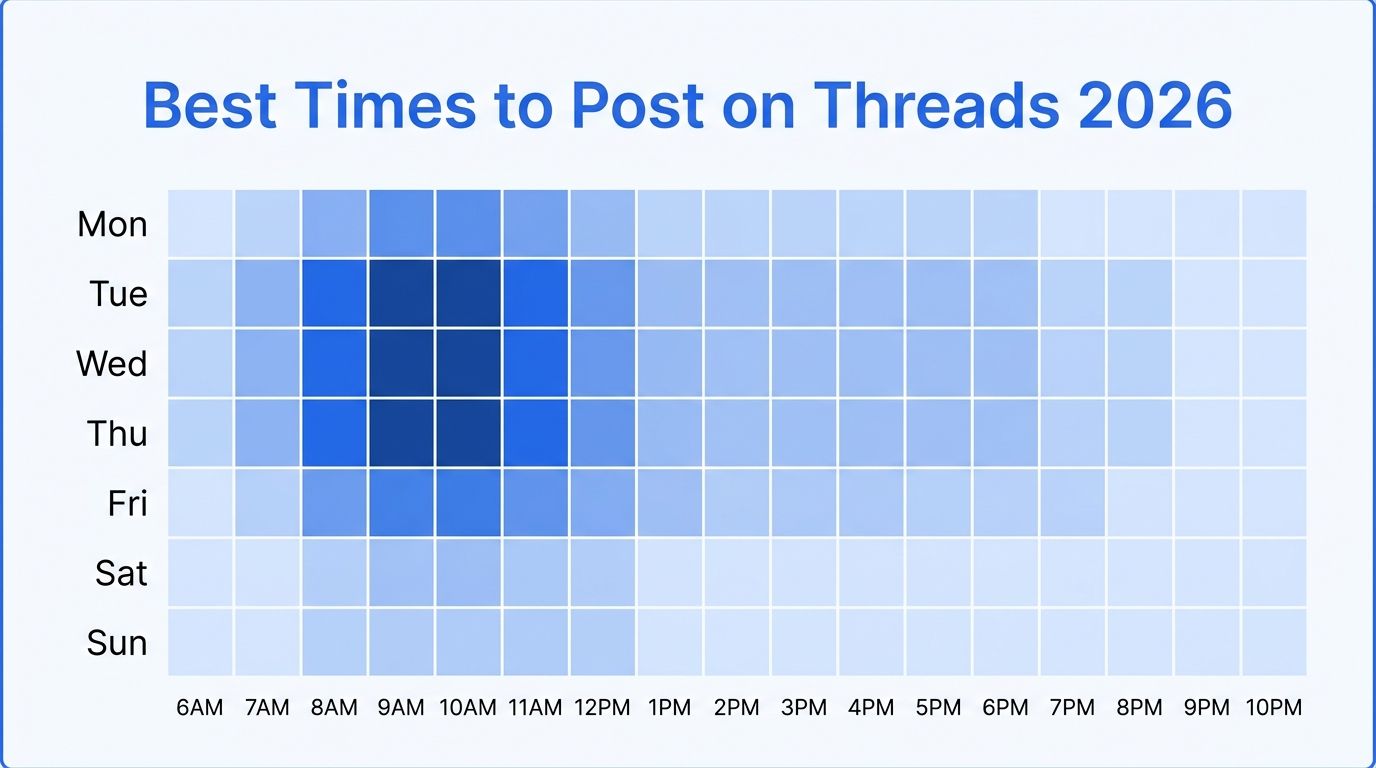
Best Time to Post on Threads in 2026 (Data-Backed Guide)
When is the best time to post on Threads? We analyzed posting patterns to find the days and times that get the most engagement on Threads in 2026. Day-by-day breakdown with specific hours.
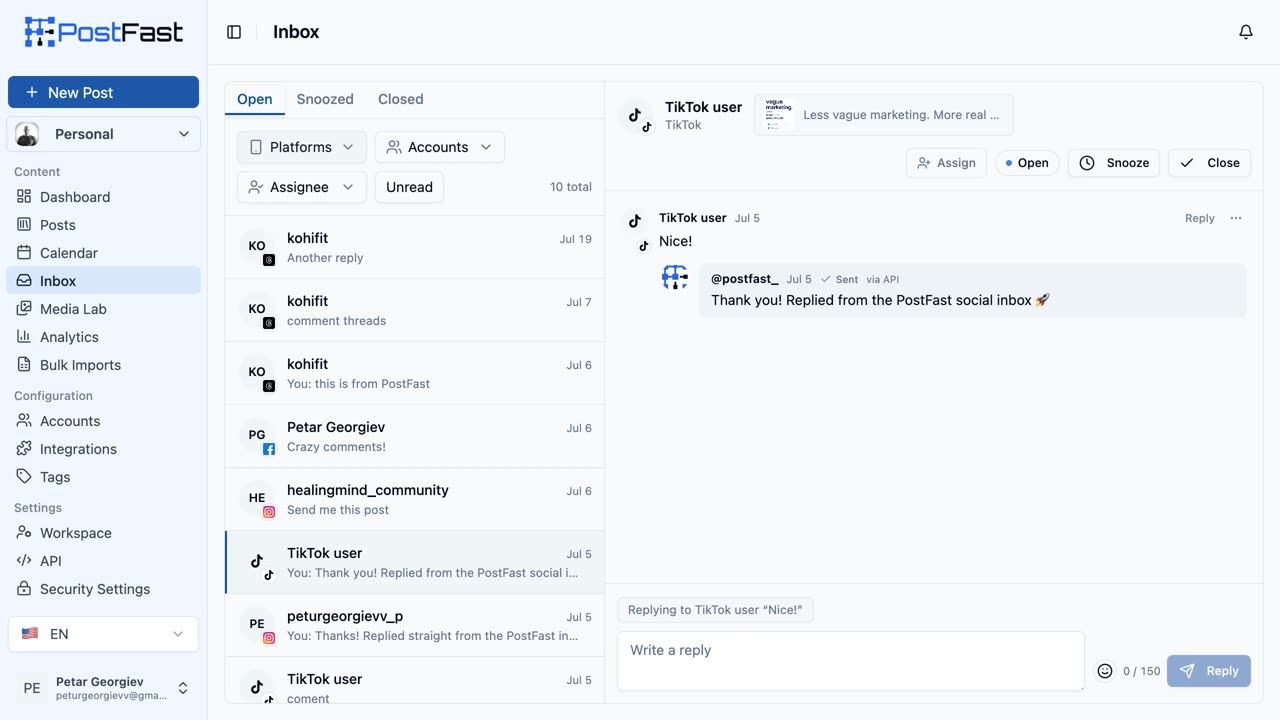
Introducing the PostFast Social Inbox: Schedule, Publish, and Now Reply
The PostFast Social Inbox is live: TikTok, Instagram, Facebook and Threads comments in one stream, replies included, on every plan from 12 euro a month.
What Is a Social Scheduler and Why Do You Need One?
A social scheduler saves creators and marketers 10+ hours a week. Here's what one actually does and which features matter for small teams.
Social media scheduling for e-commerce brands, 2026 playbook
Social media scheduling for e-commerce brands, a simple weekly system to ship product content, promos, and UGC without last minute stress.
Can ChatGPT Post to Instagram and Facebook? Yes, Here Is How
Yes, with a connected app. Use PostFast to schedule Instagram and Facebook posts, Reels and Stories from ChatGPT, with approval before publishing.