Master the Instagram Story Size: Your Complete 1080x1920 Guide
Discover the instagram story size you need for flawless 1080x1920 videos. Learn dimensions, safe zones, export tips, and boost engagement today.
On this page (8)
If you want your Instagram Story to look sharp and professional, the only dimensions you need to remember are 1080 pixels wide by 1920 pixels tall. This specific size, with a 9:16 aspect ratio, is the key to creating a fully immersive, full-screen experience for your viewers.
Getting this right is a must. If you use a different size, Instagram will step in to crop or stretch your content, which almost always results in blurry images or, even worse, your key message getting cut off.
A Quick Reference for Instagram Story Size
Nailing the numbers is always the first step. When your content doesn't match Instagram's required format, the platform's automatic adjustments can really hurt your engagement. No one sticks around for a pixelated video or a Story where the text is unreadable.
Think about it this way: In Bulgaria, Stories are the go-to format for the 25-34 age group. This demographic makes up a huge 29.9% of the country's 1.95 million Instagram users, and they have high standards for the content they consume. Sticking to the 1080x1920 pixel size is the bare minimum to keep them tapping forward. You can find more insights on regional Instagram use here, which really drives home why these specs matter.
Instagram Story Specifications at a Glance
To make things even simpler, here's a quick summary table with the most important technical specs for any Instagram Story asset you create.
| Specification | Requirement |
|---|---|
| Dimensions | 1080 x 1920 pixels |
| Aspect Ratio | 9:16 |
| Minimum Width | 500 pixels |
| Image File Types | JPG, PNG |
| Video File Types | MP4, MOV |
| Max Image File Size | 30 MB |
| Max Video File Size | 4 GB |
| Max Video Duration | 60 seconds per Story card |
Keep this table handy. It's your cheat sheet for making sure every image and video is perfectly optimized before you even think about uploading.
Key Story Specifications
Below is a visual breakdown that covers the most critical technical requirements for your Instagram Story assets, from dimensions and aspect ratio to file sizes.
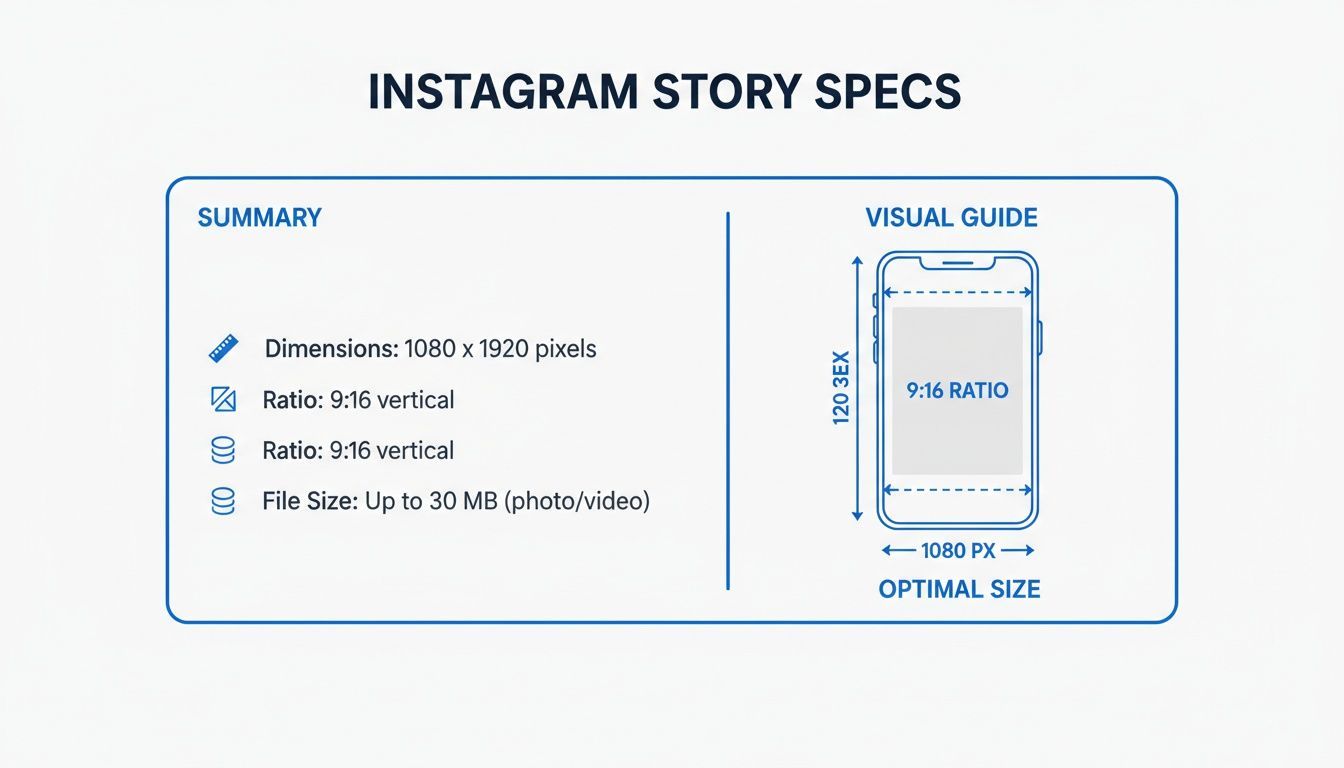
This graphic drives home the three pillars of a perfect Story: the exact pixel dimensions, the must-have vertical ratio, and the maximum file sizes for both images and videos. If you need to dive deeper into specs for other formats, check out our comprehensive guide on all Instagram sizes.
And of course, when you use a scheduler like PostFast, you can forget about the guesswork. The platform helps you manage all these requirements automatically, ensuring every Story you schedule is perfectly optimized before it ever goes live.
Why Perfect Story Dimensions Boost Engagement
Getting your Instagram Story size right is about more than just fitting the screen; it's a strategic move that directly impacts how your content performs. A correctly sized Story creates a smooth, professional viewing experience that keeps your audience watching from start to finish. When your visuals fill the entire screen without any awkward black bars or pixelation, it immediately signals quality and attention to detail.
This polished look makes your brand feel more credible and trustworthy. On the flip side, improperly sized content can instantly sabotage your message. Instagram’s automatic adjustments often lead to blurry visuals, unexpected cropping that cuts off important text, or a distorted image that just looks unprofessional. These small mistakes can be jarring enough to make a viewer tap away, tanking your Story completion rates.
Connecting Visuals to Business Results
Clean visuals lead directly to better business results. When your Story is optimized, viewers are more likely to stay engaged, giving them more chances to interact with your content. This has a massive effect on the performance of interactive elements like polls, quizzes, and question stickers.
A properly formatted Story ensures these stickers are fully visible and easy to tap. Higher completion rates and more sticker interactions signal to the Instagram algorithm that your content is valuable, which can lead to better reach over time. Think of it as removing friction; the smoother the visual experience, the easier it is for your audience to consume and act on your message.
An improperly sized Story is like a poorly tailored suit; it makes the whole brand look sloppy, no matter how good the message is. Perfect dimensions are the foundation of a strong visual identity.
Maintaining Brand Consistency with Automation
Ensuring every single Story is perfectly sized can be a real headache, especially for busy teams juggling multiple accounts. Manual errors are common, but they are also completely avoidable. This is where using a scheduling tool makes a huge difference in maintaining brand consistency.
Platforms like PostFast help guarantee that every Story is perfectly sized before it goes live. By preparing and scheduling your content in advance, you eliminate the risk of last-minute slip-ups. This automation ensures every piece of content meets Instagram’s specs, protecting your brand’s professional image and maximizing your engagement potential without the manual stress.
Mastering the Instagram Story Safe Zones
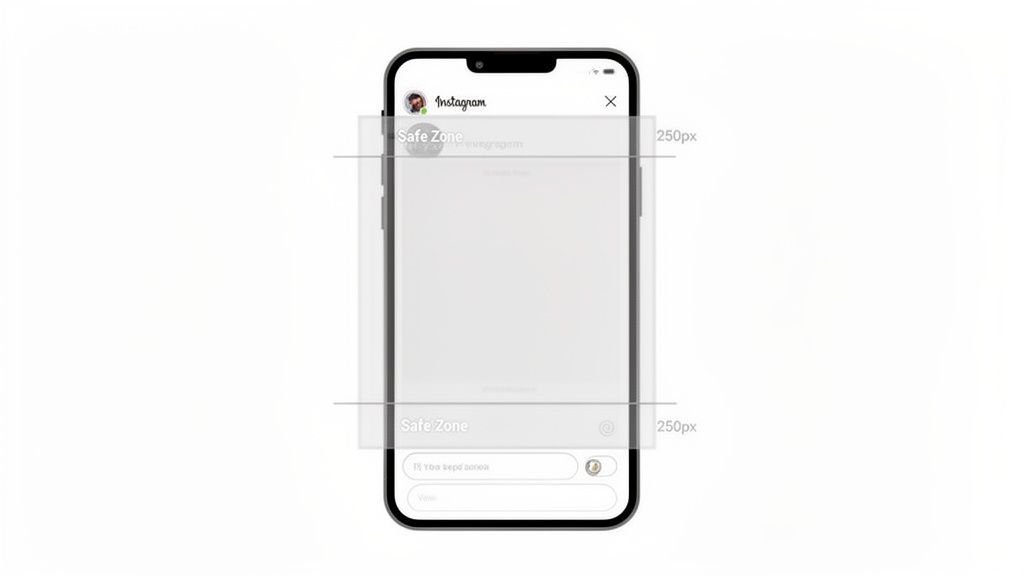
Getting the 1080 x 1920 pixel dimensions right is only half the battle. One of the biggest mistakes creators make is ignoring the safe zones, and it’s a blunder that can make key parts of your content completely invisible. Think of these zones as the no-go areas where Instagram places its own user interface elements.
When someone views your Story, they see your profile icon and username at the top, along with the progress bar for each segment. Down at the bottom, you’ve got the reply bar and other interactive buttons. If you place your logo, a call-to-action, or crucial text in these areas, Instagram’s UI will cover it right up. It looks unprofessional, and it completely defeats the purpose of your message.
Why Safe Zones Are Non-Negotiable
Ignoring the safe zones is like designing a beautiful poster and then slapping stickers over the most important details. To make sure your message always gets through, you have to keep all your vital content away from the screen's top and bottom edges. This discipline guarantees your design efforts actually pay off, rather than leaving you with frustrated viewers who can't read your text or tap your link.
The rule of thumb is simple but absolutely critical.
- Top Safe Zone: Keep all essential elements at least 250 pixels away from the top edge.
- Bottom Safe Zone: Leave a buffer of at least 250 pixels from the bottom edge.
Respecting these boundaries ensures every part of your design is visible on pretty much any device, giving your content a clean, polished look.
A classic mistake is placing a "Swipe Up" sticker or important text too low. It gets hidden by the reply bar, making it completely useless and wasting a valuable chance to engage your audience.
For small brands using scheduling tools, sticking to these specs is vital for producing crisp visuals that don’t fall into these common traps. Keeping to the 250px margins means UI overlays like profile pictures and navigation bars will never obscure your content. This attention to detail is essential for both images (under 30 MB) and video Stories, which can be up to 4 GB and are automatically segmented into clips. You can find more insights on digital trends in Bulgaria on DataReportal.
This is where a tool like PostFast becomes incredibly helpful. Its built-in templates and guides are already designed with these safe zones in mind, letting you create with confidence and schedule content knowing it’ll look perfect when it goes live.
Technical Requirements for Image Stories
Getting beyond the basic 1080x1920 pixel dimensions is where you make sure your image Stories actually look good in the wild. Nailing these technical details means your visuals stay crisp, load fast, and appear exactly how you designed them.
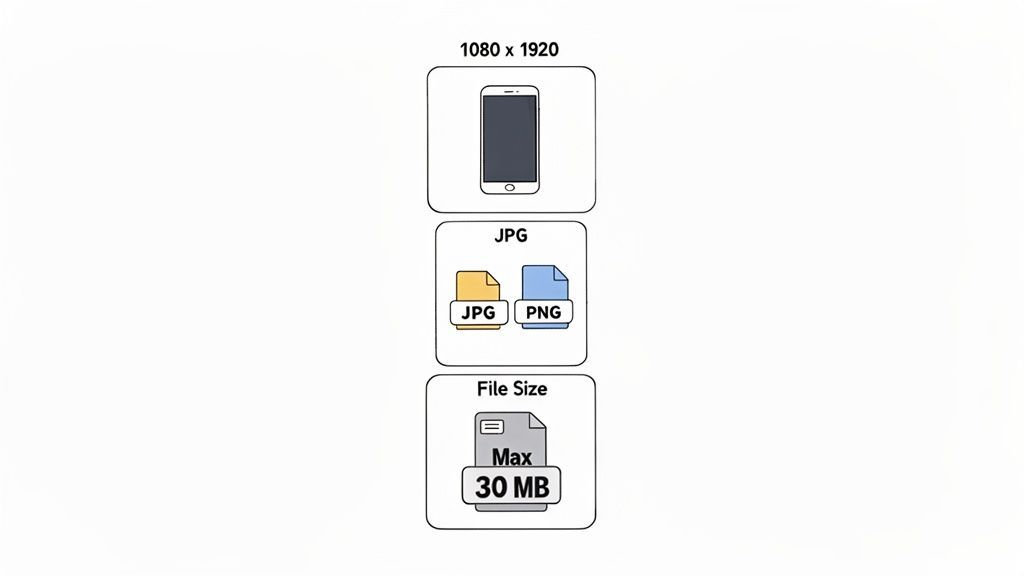
You’ll mostly be working with two file formats: JPG and PNG. Knowing when to use each one is key.
For photos, JPG (or JPEG) is almost always your best bet. Its compression is fantastic at handling complex colors and gradients, which keeps your file sizes down without a noticeable hit to quality. This is a big deal for making sure your Stories load instantly, even for people on a shaky connection.
Choosing the Right File Format and Size
On the flip side, PNG is the go-to for graphics, text overlays, logos, or anything that needs a transparent background. PNGs preserve sharp lines and solid colors way better than JPGs, so you can avoid that fuzzy, pixelated mess you sometimes see around text and logos.
Whichever format you pick, your image has to stay under the file size limit.
- Maximum File Size: 30 MB
- Recommended File Types:
- JPG: Best for photographs and complex images.
- PNG: Ideal for graphics, logos, and images needing transparency.
If your file is too big, Instagram will take matters into its own hands and compress it for you, and its compression can be brutal, ruining a perfectly good visual. It’s always better to use image optimization tools to shrink the file yourself without killing the quality.
Keeping file sizes low is a balancing act. You want the highest quality possible, but you also need a fast loading time. A Story that takes too long to appear is a Story that gets skipped.
For teams trying to stay consistent, a scheduler like PostFast can take the guesswork out of this whole process. You just upload your high-quality assets, and the platform makes sure everything is correctly formatted and optimized before it goes live. No more last-minute technical panics.
Technical Requirements for Video Stories
Video is where Instagram Stories really come alive, but your content has to hit a few technical marks to look its best. Just like with still images, your video needs to be **1080x1920 pixels** with a **9:16 aspect ratio**. But for moving pictures, there are a few extra rules you’ll want to get right.For starters, Instagram officially supports two video file formats: MP4 and MOV. While both will work just fine, MP4 is generally the better choice. It strikes the perfect balance between high quality and manageable file size, which means smoother playback for your audience.
When it comes to file size, you’ve got plenty of room to play with. Your video file can be up to 4 GB, which is more than enough for the short, punchy clips that tend to perform best in Stories anyway.
Duration and Video Segmentation
This is a big one. A single Instagram Story card can be up to 60 seconds long.
But here's the key part: if you upload a video that's longer than 15 seconds, Instagram will automatically slice it into 15-second segments. So, a 60-second video will show up as four consecutive 15-second Story cards. Understanding this is crucial for good storytelling; you can use these automatic breaks to build suspense or create a natural transition from one point to the next. If you want to dig deeper into how video formats adapt across platforms, it's worth exploring different 16:9 resolutions.
Keeping your video clips at 60 seconds or less is a hard limit. Anything longer just gets cut off, so plan your edits carefully to make sure your message fits.
Recommended Export Settings
To make sure your video looks sharp and plays without a hitch, you have to nail your export settings.
- Frame Rate: Always aim for at least 30 frames per second (FPS). This is the industry standard for smooth motion on social media.
- Bitrate: A video bitrate between 4 to 6 Mbps is the sweet spot. It gives you excellent visual quality without making the file so big that it causes buffering for viewers with slower internet.
Getting these settings right from the jump saves a lot of headaches. And if you’re using a tool like PostFast, you can just upload your high-quality video, and the platform handles the optimization to make sure it’s perfect before it goes live. It takes all the guesswork out of the equation.
How to Export High-Quality Story Content
You can pour hours into a stunning design, only to have it ruined by the wrong export settings. Getting this final step right is absolutely critical if you want your content to show up on Instagram looking just as sharp as it did on your design canvas.
Every program has its own quirks, but the goal is the same: produce a file that meets Instagram's specs without sacrificing quality. This hands-on advice gives you full control over how your content looks, with clear instructions for popular tools like Canva, Adobe Photoshop, and Premiere Pro. Nailing these settings prevents that blurry, compressed look that happens when Instagram has to aggressively resize a poorly exported file.
Recommended Export Settings for Images
For static image Stories made in tools like Canva or Photoshop, the settings are pretty straightforward but make all the difference for clarity.
- File Format: Use PNG if your graphic has sharp lines, text, or any transparency. Go with JPG for photographs to get the best quality at a reasonable file size.
- Quality: If you're exporting a JPG, always crank the quality up to 100% or the maximum available setting. Don't hold back here.
- Color Profile: Stick with the sRGB color profile. It’s the standard for web and mobile displays, which means your colors will look accurate and vibrant to your audience.
Recommended Export Settings for Videos
When you’re exporting video from software like Adobe Premiere Pro or Final Cut Pro, you need to pay a little more attention to the details to get that perfect balance between quality and performance.
- Format: The H.264 codec is your best friend. It’s universally supported and gives you excellent compression without looking blocky.
- Frame Rate: A frame rate of 30 FPS (frames per second) delivers that smooth, natural motion that just feels right on mobile.
- Bitrate: For a 1080p video, aim for a target bitrate somewhere between 4 and 6 Mbps (megabits per second). This range is the sweet spot for high quality without creating a massive file that Instagram will crush.
Once your content is looking pristine, you can learn how to make the most of it with our guide on reposting on Instagram.
Heads up: The most common mistake people make is exporting a video with a bitrate that’s way too high. It feels like "higher is better," but Instagram will aggressively compress an oversized file. The result is often worse quality than if you'd just exported it correctly in the first place.
To give you a quick reference, here’s a breakdown of the ideal settings you should be looking for in your favorite tools.
Recommended Export Settings for Story Content
This table summarizes the optimal settings for exporting high-quality images and videos from some of the most popular content creation tools. Use it as a quick checklist before you hit that export button.
| Setting | Image (Canva/Photoshop) | Video (Premiere Pro/Final Cut) |
|---|---|---|
| File Type/Format | PNG or JPG | MP4 (H.264 Codec) |
| Dimensions | 1080 × 1920 pixels | 1080 × 1920 pixels |
| Quality/Bitrate | 100% (for JPG) | 4–6 Mbps (VBR, 1 Pass) |
| Color Profile | sRGB | Rec. 709 |
| Frame Rate | N/A | 30 FPS |
Getting these settings right every time ensures your content looks professional and performs well, without any nasty surprises after you upload.
Of course, using a publishing platform can take all this off your plate. With a tool like PostFast, you just upload your high-quality file and trust that it will be perfectly optimized and published every single time. No more guesswork.
Common Sizing Mistakes and How to Fix Them
Even when you know all the right numbers, it’s surprisingly easy to make small mistakes that tank your content's quality. Getting a handle on these common slip-ups is the fastest way to make your Instagram Stories look polished and professional every single time.
One of the most frequent errors is uploading a low-resolution image to start with. If your original file is tiny, Instagram has to stretch it to fill the 1080x1920 screen, and the result is a blurry, pixelated mess. Always, always start with a high-quality file.
Another classic mistake is using the wrong aspect ratio. When you upload a square (1:1) or landscape (16:9) photo, Instagram slaps those ugly black bars at the top and bottom, which instantly kills the immersive feel of a full-screen Story.
Ignoring the All-Important Safe Zones
We've already touched on this, but ignoring the safe zones is a mistake worth repeating because it happens so often. When you place text, logos, or stickers too close to the edges, they get covered by Instagram’s user interface elements.
This simple oversight can make your call-to-action or key message completely invisible. The fix is simple: keep your crucial elements within that central viewing area, leaving plenty of breathing room at the top and bottom.
For Bulgarian influencers and SMBs, getting these details right can unlock huge potential with a local user base hitting 1.955 million. The 25-34 age group, a massive slice of that audience, loves the casual feel of Stories, but sloppy sizing just makes a brand look unprofessional. You can dig into more Bulgarian Instagram demographics on Statista.
The Fix: Before you hit post, do a quick visual check. Is your main text clear of the top and bottom edges? Is the aspect ratio correct? Is the original image sharp? A five-second check can save your Story from looking amateur.
Using a content planner like PostFast helps you sidestep these mistakes before they ever go live. The platform's templates and previews are built with the correct dimensions and safe zones already in mind, helping you protect your brand’s reputation by ensuring every single Story is perfectly optimized.
Frequently Asked Questions About Story Size
Even with all the specs dialed in, a few questions always seem to pop up. Here are some quick answers to the common ones, so you can post with total confidence.
Think of these as reinforcements of the key specs we've already covered, making sure you have all the info you need to nail the correct Instagram Story size every time.
What Happens If I Upload the Wrong Size?
If you upload an image or video that isn't the standard 1080x1920 pixels, Instagram will try to fix it for you. That usually means one of two things: your content gets awkwardly cropped, or it gets resized and loses quality.
For instance, a wide landscape photo will have its sides chopped off to fit the vertical frame. To keep total creative control and avoid nasty surprises, it's always better to resize your assets to the correct dimensions before you upload.
Should I Upload in a Higher Resolution Than 1080p?
Uploading a Story in a much higher resolution, like 4K, gives you no real advantage and can actually make your content look worse. Instagram’s platform is optimized for 1080p, so it will aggressively compress any larger file down to that standard.
This heavy-handed compression often introduces blurriness and other visual artifacts. Stick to the recommended 1080px width. It's the most reliable way to get consistent, high-quality results.
The goal is to give Instagram's compression algorithm the best possible starting point. A perfectly sized 1080x1920 file needs less aggressive squeezing, which helps preserve the sharpness and detail you worked so hard to create.
Do Instagram Story Ads Use the Same Dimensions?
Yes, they do. Instagram Story ads follow the exact same size and aspect ratio rules as organic Stories. They must be 1080x1920 pixels with a 9:16 aspect ratio. This ensures they fill the screen and give users a seamless, non-disruptive experience.
For ads, it’s even more critical to respect the safe zones. You need to be absolutely sure your call-to-action button and branding are fully visible and not hidden by the app's interface elements.
Juggling all these specs can be a headache when you'd rather just focus on creating great content. With PostFast, you can organize your whole workflow. Simply upload your high-quality visuals, and our platform makes sure everything is perfectly formatted and scheduled to go live at the best time. It gives you more space to focus on your creative strategy. Start your free trial at https://postfa.st and see the difference.
Related
Instagram scheduling with PostFast
Feed posts, Reels, Stories, carousels
How to Schedule Instagram Posts from Desktop in 2026: Every Method That Works
Three ways to schedule Instagram posts from a desktop in 2026: Meta Business Suite, Instagram's own scheduler, and PostFast. Steps, limits, and a checklist.
Instagram Reel Cover Size & Safe Zones (2026)
Exact Reel cover sizes, safe zones, and a quick PostFast workflow so your thumbnails look clean in the grid and Reels tab.
Your Guide to the Perfect Instagram Profile Picture Size
Get the recommended Instagram profile picture size for a flawless look. Our 2026 guide covers dimensions, cropping, and tips to make your profile stand out.
Dimensions for instagram profile picture: Your Guide to a Standout Profile
Discover the right dimensions for instagram profile picture to maximize visibility and engagement on Instagram. Practical, quick tips for a flawless profile.

SaaS Marketing Automation: The Social and Email Stack We Run at PostFast
SaaS marketing automation from our own stack: what we automate on social and in lifecycle email, the event behind each sequence, and the tools by job.