Instagram Trial Reels in 2026: Test Content Before Your Followers See It
What are Instagram Trial Reels and how do you use them? Complete guide to testing Reels with non-followers first, graduation strategies, A/B testing, and how to schedule Trial Reels in 2026.
On this page (7)
You spend 30 minutes creating the perfect Reel. You post it. It flops. Your followers see an underperforming piece of content on your profile, and the algorithm quietly notes your video failed.
What if you could test that Reel on strangers first, see if it actually works, and only show it to your followers if it performs well?
That is exactly what Instagram Trial Reels do. Launched in late 2024 and expanded to all creators with 1,000+ followers by mid-2025, Trial Reels let you publish content exclusively to non-followers. Your followers never see it unless you decide it is worth sharing.
This is the closest thing Instagram has ever built to A/B testing for content. Here is how to use it strategically, not just as a safety net.
Quick status check: Trial Reels launched in December 2024 and are now a standard part of the reel composer for eligible professional accounts. Everything in this guide was re-checked against Instagram's official creator documentation in July 2026.
What Are Trial Reels?
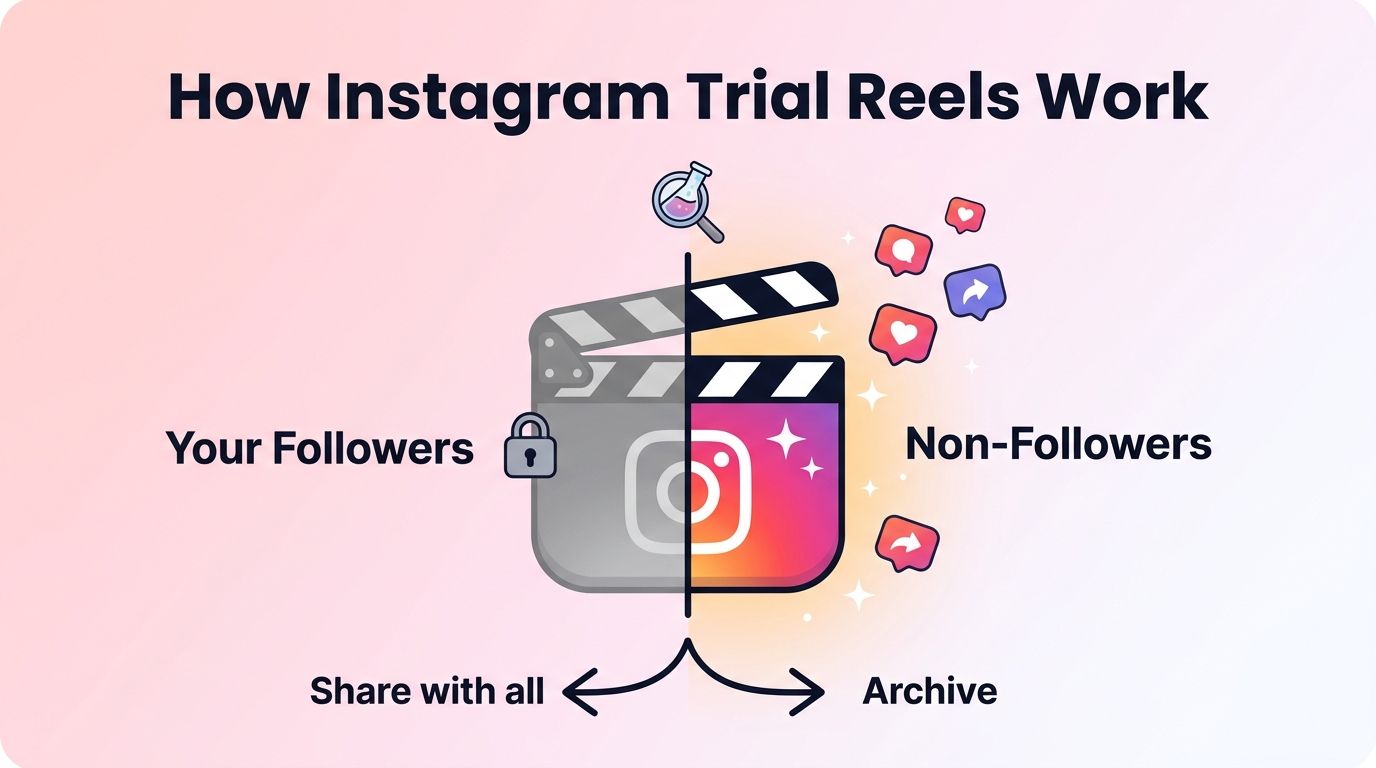
Trial Reels are Instagram Reels that are distributed only to people who do not follow you. They do not appear on your profile grid, in your followers' feeds, or on your Reels tab.
Think of it as a test run with a fresh audience.
Here is the workflow:
- Create a Reel normally
- Toggle "Trial" before publishing
- Instagram distributes the Reel only to non-followers for 24-72 hours
- You get engagement metrics: views, likes, comments, shares, and how it compares to your previous Trial Reels
- You decide: share it with your followers, or archive it
Who can use Trial Reels:
- Public account (Creator or Business profile)
- Minimum 1,000 followers
- Limit of approximately 20 Trial Reels per day
One important note: Adam Mosseri confirmed that Trial Reels almost always get less reach than regular Reels. This is because they lack the initial engagement boost from your existing followers. Compare trial-to-trial performance, not trial vs regular Reels.
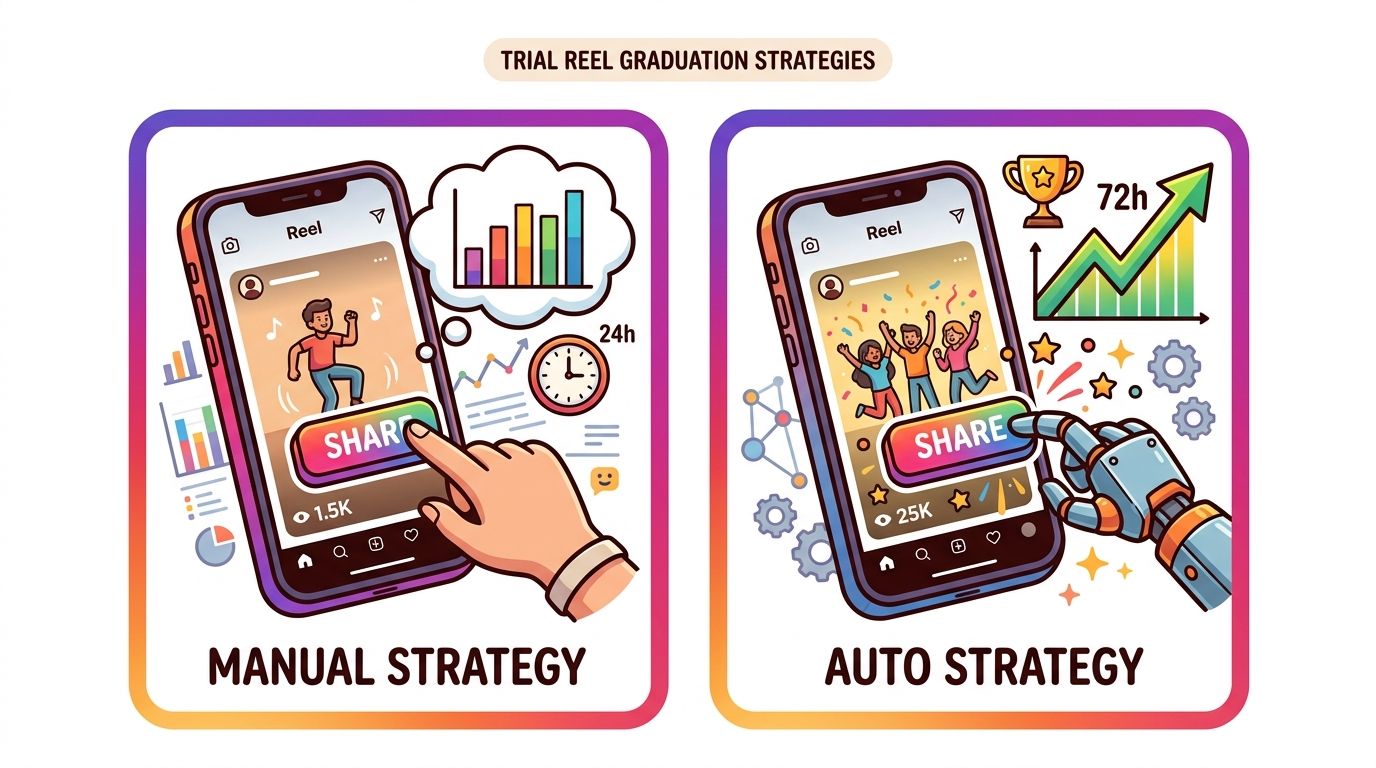
Two Graduation Strategies
When your Trial Reel is done testing, you have two options for what happens next:
Manual Graduation
You review the metrics after 24 hours and decide yourself whether to share with followers.
Best for: Creators who want full control and are testing specific creative hypotheses (different hooks, formats, or topics).
How it works: After the trial period, Instagram shows you the performance data. You tap "Share to all" to graduate the Reel to your full audience, or you archive it. It stays hidden until you act.
Auto Graduation (Performance-Based)
Instagram automatically shares the Trial Reel with your followers if it performs well within the first 72 hours.
Best for: Creators posting frequently who want to automate the testing process. Set it and let Instagram decide based on engagement signals.
How it works: Instagram evaluates the Trial Reel's performance against your recent content. If engagement metrics (views, likes, saves, shares) meet a threshold, it graduates automatically. If not, it stays as a trial only.
Schedule Trial Reels at optimal times with PostFast. Start your free 7-day trial.
5 Strategies for Using Trial Reels
Trial Reels are not just a safety net for bad content. Used strategically, they are a growth and optimization tool.
1. Test Different Hooks
The first 1-3 seconds of a Reel determine whether someone watches or scrolls past. Create two versions of the same Reel with different opening hooks and post both as Trial Reels. The one with higher view completion wins.
Example: Version A opens with "Stop doing this on Instagram" (curiosity hook). Version B opens with "I grew 10K followers in 30 days" (results hook). Post both as trials, compare completion rates, and graduate the winner.
2. Validate New Content Topics
Before committing to a new content series, test the first episode as a Trial Reel. If non-followers engage strongly, you have validation that the topic resonates beyond your existing audience. If it falls flat, you saved your profile from a low-performing post.
3. Repurpose Top Performers
Take your best-performing Reel from 3-6 months ago, re-edit it with a fresh hook or updated information, and post it as a Trial Reel. You already know the core content works. The trial tests whether the new packaging reaches a fresh audience.
Creator @chelsea_explains reportedly reached 450K followers in 2 months partly using this strategy of repurposing proven content through Trial Reels.
4. Test Posting Times
Post the same Trial Reel at different times on different days. Since Trial Reels only reach non-followers, you get a clean signal about which time slots drive the most engagement from people who do not already know your content.
5. A/B Test Audio and Formats
Buffer documented a real test: trending audio got 24% more views than voiceover on the same content. Trial Reels let you run these experiments without cluttering your profile with duplicate posts that your followers would notice.
Test: trending audio vs original audio vs voiceover. Test: static text overlay vs face-to-camera. Test: fast cuts vs one continuous shot.
How to Schedule Trial Reels
You do not have to post Trial Reels manually from the Instagram app. Scheduling tools can handle this through the Instagram API.
In PostFast:
- Create a new post and select Instagram
- Choose "Reel" as the content type
- Toggle "Post as Trial Reel"
- Select your graduation strategy: Manual or Auto (performance-based)
- Set your schedule and publish
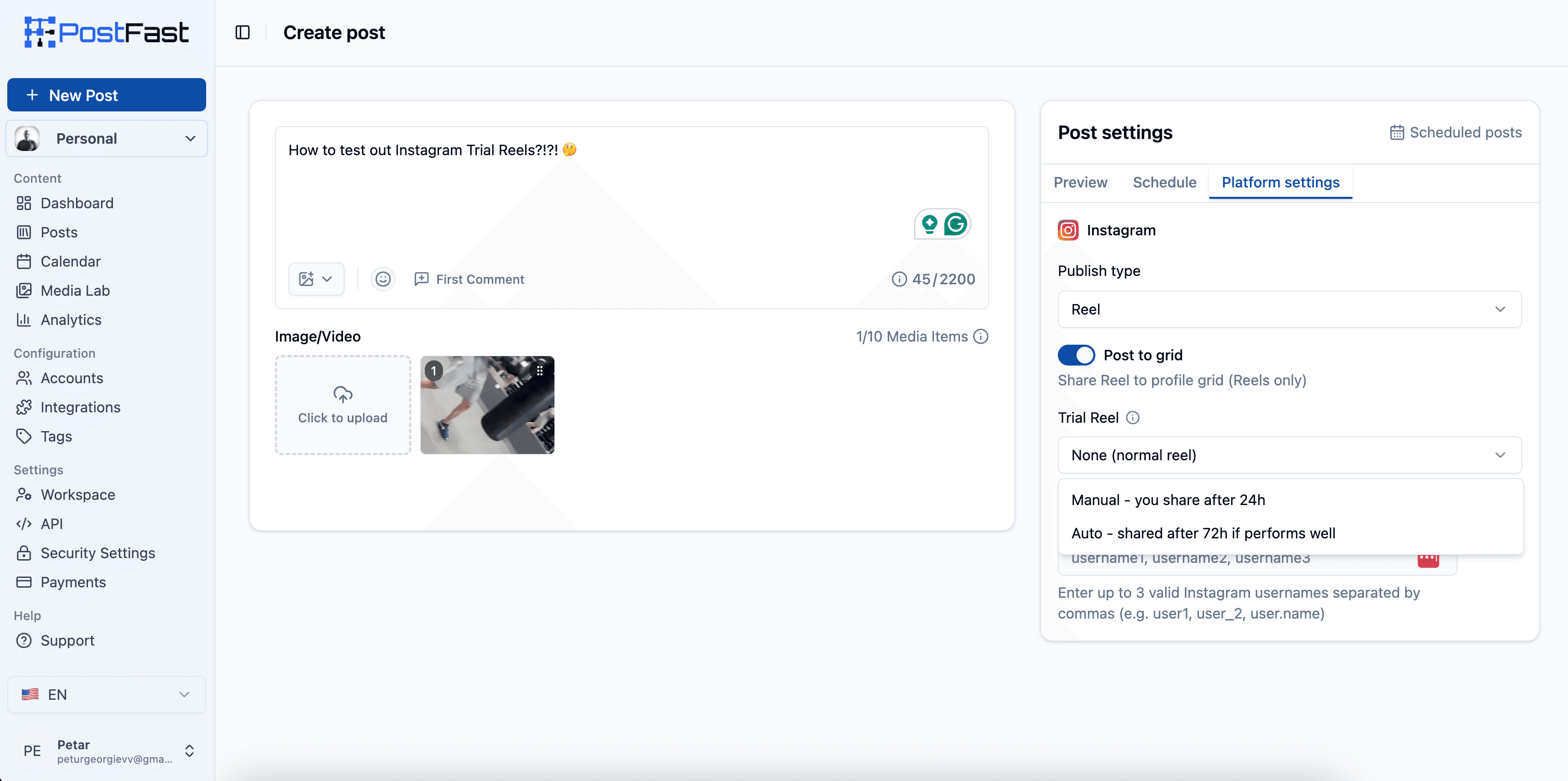
PostFast sends the Trial Reel through Instagram's Content Publishing API with the trial_params parameter, so it behaves identically to posting natively in the app. The Reel is distributed only to non-followers, and you get the same metrics and graduation options.
Which scheduling tools support Trial Reels:
| Tool | Trial Reels Support |
|---|---|
| PostFast | Full auto-publish + scheduling |
| Publer | Full auto-publish |
| Later | Full auto-publish |
| Metricool | Full auto-publish |
| Buffer | Reminder only (manual toggle in app) |
| Hootsuite | Not supported |
| Sprout Social | Not supported |
| FeedHive | Not supported |
If you are using Buffer, Hootsuite, Sprout Social, or FeedHive, you cannot schedule Trial Reels. You would need to post them manually through the Instagram app. For a full feature breakdown, see our PostFast vs Buffer and PostFast vs Hootsuite comparisons.
One practical pattern that works well: schedule your trial for one of the high-reach windows from our Instagram Reels timing data, let the 24-hour metrics come in, then share to everyone ahead of the next peak window. You get two bites at the algorithm with one piece of content.
Trial Reels Limitations
Also know the leak paths: followers will not see trials in Feed, the Reels tab, or on your profile, but they can still run into one if someone shares it in a DM, or on pages that collect reels using the same audio, location, or filter. Treat trials as low-visibility, not invisible.
Before you build your entire strategy around Trial Reels, know the constraints:
Lower reach than regular Reels. Without your followers' initial engagement, Trial Reels start cold. Expect lower absolute numbers. Judge them against other Trial Reels, not your regular posts.
No collaborators. You cannot add Collabs partners to Trial Reels. If your content strategy relies on collaboration tagging, this will not work for trials.
Duplicate detection. Instagram detects duplicate content with different text overlays. Each trial needs genuinely different hooks, audio, or visuals. You cannot post the same video five times with different captions.
Minimum 1,000 followers. New accounts and accounts under 1,000 followers do not have access to Trial Reels.
API rate limits. There is a daily limit on Trial Reels published through the API (approximately 20). If you are testing at high volume, you may hit this cap.
Frequently Asked Questions
What are Instagram Trial Reels?
Trial Reels are Instagram Reels published exclusively to non-followers. They do not appear on your profile grid or in your followers' feeds. After a testing period (24-72 hours), you can choose to share the Reel with your full audience or archive it.
How do I get Trial Reels on Instagram?
You need a public professional account (Creator or Business) with at least 1,000 followers. The feature should appear as a "Trial" toggle when creating a Reel. If you do not see it, make sure your app is updated to the latest version.
Do Trial Reels get less views?
Yes. Adam Mosseri confirmed that Trial Reels almost always get less reach than regular Reels because they lack the initial engagement boost from your existing followers. Compare trial-to-trial, not trial vs regular posts.
Can I schedule Trial Reels?
Yes. Tools like PostFast, Publer, Later, and Metricool support scheduling Trial Reels through the Instagram API. Buffer only supports reminder-based posting (you manually toggle Trial in the app). Hootsuite, Sprout Social, and FeedHive do not support Trial Reels.
What is the difference between Manual and Auto graduation?
Manual graduation lets you review metrics and decide whether to share with followers. Auto graduation (performance-based) lets Instagram automatically share the Reel with your full audience if it performs well within 72 hours. Choose Manual for controlled testing, Auto for high-volume posting.
Can I use Trial Reels for A/B testing?
Yes. Post two versions of the same content with different hooks, audio, or formats as separate Trial Reels. Compare engagement metrics (completion rate, likes, shares) to determine which version resonates better, then graduate the winner.
Start Testing Smarter
Trial Reels are the most underused feature on Instagram in 2026. Most creators do not know they exist. The ones who use them systematically gain a real edge: they only show their followers content that is already proven to work.
Test your hooks, validate new topics, repurpose old winners, and optimize your posting times. All without your followers seeing a single underperforming post.
Try PostFast free for 7 days to schedule Trial Reels alongside your regular content across Instagram, TikTok, YouTube, LinkedIn, X, Facebook, Threads, Pinterest, Bluesky, and Telegram.
Related articles

Best Time to Post on Social Media in 2026: 61,008 Posts Scored Against Their Own Normal
61,008 posts with clean metrics, each scored against its account's normal: Instagram 3 PM local, Facebook 3 to 5 PM, YouTube 1 PM or evenings, TikTok flat.
PostFast MCP Server for Claude, ChatGPT and Cursor: Launch Notes and Changelog (2026)
The launch note for PostFast's MCP server: npm release March 2026, ChatGPT and Claude connectors June 2026, inbox tools August 2026. Setup, tools and changelog.
Can You Schedule Posts on Bluesky? How to Schedule Bluesky Posts in 2026
Yes, with a scheduling tool: Bluesky's own app has no scheduler. What Bluesky offers, the 300-grapheme and media limits, and how to schedule with PostFast.

Can You Schedule Posts on LinkedIn? How to Schedule LinkedIn Posts for Profiles and Pages in 2026
Yes. LinkedIn schedules posts 10 minutes to 3 months ahead (1 hour on Pages). Desktop, mobile, and Page steps, plus where PostFast goes further.
How to Schedule Pinterest Pins in 2026: Pinterest's Scheduler vs PostFast, Step by Step
Two ways to schedule Pinterest Pins: Pinterest's own scheduler (30 days ahead, 10 Pins queued) and PostFast for image, video, and multi-image Pins from desktop.
Best Social Media Schedulers in 2026: 11 Tools Compared on Price, Platforms, and Automation
Eleven social media schedulers compared on September 2026 pricing, platforms, auto-publishing, and API or MCP automation, using each vendor's own pricing page.