The AI-Operable Social Inbox: Let Claude or ChatGPT Answer Your Comments
PostFast's Social Inbox works from Claude, ChatGPT, Cursor or any MCP client: read comments, draft replies, hide spam and triage, on every plan.
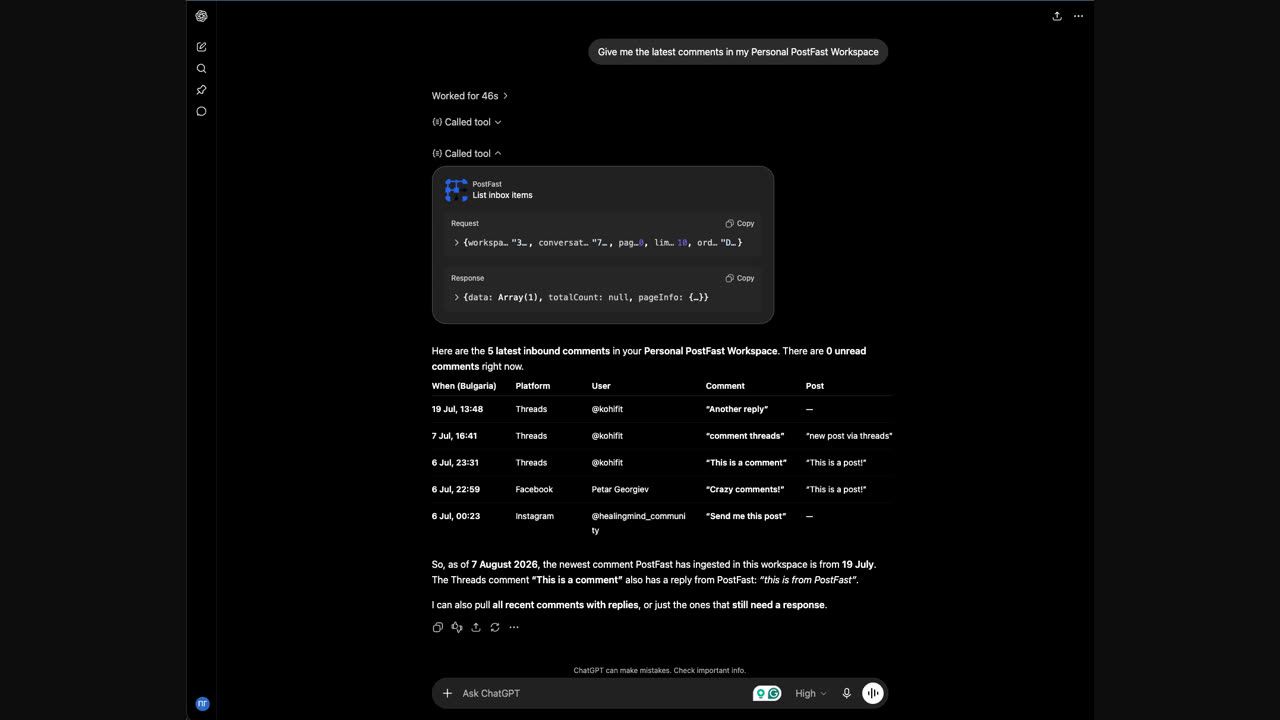
Until this week, "AI for social media" meant one thing: writing. Draft the caption, pick the hashtags, schedule the post. What happened after publishing, the forty comments asking about pricing, the spam, the question you missed three days ago, stayed a human job.
That changes with the PostFast Social Inbox. It is not just a screen in the dashboard. Every inbox action is exposed through our MCP server and public API, which means Claude, ChatGPT, Cursor, or any MCP client can operate it: read your comments, draft replies, send them, hide spam, and hand the tricky ones back to you. In PostFast, inbox access from an AI assistant is included on every plan, including the 7-day trial, with no per-seat or per-conversation charge.
The Workflow, In One Prompt
Connect PostFast to your assistant, then say:
"Go through today's comments, answer the easy ones in my voice, and flag anything I should see myself."
Here is what happens behind that sentence:
- The assistant calls
list_inbox_conversationsand sees every unanswered comment thread across your TikTok, Instagram, Facebook and Threads accounts, grouped by post, newest first. - For each thread it reads the full context with
list_inbox_items: the comment, earlier replies, who wrote what. - It drafts replies and sends the ones you approve: in ChatGPT and Claude with
preview_comment_replyand thenreply_to_comment, which shows you each reply and waits for your yes, and in your own scripts withreply_to_inbox_item. Character limits are enforced by the server, so the assistant cannot break platform rules even if it tries. - Spam gets hidden with
set_inbox_item_state. Questions that need you get left open, or assigned to a teammate withassign_inbox_conversation. - Everything it answered gets closed with
set_inbox_conversation_status, so your inbox is a to-do list that actually shrinks.
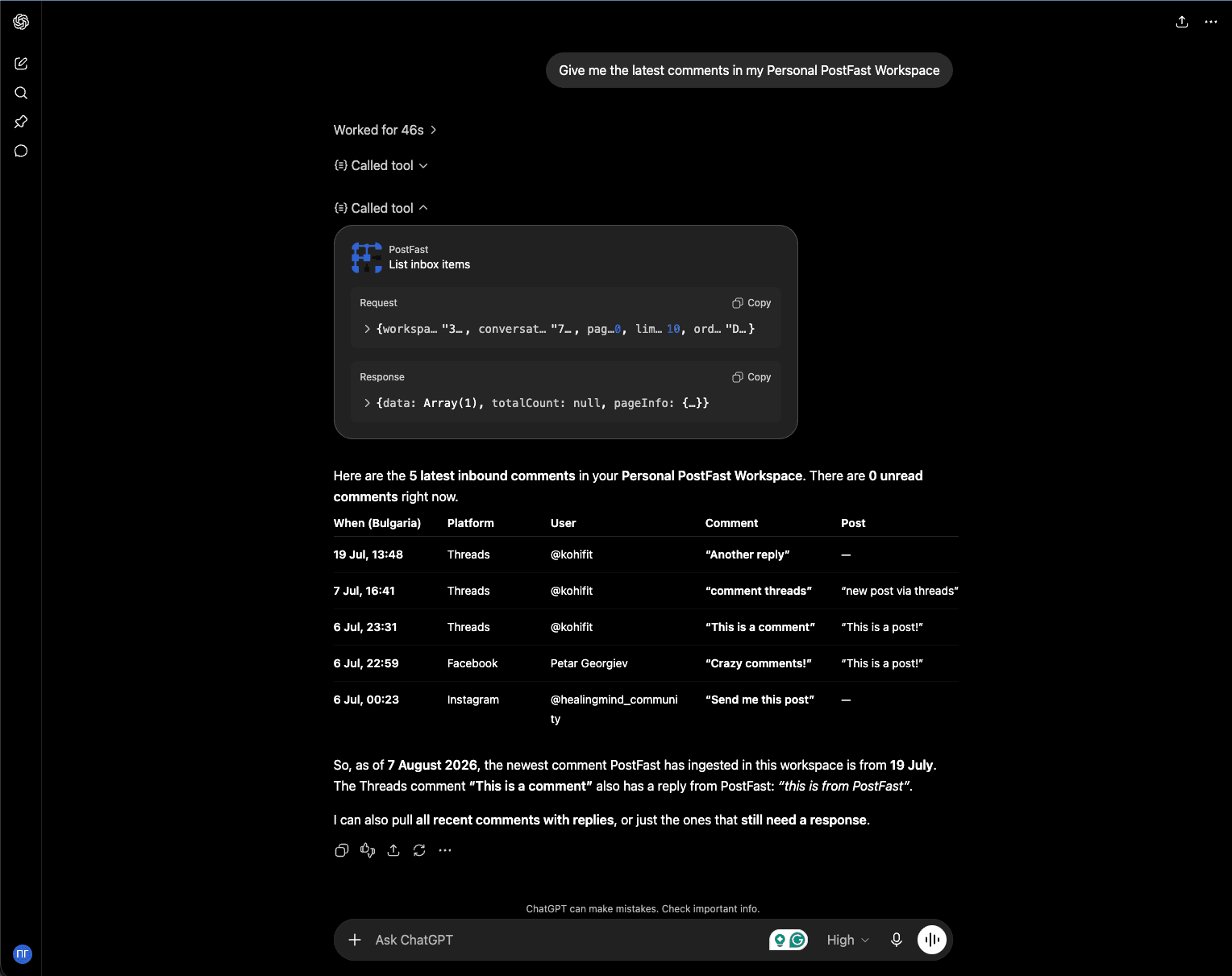
The replies land on the platform like any other reply, and they show up in your PostFast inbox thread marked as sent via API, so you always see what your assistant did.
Guardrails, Because Replies Are Public
Letting software answer your customers in public deserves some skepticism, so here is exactly how the boundaries work:
- You decide what it can touch. Connecting from Claude or ChatGPT is an OAuth flow: a consent screen on PostFast's own site lists what the assistant is asking for, such as viewing comments, replying and moderating, before you approve it. The assistant then acts as you, with your workspace role still enforced on every request, and disconnecting the connector cuts access instantly. Running your own script or the local server instead? That uses a workspace API key you create and can revoke any time. Either way, the inbox only ever contains comments on your own posts, pushed to PostFast by the platforms themselves.
- The server decides what is possible, not the AI. Every conversation carries a server-computed reply capability: whether replying is allowed, the exact character limit, and whether the platform's reply window is still open. The assistant reads those fields instead of guessing platform rules.
- Instagram private replies stay official. An assistant can move a "how much is it?" comment to DMs using Instagram's official private reply, once per comment, within 7 days, exactly like a human would.
- Hard limits, enforced server-side. Replies are rate-limited per workspace, and sending the same reply over and over gets rejected with an error that tells the assistant to vary its wording. And the biggest limit is structural: the inbox can only ever reply to comments on your own posts. Commenting on other people's content is not a restricted feature, it simply does not exist here.
- You choose the autonomy level. Most people start with "draft replies and show me before sending." With your own scripts or the local server you can later let the assistant send routine answers itself, and there the prompt is the policy; in ChatGPT and Claude, every reply waits for your yes.
Setting It Up
- Claude: add PostFast from Claude's connector directory, or as a custom connector using
https://mcp.postfa.st/mcp, or install the local server. Steps: postfa.st/api-integrations/claude - ChatGPT: install PostFast from the ChatGPT plugin directory, or add
https://mcp.postfa.st/mcpthrough Developer mode. Steps: postfa.st/api-integrations/chatgpt - Cursor, VS Code, or any MCP client:
npx postfast-mcpwith your workspace API key: postfa.st/api-integrations/mcp - Your own code or agents: the same operations are plain REST endpoints under
/social-inbox, documented at postfa.st/docs
Ten inbox tools ship in postfast-mcp 0.3.0: listing and reading conversations, unread counts, replying, Instagram private replies, hide and delete, mark-read, snooze and close, and assignment.
What It Costs: Nothing Extra
The Social Inbox, including AI access to it, is part of every PostFast plan, from Starter at 12 euro a month, and it is in the 7-day free trial. No per-seat inbox pricing, no engagement add-on, no separate AI tier. In most social tools the inbox alone starts at several times our whole subscription.
Honest Limits
- It is a comments inbox by design. Comments on your own posts, plus Instagram private replies.
- Platforms today: TikTok (Business accounts), Instagram, Facebook Pages and Threads. LinkedIn comments are coming soon.
- An assistant is as good as your instructions. Give it your tone, tell it what it must never answer (refunds, complaints, anything legal), and keep the flagged pile for yourself. The assign and snooze tools exist exactly so the handoff is clean.
A Note on Platform Rules
Everything above runs through each platform's official comment APIs, the reviewed endpoints built exactly for managing the comments on your own posts, and the same ones the industry's comment tools run on. What platforms actually prohibit is fake engagement: mass, repetitive, or bot comments on other people's content. Replying to the people who comment on your own posts is the use case these APIs exist for.
One thing does not change with automation: platform rules bind your account whether a human or an assistant hits send. That is one more reason to start draft-first and keep replies genuinely useful.
Frequently Asked Questions
Which AI assistants can use the PostFast Social Inbox?
Any MCP client: Claude (from its connector directory, as a custom connector, or through the local server), ChatGPT (from its plugin directory or via Developer mode), Cursor, VS Code, and anything else that speaks MCP. There is also a plain REST API under /social-inbox for your own scripts and agents.
Can the AI send replies without my approval?
Not in Claude or ChatGPT: there, the connector shows you each reply and waits for your yes before it is sent. For your own scripts and the local server it is an API key you control, and the usual pattern there is draft-first: it proposes replies and you approve before anything is sent. Fully autonomous replying is possible only there, and it is a prompt you write deliberately.
What stops the AI from breaking platform rules?
The server. Every conversation carries a computed reply capability: whether a reply is allowed, the exact character limit per platform, and whether the reply window is still open. Replies that violate those constraints are rejected server-side.
Which platforms does this work on?
TikTok (Business accounts), Instagram, Facebook Pages and Threads comments, with LinkedIn coming soon. The inbox handles comments on your own posts, not direct messages, with official Instagram private replies as the one DM-shaped exception.
Does AI access cost extra?
No. The Social Inbox and its MCP and API access are included in every PostFast plan, from Starter at 12 euro a month, and in the free trial.
Your posts get comments whether you are online or not. Now your assistant can hold the line until you are.
Related
The PostFast MCP server for Claude and ChatGPT
Claude, ChatGPT, Cursor
Which Social Media Scheduler Has an API and an MCP Server for Claude and ChatGPT? PostFast, on Every Plan
PostFast: REST API and official MCP server on every plan, trial included. OAuth connector for ChatGPT and Claude, npx server for Claude Code and Cursor.

How to Connect Claude to Instagram: Post, Schedule, Reply
Connect Claude to Instagram so it can schedule posts, Reels and Stories, answer comments and report post stats. Setup steps, prompts that work, and limits.

How to Connect Claude to Facebook Pages: Post, Schedule, Reply
Connect Claude to your Facebook Page with a connector: schedule posts, Reels and Stories, answer comments, and approve before anything goes live.

PostFast and OpenClaw: How to Schedule Social Media Posts with AI
Managing social media across multiple platforms is a time sink. Open the scheduler, pick your accounts, write the caption, upload media, set the time, repeat. Multiply that by every post, every week. It adds up fast.

10 Creative Strategies for Finding Perfect Names for a Business in 2026
Struggling to find great names for a business? Explore our 10 proven strategies, with real examples and practical tips to help you find the perfect fit.

Can ChatGPT Post to Instagram and Facebook? Yes, Here Is How
Yes, with a connected app. Use PostFast to schedule Instagram and Facebook posts, Reels and Stories from ChatGPT, with approval before publishing.