 vs
vs
PostFast vs SocialPilot: Pricing, Features & Platform Comparison
An honest, feature-by-feature comparison with real pricing math. See how PostFast and SocialPilot stack up for scheduling, analytics, team collaboration, and more.
Last updated: September 27, 2026
Quick Comparison
Our pick- Best for
- Flat pricing with no per-seat fees, full REST API, MCP Server, Make/n8n integrations, Telegram support
- Starting price
- €10/mo annual (flat)
- Platforms
- 11
- Free plan
- 7-day free trial
- Best for
- Agency white-label, AI content generation, client management, review management
- Starting price
- $17/mo annual ($20 monthly)
- Platforms
- 10
- Free plan
- 14-day free trial (no free plan)
Try PostFast free for 7 days, no credit card required
Start Free Trial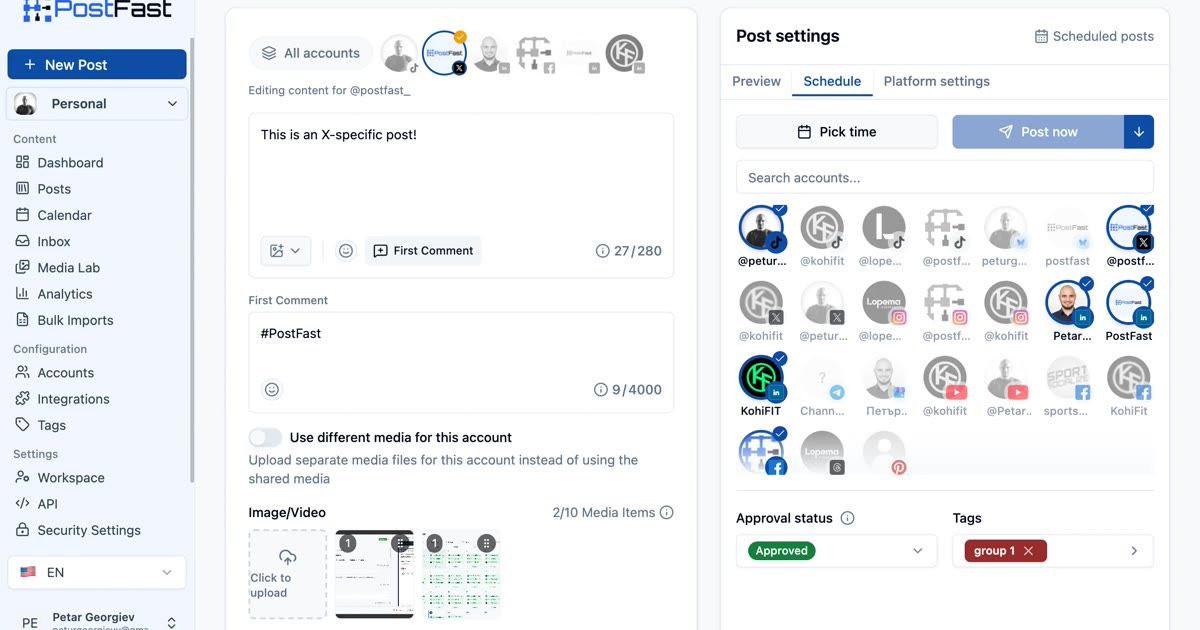
Publishing & Scheduling
Both tools offer cross-platform scheduling with calendar views. SocialPilot includes bulk scheduling, RSS feeds, repeat posts, and smart queues on most plans. PostFast allows up to 150 posts queued at once on Starter, rising to unlimited on Pro, with seats included in the plan. SocialPilot gates bulk scheduling behind Standard+ ($40/mo).
| Feature | PostFast | SocialPilot |
|---|---|---|
| Cross-platform posting | ||
| Calendar view | Creator plan+ | |
| Unlimited scheduled posts | ||
| Bulk scheduling & CSV uploads | Standard+ ($40/mo) | |
| Smart Queues (auto-scheduling) | ||
| RSS feeds automation | 5–20 feeds depending on plan | |
| Repeat / evergreen posts | ||
| First comment scheduling | X, Instagram, Facebook, YouTube, Threads, TikTok | |
| LinkedIn document posts (PDF, PPT, Word) | ||
| Fully automated Instagram Reels & Stories | ||
| Instagram Trial Reels | ||
| Facebook Stories & Reels | ||
| Instagram Carousels | ||
| URL shortener (Bitly, Rebrandly, Sniply) | ||
| UTM parameters | ||
| Custom fields | ||
| Watermark on images |
Content Creation
SocialPilot includes AI Pilot for caption generation with credit limits (500–unlimited depending on plan), plus stock photo libraries. PostFast integrates AI through MCP and OpenClaw.
| Feature | PostFast | SocialPilot |
|---|---|---|
| AI caption generation | Via MCP / AI agents | AI Pilot (500–unlimited credits) |
| Content library | ||
| Holiday calendar | ||
| Image editor | Crop tool with presets, no filters | |
| Unsplash stock photos | ||
| Giphy integration | ||
| Canva integration | ||
| Instagram image tagging | ||
| Location tagging |
See PostFast in action
7-day free trial · No credit card · Cancel anytime
Analytics & Reporting
SocialPilot includes detailed analytics on Standard+ ($40/mo) with custom reports, competitor reports, and white-label PDF reports on Premium+ ($100/mo). PostFast provides post-level analytics with advanced dashboards on Creator plans.
| Feature | PostFast | SocialPilot |
|---|---|---|
| Post-level analytics | Standard+ ($40/mo) | |
| Advanced analytics dashboard | Creator plan+ | Standard+ ($40/mo) |
| Competitor reports | Standard+ ($40/mo) | |
| White-label PDF reports | Pro and Enterprise | Premium+ ($100/mo) |
| Schedule reports via email | Premium+ ($100/mo) | |
| Custom reports | Standard+ ($40/mo) | |
| Hashtag analytics | Standard+ ($40/mo) |
Team & Client Collaboration
SocialPilot is agency-focused with client seats, approval workflows, and white-label capabilities. However, user limits are strict: Essentials has 1 user, Standard has 3, Premium has 6. Unlimited users requires Ultimate ($200/mo). PostFast includes seats with the plan instead, from €10/mo on annual: 1 user on Starter, then 5, 8, 15 and 30 per workspace, with no per-seat charge.
| Feature | PostFast | SocialPilot |
|---|---|---|
| Multi-user workspaces | Seats included per plan, no per-seat fee (1 to 30 per workspace) | Essentials: 1, Standard: 3, Premium: 6, Ultimate: unlimited |
| Client seats | Client role, uses one of the plan's seats | Premium+ (unlimited, free) |
| Content approval workflows | All plans | Standard+ ($40/mo) |
| Client approval workflows | All plans (Client role approves) | Premium+ ($100/mo) |
| Manager approval workflow | Per-user Approve permission, single gate | Standard+ ($40/mo), routed stage |
| White-label branding | Workspace logo | Premium+ ($100/mo), Advanced on Ultimate |
| Slack integration | ||
| Pay extra per account beyond the plan cap | No, the plan's account limit is the price | $4/mo per extra account |
| Pay extra per user beyond the plan cap | No, seats are included in the plan | $5/mo per extra user (Standard & Premium) |
Engagement & Community
Both tools ship a social inbox, but the gating differs. SocialPilot's starts on Standard ($34/mo annual, $40/mo monthly) and covers comments and messages. PostFast's covers comments on TikTok, Instagram, Facebook and Threads posts and is included on every plan, including the trial.
| Feature | PostFast | SocialPilot |
|---|---|---|
| Social inbox | All plans | Standard+ ($34/mo annual) |
| Reply to comments & messages | Comments only | Standard+ ($34/mo annual) |
| Social inbox automation | Standard+ ($34/mo annual) | |
| Review management | Separate product |
API & Integrations
PostFast offers a full REST API on all plans from €10/mo on annual, plus MCP Server, Make, n8n, and Zapier integrations. SocialPilot's API is Enterprise-only (custom pricing) and supports Zapier but not Make or n8n.
| Feature | PostFast | SocialPilot |
|---|---|---|
| REST API | All plans (full CRUD) | Enterprise only (custom pricing) |
| MCP Server (Claude, Cursor, VS Code) | ||
| AI agent integrations (Hermes Agent, OpenClaw, NanoClaw) | ||
| Zapier integration | ||
| Make (Integromat) integration | ||
| n8n integration | Verified community node | |
| ChatGPT app / GPT integration | Published ChatGPT app (hosted connector) | Custom GPT |
| Browser extension | Chrome & Firefox | |
| WordPress plugin | ||
| Shopify integration | ||
| Mobile app (iOS & Android) |
Platform Support
PostFast supports 11 social networks while SocialPilot supports 10. Here's the full breakdown.
| Platform | PostFast | SocialPilot |
|---|---|---|
| X (Twitter) | ||
| TikTok | ||
| YouTube | ||
| Threads | ||
| BlueSky | ||
| Telegram | ||
| Google Business Profile |
Pricing Comparison
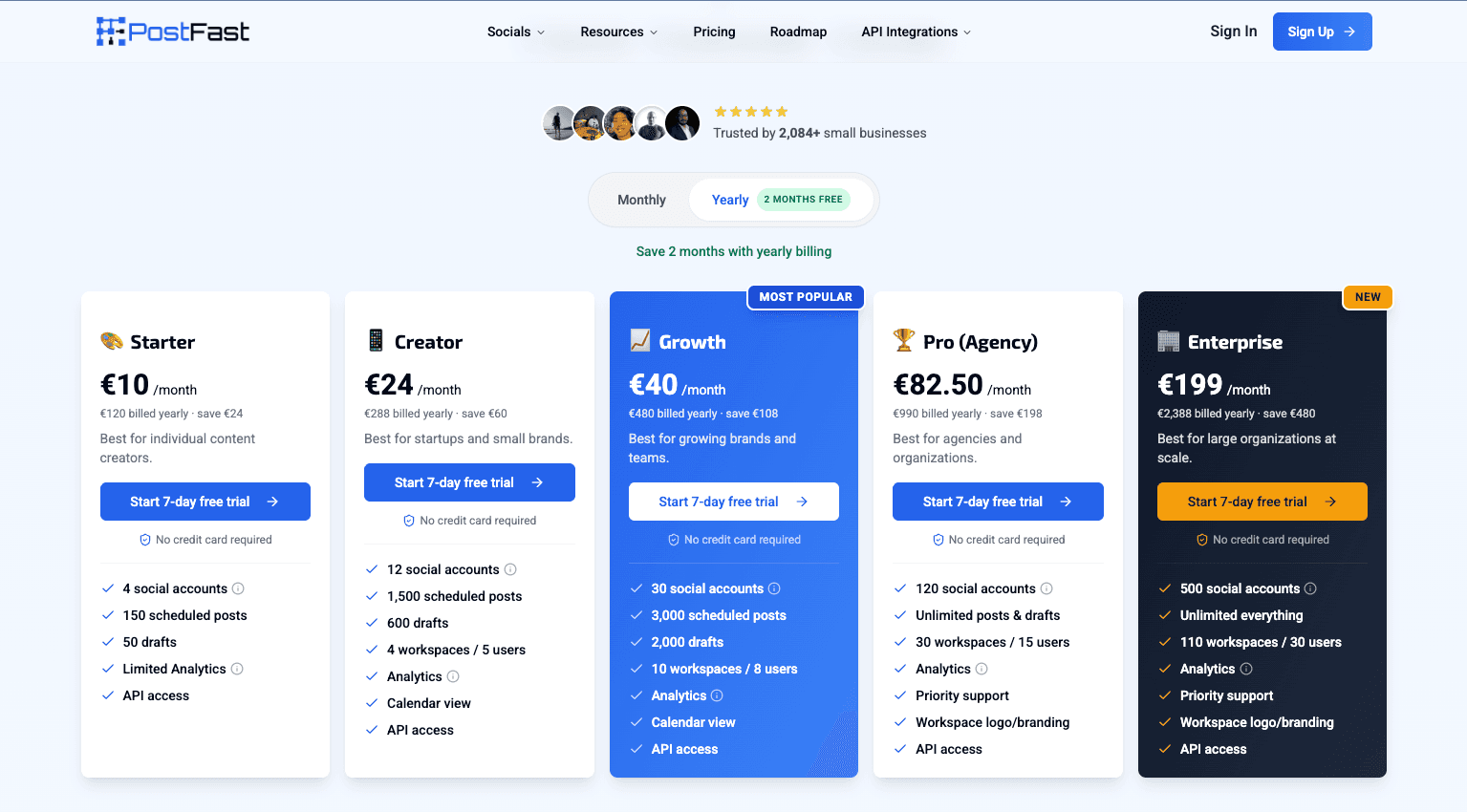
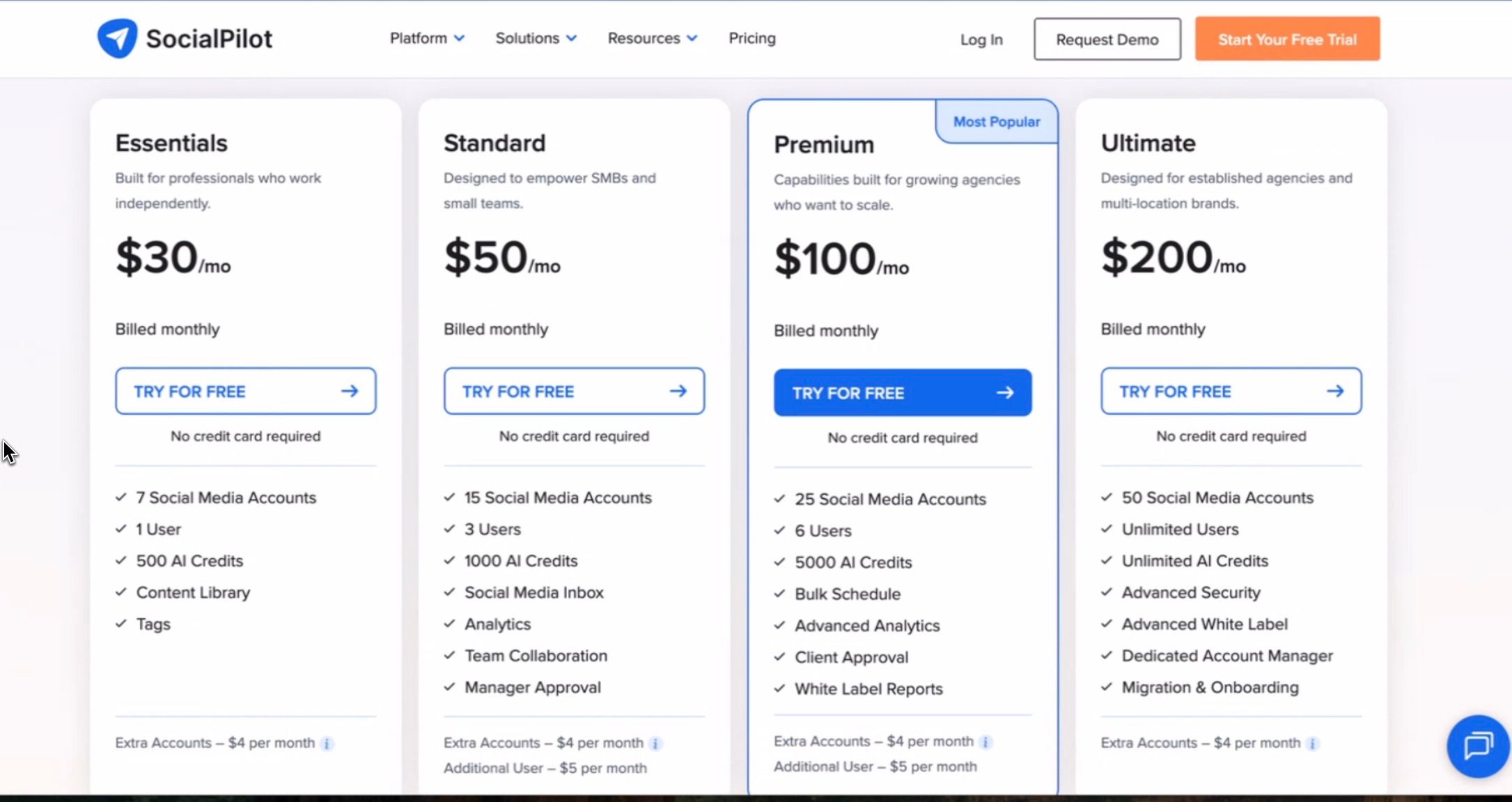
Side-by-side pricing as you scale from a few accounts to 100+.
| Accounts | PostFast | SocialPilot |
|---|---|---|
| 4 | €10/mo annual (Starter) | $17/mo (Essentials, 5 accounts, 1 user) |
| 10 | €24/mo annual (Creator) | $34/mo (Standard, 3 users) |
| 12 | €24/mo annual (Creator) | $42/mo (Standard + 2 extra accounts at $4) |
| 25 | €40/mo annual (Growth) | $105/mo (Premium + 5 extra accounts at $4) |
| 50 | €82.50/mo annual (Pro) | $210/mo (Ultimate + 10 extra accounts at $4) |
| 120 | €82.50/mo annual (Pro) | $490/mo (Ultimate + 80 extra at list), or Enterprise quote |
| 500 | €199/mo annual (Enterprise) | $2,010/mo (Ultimate + 460 extra at list), or Enterprise quote |
Both columns are annual-billed per-month. PostFast prices in EUR (flat rate, seats included per plan). SocialPilot prices in USD: Essentials $17, Standard $34, Premium $85, Ultimate $170 on annual billing ($20/$40/$100/$200 monthly). SocialPilot caps accounts per plan (Essentials 5, Standard 10, Premium 20, Ultimate 40) and users per plan (1/3/6/unlimited); extra accounts are $4/mo each and extra users $5/mo each on Standard and Premium, and those add-on rates are listed flat rather than discounted on annual billing. The 120 and 500 account rows apply that list add-on rate on top of Ultimate; in practice SocialPilot routes rosters that size to a quoted Enterprise plan, so treat them as the published-price ceiling rather than a quote. SocialPilot figures read from its own pricing page on 16 September 2026. Percentages and multiples on this page compare both sides in EUR at the ECB reference rate of 25 September 2026 (1 EUR = 1.1403 USD).
Save up to 56% vs SocialPilot
7-day free trial · No credit card required
Strengths at a Glance
No tool is perfect for everyone. Here's an honest look at where each platform excels.
strengths
- 1Unlimited users on Ultimate. SocialPilot stops counting seats on Ultimate ($170/mo annual, $200 monthly). PostFast caps seats per workspace at every tier (1, 5, 8, 15, 30).
- 2Broader inbox. SocialPilot's inbox handles messages and story replies as well as comments, and adds inbox automation (Standard+). PostFast's Social Inbox is comments-only on TikTok, Instagram, Facebook and Threads, though it is included from the entry plan rather than Standard.
- 3Agency white-label. Custom-branded dashboard with your logo, favicon, and domain on Premium ($100/mo) and Advanced white-label on Ultimate ($200/mo). PostFast only offers workspace logo.
- 4Client management. Dedicated client seats with client-specific approval workflows for agencies managing multiple brands. PostFast doesn't have client management.
- 5AI Pilot. Built-in AI caption generation with 500–unlimited credits depending on plan. PostFast integrates AI through MCP and OpenClaw instead.
- 6Smart Queues. Automatically schedule posts at optimal times using queued slots. PostFast doesn't offer queue-based scheduling.
- 7RSS feeds automation. Auto-publish from RSS feeds (5–20 feeds depending on plan). PostFast doesn't support RSS feeds.
- 8Repeat / evergreen posts. Schedule content to republish automatically. PostFast doesn't support recurring posts.
- 9Content library. Store and organize reusable content, images, and videos. PostFast doesn't offer a content library.
- 10Scheduled report delivery. Branded PDF reports emailed to clients on a schedule. PostFast also puts the client's logo and name on the PDF and removes its own footer on Pro and Enterprise, but you export and send it yourself.
- 11Competitor reports. Track and benchmark competitor social performance. PostFast doesn't offer competitor analytics.
- 12Review management. Separate product for managing Google, Yelp reviews. PostFast doesn't offer review management.
- 13Browser extension. Schedule content from any webpage with Chrome/Firefox extension. PostFast doesn't offer a browser extension.
- 14ChatGPT GPT integration. Schedule posts directly from ChatGPT. PostFast uses MCP Server for AI tool integration instead.
strengths
- 132% cheaper to start. PostFast Starter is €10/mo on annual for 4 accounts. SocialPilot Essentials is $17/mo on annual (about €15; $20 monthly) for 5 accounts; both entry tiers are single-user.
- 2No per-seat charge. PostFast includes 5 users per workspace on Creator, 8 on Growth and 15 on Pro at no extra cost. SocialPilot caps users at 1, 3 and 6 on its lower tiers and bills $5/mo per extra user.
- 356% cheaper at 25 accounts. PostFast Growth (€40/mo on annual) covers 30 accounts with 8 users per workspace. SocialPilot Premium ($85/mo on annual) covers only 20 accounts, so 25 costs $105/mo (about €92) with extra-account add-ons, and limits you to 6 users.
- 4Flat past the account cap. PostFast Pro is €82.50/mo on annual for 120 accounts. SocialPilot Ultimate is $170/mo on annual for 40, so 50 accounts costs $210/mo once the extra-account add-ons are counted.
- 53x more accounts. PostFast Pro (€82.50/mo on annual) supports 120 accounts. SocialPilot's best non-enterprise plan (Ultimate, $170/mo on annual) supports only 40.
- 6Full REST API on all plans. PostFast's API is available from €10/mo on annual. SocialPilot's API requires Enterprise (custom pricing).
- 7MCP Server on every plan. Schedule posts directly from Claude, Cursor, VS Code Copilot, and other AI tools, on every plan including the 7-day trial.
- 8AI agent integrations (Hermes Agent, OpenClaw, NanoClaw). Schedule social media posts by messaging a self-hosted or local AI agent from WhatsApp, Telegram, Slack, Discord, and Signal. Unique to PostFast.
- 9Make and n8n integrations. PostFast integrates with Make and n8n in addition to Zapier. SocialPilot only supports Zapier.
- 10Telegram support. Native support for Telegram channels and groups. SocialPilot doesn't support Telegram.
- 11No per-user charges. PostFast has flat pricing. SocialPilot charges $5/mo per extra user on Standard and Premium plans.
- 12Approval workflows on all plans. PostFast includes approval workflows from €10/mo on annual. SocialPilot requires Standard at $40/mo.
Which Tool Is Right for You?
The best choice depends on your team size, budget, and technical requirements. Here's a quick decision guide.
Choose SocialPilot if:
- •You're an agency that needs white-label branding and client management
- •Replying to direct messages and story replies matters as much as comments
- •Built-in AI content generation (AI Pilot) matters for your workflow
- •Smart Queues and RSS feed automation are part of your publishing process
- •Recurring / evergreen post scheduling is a must
- •You need white-label PDF reports for clients
- •Review management (separate SocialPilot product) is needed
- •You want competitor analytics and benchmarking
- •A ChatGPT GPT or browser extension is useful for your workflow
Choose PostFast if:
- Budget matters - PostFast is 19–56% cheaper at every account tier up to 50
- You have a team of 2+ and don't want per-user limitations or charges
- API access is central to your workflow (SocialPilot API is Enterprise-only)
- You need Make or n8n integrations (SocialPilot only supports Zapier)
- Telegram support is needed
- You need more than 40 accounts without jumping to Enterprise pricing
- You need approval workflows without paying $40/mo
- You're a small team that wants enterprise features at startup pricing
Switching from SocialPilot to PostFast
Migrating between social media schedulers doesn't have to be complicated. Here's how to make the switch.
Switching from SocialPilot to PostFast is straightforward. Connect your social accounts via OAuth - PostFast supports all 10 of SocialPilot's 10 platforms plus Telegram. SocialPilot supports Zapier, so existing automations can be redirected to PostFast's Zapier, Make, or n8n integrations. PostFast's REST API provides programmatic access SocialPilot reserves for Enterprise. PostFast's Social Inbox covers comments on TikTok, Instagram, Facebook and Threads on every plan. Note that PostFast doesn't include message handling in that inbox, a content library, client management, recurring posts, or RSS feeds, and its white labelling covers the client PDF report rather than a branded dashboard on your own domain - if you rely on these agency-focused features, evaluate whether PostFast's API and MCP capabilities meet your needs.
Researching more options?
See all SocialPilot alternativesFrequently Asked Questions
Common questions about PostFast vs SocialPilot, answered.
Is SocialPilot better than PostFast?
SocialPilot is better if you're an agency needing white-label branding, client management, an inbox that also covers messages, AI content generation, and white-label reports. PostFast is better if you need affordable multi-user scheduling, a REST API on all plans, MCP Server for AI-powered scheduling, Telegram support, and Make/n8n integrations - at 19–56% lower pricing up to 50 accounts.
How much does SocialPilot cost vs PostFast?
SocialPilot on annual billing: Essentials $17/mo (5 accounts, 1 user), Standard $34/mo (10 accounts, 3 users), Premium $85/mo (20 accounts, 6 users), Ultimate $170/mo (40 accounts, unlimited users); monthly billing is 15% higher ($20/$40/$100/$200), and extra accounts cost $4/mo each. PostFast on annual billing: €10/mo (4 accounts, 1 user), €24/mo (12 accounts), €40/mo (30 accounts), €82.50/mo (120 accounts). At 10 accounts, PostFast Creator is €24/mo with 5 users per workspace and SocialPilot Standard is $34/mo with 3 users, both on annual billing. The two are priced in different currencies, so compare checkout totals rather than a converted percentage.
Does SocialPilot have an API?
SocialPilot's API is only available on the Enterprise plan (custom pricing). It also includes SSO. PostFast offers a full REST API with CRUD operations on all plans starting at €10/mo on annual, plus MCP Server integration for AI tools.
How many users does SocialPilot allow?
SocialPilot limits users by plan: Essentials (1 user), Standard (3 users), Premium (6 users), Ultimate (unlimited). Extra users cost $5/mo each on Standard and Premium. PostFast includes its seats in the plan from €10/mo on annual, with no per-user charges: 1 user on Starter, then 5, 8, 15 and 30 per workspace.
Can I switch from SocialPilot to PostFast?
Yes. Connect your social accounts via OAuth in PostFast. PostFast supports all 10 of SocialPilot's 10 platforms plus Telegram. SocialPilot's Zapier automations can be redirected to PostFast. PostFast's Social Inbox brings comment replies on TikTok, Instagram, Facebook and Threads with you, on every plan. Note that PostFast doesn't have message handling in that inbox, a content library, or client management, and its white labelling covers the client PDF report rather than a branded dashboard - evaluate whether PostFast's API and MCP capabilities meet your agency needs.
Does SocialPilot support Telegram?
No. SocialPilot does not support Telegram. It supports 10 platforms: Facebook, Instagram, TikTok, X (Twitter), LinkedIn, Threads, YouTube, Pinterest, Google Business Profile, and Bluesky. PostFast supports Telegram channels and groups natively.
Learn More
Explore PostFast features, integrations, and documentation.
Ready to try PostFast?
Start your 7-day free trial today. No credit card required. Connect your accounts and start scheduling in minutes.
Start Your Free Trial