Introducing the PostFast Social Inbox: Schedule, Publish, and Now Reply
The PostFast Social Inbox is live: TikTok, Instagram, Facebook and Threads comments in one stream, replies included, on every plan from €15 a month.
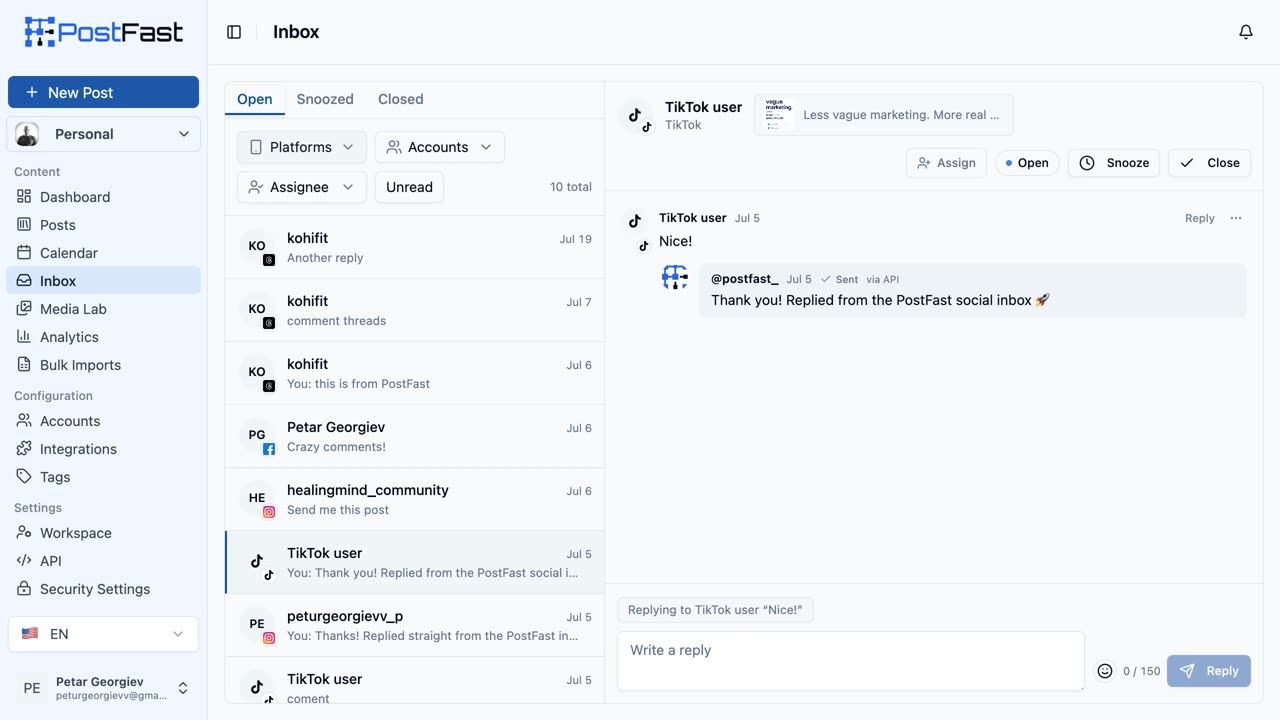
Until now, PostFast helped you plan and publish. What happened after you hit publish was your problem: four apps, four notification tabs, and the quiet fear that somewhere a customer asked a question three days ago and nobody answered.
That changes today. The Social Inbox is live for every PostFast workspace.
One Stream for Four Platforms
The comments people leave on your TikTok, Instagram, Facebook Page and Threads posts now land in one place, grouped by the post they belong to. The platforms push each comment to PostFast the moment it happens, so new comments usually appear within seconds. No polling, no refresh button.
There is nothing to set up. The accounts you already publish with are the accounts the inbox uses. Connect an account once and its comments simply start arriving. LinkedIn page comments are coming soon.
What You Can Do From the Inbox
- Reply in context. Answer a whole thread or a single comment, with a live character counter that knows each platform's limit.
- Take an Instagram comment private. Answer one comment with a direct message using Instagram's official private reply, once per comment and within 7 days of it. Perfect for the "how much is it?" questions you would rather not negotiate in public.
- Hide, unhide, or delete. Hiding hides the comment on the platform itself and can be undone whenever you like. Deleting removes it on the platform too and cannot be undone.
- Triage like a team. Every conversation is Open, Snoozed or Closed. Snooze what can wait, close what is finished, reopen what comes back, and assign the conversation to the teammate who should answer it.
- Never lose your place. Unread counts on every conversation and a New divider inside each thread show exactly what arrived since you last looked. Opening a conversation marks it read.
- Filter the noise. Narrow the list by platform, account, assignee or unread only, then clear it all in one click.
Reply length is handled for you, per platform:
| Platform | Reply limit |
|---|---|
| TikTok | 150 characters |
| 2,200 characters | |
| 8,000 characters | |
| Threads | 500 characters |
And if you run client accounts, workspace roles carry over: Admins and Editors reply and moderate, Client users read along without being able to touch anything.
Included on Every Plan. Yes, Every Plan.
Engagement inboxes are usually where social media tools get expensive. The industry pattern is the same everywhere: scheduling is the cheap tier, replying to your own customers is the premium one, often priced per seat or per user.
We think that is backwards. Replying to the people who comment on your posts is not a premium activity. It is the whole point of posting.
So the Social Inbox is included on every PostFast plan, from Starter at €15 a month, and in the 7-day free trial too. No per-seat charge, no engagement add-on, no usage meter on replies. A post that takes off costs you nothing extra.
Connected Facebook or Threads a While Ago? Reconnect Once.
Comment management needs a permission that older connections did not grant. If you connected your Facebook account before 28 July 2026 or your Threads account before 4 August 2026, the inbox will ask you to reconnect that account once.
Reconnecting takes a few seconds, adds the comment permission, and changes nothing else. Your scheduled posts, your analytics and your account settings all stay exactly as they are. Accounts connected after those dates are already set.
What V1 Is, and What It Is Not
We would rather tell you the edges ourselves:
- Comments, not DMs. The inbox covers comments on your own posts, with Instagram private replies as the one exception. That is by design.
- Four platforms today. X, YouTube, Pinterest, Bluesky, Telegram and Google Business Profile are not covered yet. LinkedIn is coming soon.
- New comments only. The inbox starts counting from launch and from the moment each account is connected. Old comments are not imported, so it fills up as new activity arrives rather than arriving full.
One update since launch: the inbox is now wired into the same MCP and API connectors that schedule PostFast posts, so an AI assistant can read your comments and reply with the same permissions as a team member. The full walkthrough is in our AI inbox post.
How to Start
Already on PostFast? The Inbox tab is waiting in your dashboard. Open it and your comments are either already there or one reconnect away.
New here? Start a free 7-day trial, connect the accounts you post with, and comments join your content calendar the moment they happen. No credit card needed.
Frequently Asked Questions
Which platforms does the Social Inbox support?
Comments on your TikTok, Instagram, Facebook Page and Threads posts. LinkedIn page comments are coming soon. X, YouTube, Pinterest, Bluesky, Telegram and Google Business Profile are not covered in this release.
Does the Social Inbox cost extra?
No. It is included in every PostFast plan, from Starter at €15 a month, and in the 7-day free trial. There is no per-conversation charge, no per-seat inbox fee and no engagement add-on.
Can I answer DMs in the inbox?
V1 is comments. The one exception is Instagram private replies, which let you answer a comment with a direct message using the official API, once per comment and within 7 days.
Why is Facebook or Threads asking me to reconnect?
Comment management needs a permission that older connections did not include. Facebook accounts connected before 28 July 2026 and Threads accounts connected before 4 August 2026 need a single reconnect. It takes seconds and changes nothing about your posts or analytics.
Can my whole team use it?
Yes. Conversations can be assigned to workspace members, unread counts are shared, Admins and Editors can reply and moderate, and Client-role users get read-only access. Permissions follow the same workspace roles you already use in PostFast.
Publishing and replying belong in the same tool. Now they are in the same tab.
Related
How to Connect Claude to Facebook Pages: Post, Schedule, Reply
Connect Claude to your Facebook Page with a connector: schedule posts, Reels and Stories, answer comments, and approve before anything goes live.
How to Schedule Threads Carousels (4 to 6 Slide Formula)
You can plan and schedule Threads carousels without hopping between devices. PostFast lets you build a week of posts, line them up on a calendar, and publish on time.

Meta Muse AI for Social Media Managers (2026): What the Agent Does, What It Costs, and How to Connect a Scheduler
Meta Muse is Meta's personal AI agent. What it can do for social media managers today, what it costs, and how a scheduler connects through connectors.
Can ChatGPT Post to Instagram and Facebook? Yes, Here Is How
Yes, with a connected app. Use PostFast to schedule Instagram and Facebook posts, Reels and Stories from ChatGPT, with approval before publishing.