 vs
vs
PostFast vs Loomly: Pricing, Features & Platform Comparison
An honest, feature-by-feature comparison with real pricing math. See how PostFast and Loomly stack up for scheduling, analytics, team collaboration, and more.
Last updated: September 27, 2026
Quick Comparison
Our pick- Best for
- Flat pricing, API-first automation, X/Twitter & BlueSky, seats included with no per-seat fee
- Starting price
- €10/mo annual (flat)
- Platforms
- 11
- Free plan
- 7-day free trial
- Best for
- Content inspiration, team collaboration with Slack/Teams, AI captions, saved replies
- Starting price
- $49/mo annual ($65 monthly)
- Platforms
- 9
- Free plan
- 15-day free trial (no free plan)
Try PostFast free for 7 days, no credit card required
Start Free Trial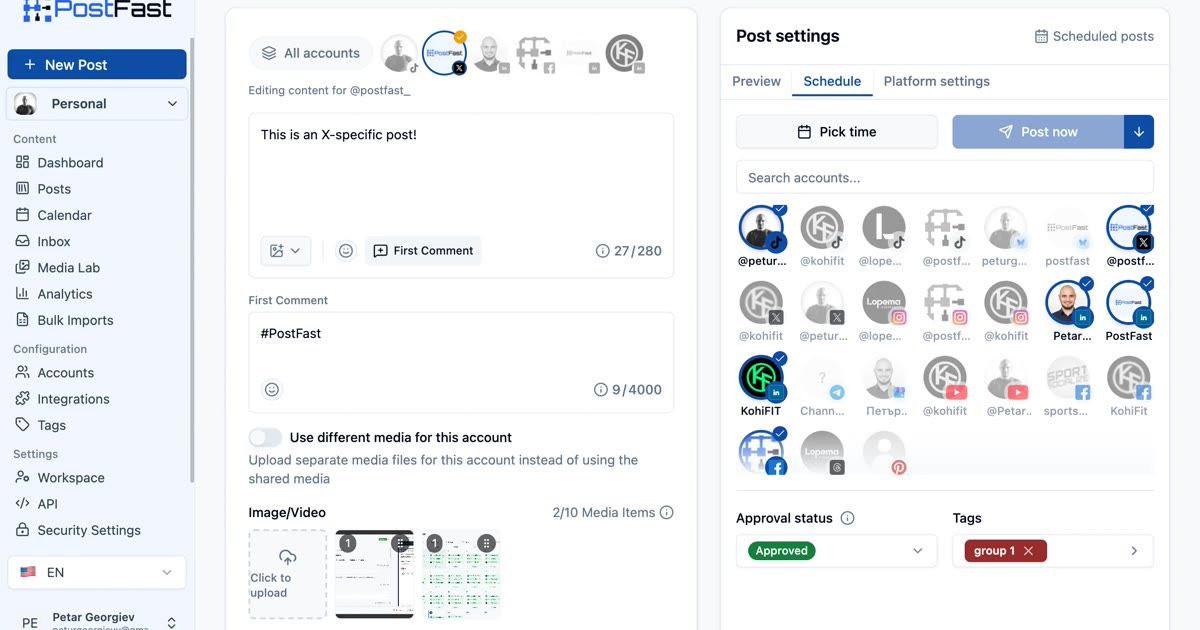
Publishing & Scheduling
Loomly includes unlimited scheduling on its paid plans and adds recurring posts, best time to post, and a slideshow creator. PostFast allows up to 150 posts queued at once on Starter, rising to unlimited on Pro and Enterprise.
| Feature | PostFast | Loomly |
|---|---|---|
| Cross-platform posting | ||
| Calendar view | Creator plan+ | |
| Unlimited scheduled posts | ||
| Bulk posting | ||
| Recurring / evergreen posts | ||
| Best time to post | ||
| First comment scheduling | X, Instagram, Facebook, YouTube, Threads, TikTok | |
| LinkedIn document posts (PDF, PPT, Word) | ||
| Fully automated Instagram Reels & Stories | ||
| Instagram Trial Reels | ||
| Facebook Stories & Reels | ||
| Instagram Carousels | ||
| Post optimization tips | ||
| Slideshow creator |
Content Creation
Loomly focuses on content inspiration with AI captions, post ideas, hashtag manager, and built-in stock libraries. PostFast integrates AI through MCP and OpenClaw instead of built-in tools.
| Feature | PostFast | Loomly |
|---|---|---|
| AI caption generation | Via MCP / AI agents | |
| Post ideas & inspiration | ||
| Hashtag manager | Beyond only ($249/mo annual) | |
| Unsplash stock photos | ||
| Giphy integration | ||
| Google Drive upload | ||
| Canva integration | Export from Canva | |
| Media editor | ||
| Post templates |
See PostFast in action
7-day free trial · No credit card · Cancel anytime
Analytics & Reporting
Loomly provides advanced analytics with scheduled reports, link shortener tracking, and export options on all paid plans. PostFast provides post-level analytics with advanced dashboards on Creator plans.
| Feature | PostFast | Loomly |
|---|---|---|
| Post-level analytics | ||
| Advanced analytics dashboard | Creator plan+ | |
| Schedule reports to stakeholders | ||
| Export reports (PDF/CSV) | All plans (analytics PDF + CSV) | |
| Link shortener with analytics | Loom.ly shortener | |
| UTM parameter tracking |
Team & Collaboration
Loomly caps users at 3 on Starter ($49/mo annual) - unlimited users requires Beyond ($249/mo annual). PostFast includes seats with the plan from €10/mo on annual: 1 user on Starter, then 5, 8, 15 and 30 per workspace, with no per-seat charge.
| Feature | PostFast | Loomly |
|---|---|---|
| Multi-user workspaces | Seats included per plan, no per-seat fee (1 to 30 per workspace) | Starter: 3 users, Beyond: unlimited |
| Approval workflows | All plans | |
| Custom roles & workflows | Three roles + per-user overrides | Beyond only ($249/mo annual) |
| Slack integration | ||
| Microsoft Teams integration | ||
| White-label branding | Workspace logo | Beyond only (branded subdomain, custom logo/favicon) |
| Co-authoring |
Engagement & Community
Both tools ship a social inbox. Loomly's covers comments and messages with saved replies; PostFast's covers comments on TikTok, Instagram, Facebook and Threads posts and is included on every plan.
| Feature | PostFast | Loomly |
|---|---|---|
| Social inbox | Comments, all plans | |
| Reply to comments & messages | Comments only | |
| Saved replies | ||
| Assign conversations to team members | All plans |
API & Integrations
PostFast offers a full REST API, MCP Server, and native Make/n8n integrations. Loomly integrates with Zapier, with no public API and no Make/n8n support; its MCP server reads posts and creates drafts and post ideas.
| Feature | PostFast | Loomly |
|---|---|---|
| REST API | All plans (full CRUD) | |
| MCP Server (Claude, Cursor, VS Code) | Drafts and post ideas only | |
| AI agent integrations (Hermes Agent, OpenClaw, NanoClaw) | ||
| Zapier integration | ||
| Make (Integromat) integration | ||
| n8n integration | Verified community node | |
| Mobile app (iOS & Android) |
Platform Support
PostFast supports 11 social networks while Loomly supports 9. Here's the full breakdown.
| Platform | PostFast | Loomly |
|---|---|---|
| X (Twitter) | ||
| TikTok | ||
| YouTube | ||
| Threads | ||
| BlueSky | ||
| Telegram | ||
| Google Business Profile | ||
| Snapchat | Push notifications only |
Pricing Comparison
Side-by-side pricing as you scale from a few accounts to 100+.
| Accounts | PostFast | Loomly |
|---|---|---|
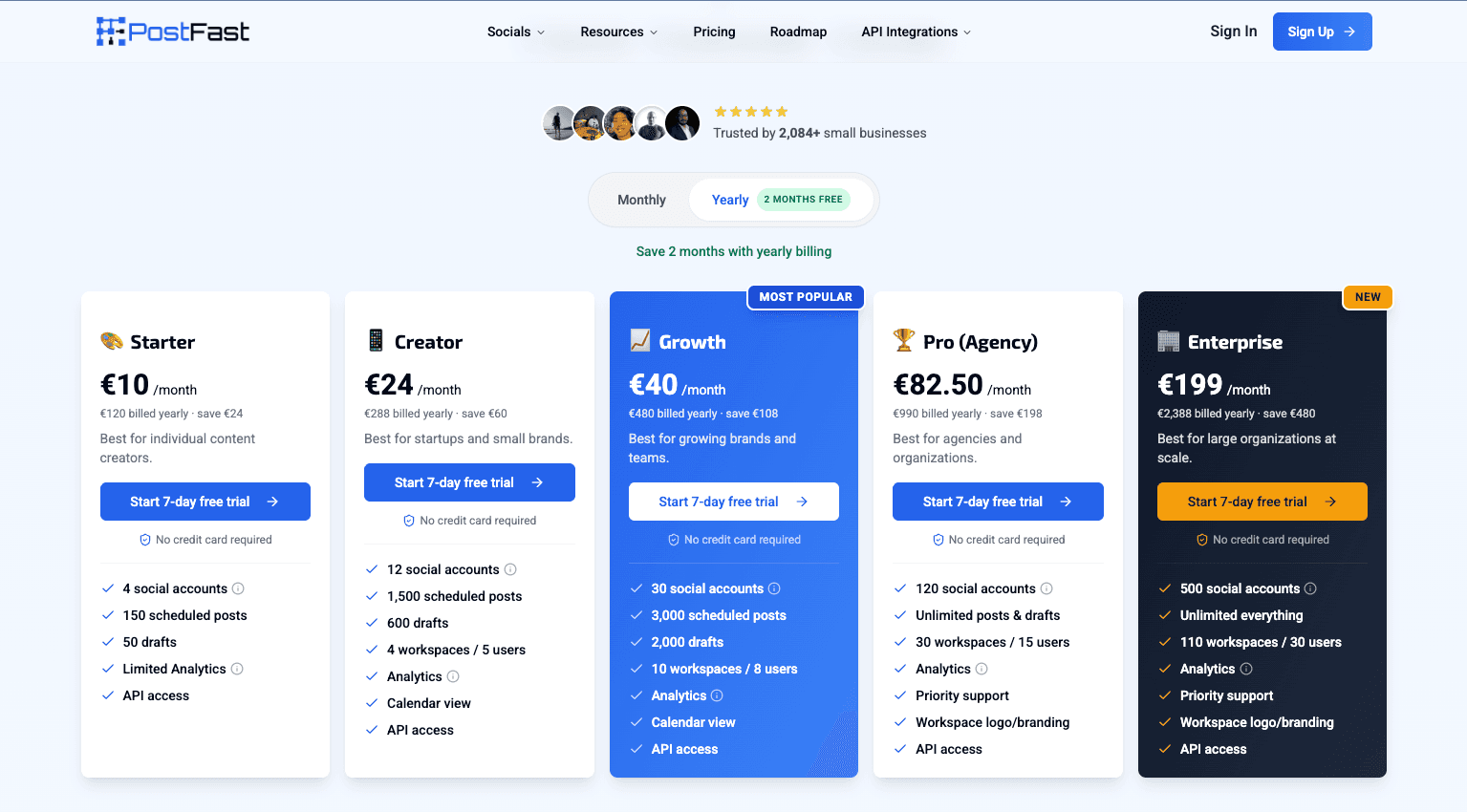
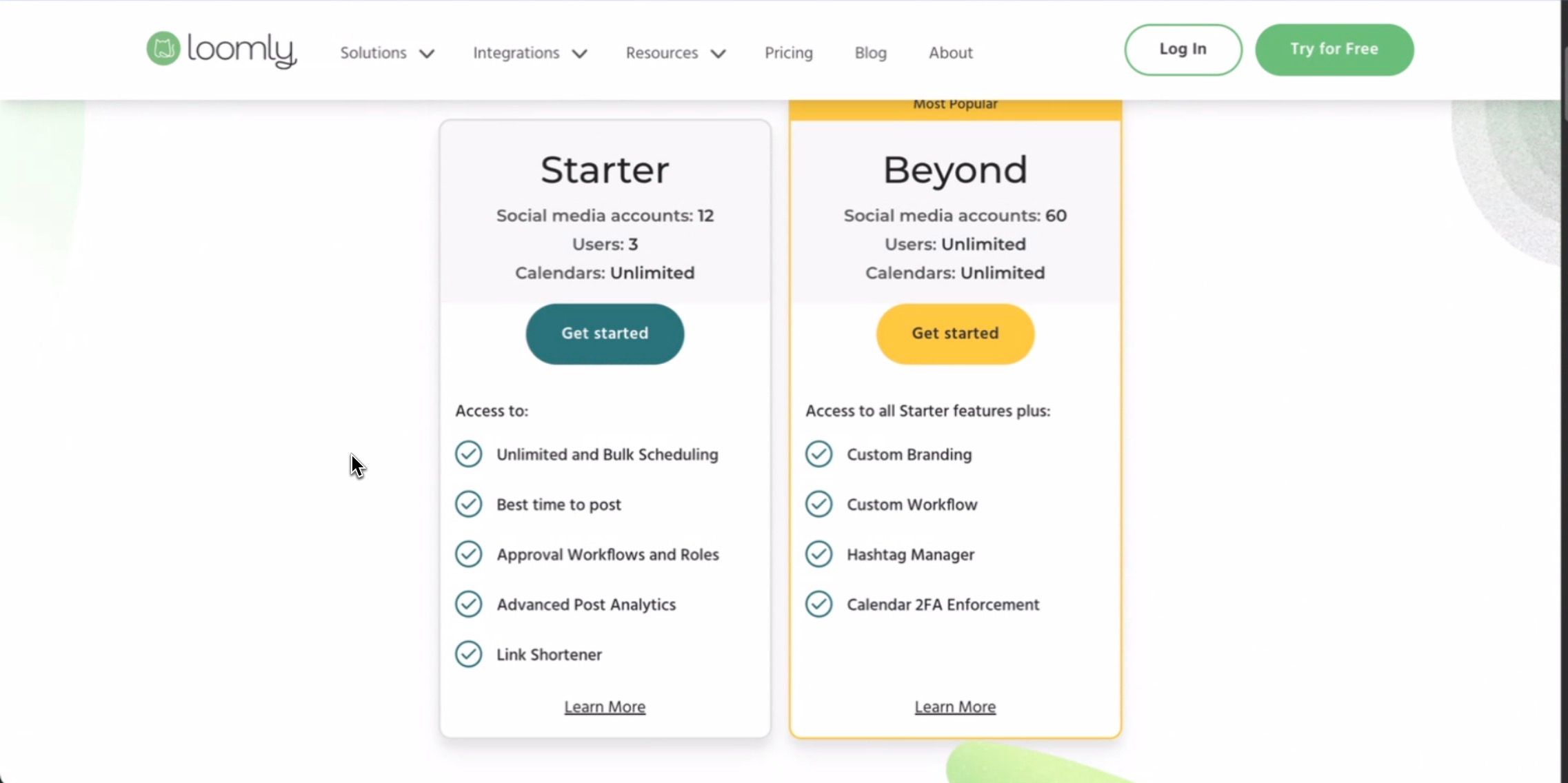
| 3 | €10/mo annual (Starter) | $49/mo (Starter) |
| 4 | €10/mo annual (Starter) | $49/mo (Starter) |
| 12 | €24/mo annual (Creator) | $49/mo (Starter) |
| 13 | €40/mo annual (Growth) | $249/mo (Beyond) |
| 60 | €82.50/mo annual (Pro) | $249/mo (Beyond) |
| 120 | €82.50/mo annual (Pro) | Custom (Enterprise) |
Both columns are annual-billed per-month. PostFast prices in EUR (flat rate). Loomly prices in USD: Starter $49/mo and Beyond $249/mo billed yearly ($65 and $332 on monthly billing). Loomly has no free plan and only 2 paid tiers - if you exceed Starter's 3-user or 12-account limit, you jump from $49/mo to $249/mo on annual billing with no mid-tier option. Prices as of July 2026. Percentages and multiples on this page compare both sides in EUR at the ECB reference rate of 25 September 2026 (1 EUR = 1.1403 USD).
Save up to 81% vs Loomly
7-day free trial · No credit card required
Strengths at a Glance
No tool is perfect for everyone. Here's an honest look at where each platform excels.
strengths
- 1Unlimited users on Beyond. Loomly stops counting seats on Beyond ($249/mo annual, $332 monthly). PostFast caps seats per workspace at every tier (1, 5, 8, 15, 30), so a very large team on one workspace is a point for Loomly.
- 2Broader inbox. Loomly's inbox covers comments, mentions, and messages across all connected channels, with saved replies. PostFast's Social Inbox covers comments on TikTok, Instagram, Facebook and Threads, and has no saved replies (both let you assign conversations to teammates).
- 3Content inspiration. Loomly generates post ideas and suggestions daily, plus trending X topics to spark creativity. PostFast doesn't offer content inspiration.
- 4Best time to post. Loomly analyzes your audience and recommends optimal posting times. PostFast doesn't offer AI-powered scheduling.
- 5AI caption generation. Built-in AI captions on all plans. PostFast integrates AI through MCP and OpenClaw instead.
- 6Hashtag manager. Organize and reuse hashtag collections for faster posting (Beyond plan). PostFast doesn't offer hashtag management.
- 7Slack & Microsoft Teams. Real-time notifications for post approvals and updates. PostFast doesn't integrate with Slack or Teams.
- 8Recurring posts. Schedule evergreen content to republish automatically. PostFast doesn't support recurring posts.
- 9Link shortener with analytics. Built-in Loom.ly link shortener with click tracking. PostFast doesn't offer link shortening.
- 10Snapchat support. Loomly supports Snapchat via push notifications. PostFast doesn't support Snapchat.
- 1115-day free trial. More than double PostFast's 7-day trial period.
- 12Scheduled reports. Auto-send analytics reports to stakeholders on a schedule. PostFast doesn't offer scheduled reports.
- 13Stock libraries. Unsplash, Giphy, and Google Drive integrations for visual content. PostFast doesn't offer built-in stock libraries.
strengths
- 14x cheaper to start. PostFast Starter is €10/mo on annual for 4 accounts. Loomly Starter is $49/mo on annual (about €43) for 12 accounts and 3 users; both entry tiers are single-figure on seats, so the gap here is price, not headcount.
- 244% cheaper at 12 accounts. PostFast Creator (€24/mo on annual) covers 12 accounts with 5 users per workspace. Loomly Starter ($49/mo on annual, about €43) covers 12 accounts with 3 users.
- 3No $200/mo cliff. Need 13+ accounts on Loomly? You jump from $49/mo to $249/mo on annual billing, a $200/mo increase. PostFast Growth gives you 30 accounts for just €40/mo on annual, and Pro (€82.50/mo on annual) handles 120.
- 42x more accounts at 62% less. PostFast Pro (€82.50/mo on annual) supports 120 accounts. Loomly Beyond ($249/mo on annual, about €218) supports only 60.
- 5Seats included, not billed per head. PostFast includes 5 users per workspace on Creator, 8 on Growth and 15 on Pro at no extra charge, against 3 users on Loomly Starter.
- 6X (Twitter) support. Loomly does not support X for scheduling. PostFast supports X with full features including first comments and threads.
- 7BlueSky support. Native BlueSky scheduling. Loomly doesn't support BlueSky.
- 8Telegram support. Native support for Telegram channels and groups. Loomly doesn't support Telegram.
- 9Full REST API on all plans. PostFast's API is available from €10/mo on annual with full CRUD operations and batch posting. Loomly has no public API.
- 10MCP Server on every plan. Schedule posts directly from Claude, Cursor, VS Code Copilot, and other AI tools, on every plan including the 7-day trial.
- 11AI agent integrations (Hermes Agent, OpenClaw, NanoClaw). Schedule social media posts by messaging a self-hosted or local AI agent from WhatsApp, Telegram, Slack, Discord, and Signal. Unique to PostFast.
- 12Make and n8n integrations. PostFast integrates with Make and n8n in addition to Zapier. Loomly only supports Zapier.
- 13LinkedIn document posts. Publish PDFs, PowerPoint, and Word documents to LinkedIn. Loomly doesn't support document posts.
- 14First comment scheduling. Schedule first comments on X, Instagram, Facebook, YouTube, Threads, and TikTok. Loomly doesn't offer first comment scheduling.
Which Tool Is Right for You?
The best choice depends on your team size, budget, and technical requirements. Here's a quick decision guide.
Choose Loomly if:
- •Community management has to cover messages and mentions, not only comments
- •Slack and Microsoft Teams notifications for post approvals matter for your workflow
- •You need content inspiration and AI captions built in
- •Hashtag management and post templates are part of your process
- •You need Snapchat scheduling
- •Recurring / evergreen post scheduling is a must
- •You need scheduled analytics reports sent to stakeholders
Choose PostFast if:
- You need X (Twitter), BlueSky, or Telegram support (Loomly has none of these)
- Budget matters - PostFast is 44–81% cheaper at every priced account tier
- You need more than 3 users without jumping to $249/mo on annual
- API access and automation are central to your workflow (Loomly has no API)
- You want to schedule from AI tools (Claude, Cursor, VS Code) via MCP
- You need Make or n8n integrations (Loomly only supports Zapier)
- You post LinkedIn documents (PDFs, presentations)
- You need first comment scheduling
- You manage 13+ accounts and don't want a $267/mo price jump
- You need 60+ accounts (Loomly caps at 60 on Beyond, PostFast Pro supports 120)
Switching from Loomly to PostFast
Migrating between social media schedulers doesn't have to be complicated. Here's how to make the switch.
Switching from Loomly to PostFast is straightforward. Connect your social accounts via OAuth - PostFast supports 9 of Loomly's 9 platforms (Snapchat not supported) plus X, BlueSky, and Telegram that Loomly doesn't offer. Loomly supports Zapier, so existing automations can be redirected to PostFast's Zapier, Make, or n8n integrations. PostFast's REST API provides programmatic access Loomly doesn't offer. PostFast's Social Inbox covers comments on TikTok, Instagram, Facebook and Threads on every plan. Note that PostFast doesn't include message or mention handling in that inbox, content inspiration, recurring posts, or Slack/Teams notifications - if you rely on these, evaluate whether PostFast's MCP/OpenClaw and API capabilities meet your needs.
Researching more options?
See all Loomly alternativesFrequently Asked Questions
Common questions about PostFast vs Loomly, answered.
Is Loomly better than PostFast?
Loomly is better if your inbox needs to cover messages and mentions as well as comments, or you want content inspiration, AI captions, Slack/Teams notifications, and scheduled reports. PostFast is better if you need X/Twitter, BlueSky, or Telegram support, a REST API on every plan, seats included rather than billed per head, and significantly lower pricing - PostFast is 44–81% cheaper at every priced account tier.
How much does Loomly cost vs PostFast?
Loomly has no free plan and two paid tiers: Starter at $49/mo (12 accounts, 3 users) and Beyond at $249/mo (60 accounts, unlimited users) billed yearly ($65 and $332 on monthly billing). PostFast on annual billing: €10/mo (4 accounts, 1 user), €24/mo (12 accounts, 5 users per workspace), €40/mo (30 accounts, 8 users), €82.50/mo (120 accounts, 15 users). Both cover 12 accounts at their entry tier: PostFast Creator is €24/mo and Loomly Starter is $49/mo, both billed yearly, with 5 users per workspace against Loomly's 3.
Does Loomly support X (Twitter)?
No. Loomly does not support X (Twitter) for scheduling or publishing. If you need to post to X, PostFast supports it with full features including first comments and threaded content. Loomly's supported platforms are: Instagram, Facebook, LinkedIn, TikTok, YouTube, Pinterest, Threads, Google Business Profile, and Snapchat.
Does Loomly have an API?
No. Loomly does not offer a public REST API. It integrates with Zapier for automation and has no Make/n8n support. PostFast offers a production REST API with full CRUD operations on all plans starting at €10/mo on annual, plus MCP Server and OpenClaw integrations.
Can I switch from Loomly to PostFast?
Yes. Connect your social accounts via OAuth in PostFast. PostFast supports 9 of Loomly's 9 platforms plus X, BlueSky, and Telegram. Loomly's Zapier automations can be redirected to PostFast. PostFast's Social Inbox brings comment replies on TikTok, Instagram, Facebook and Threads with you. Note that PostFast doesn't have message handling in that inbox, content inspiration, or Slack/Teams integration - evaluate whether PostFast's API and MCP capabilities meet your automation needs.
Why is there such a big price jump on Loomly?
Loomly only has 2 paid tiers: Starter ($49/mo annual, 12 accounts, 3 users) and Beyond ($249/mo annual, 60 accounts, unlimited users). If you outgrow the 3-user or 12-account limit, you must jump $200/mo to Beyond. PostFast has 5 graduated tiers on annual billing (€10, €24, €40, €82.50, €199) with no sudden price cliffs, and seats included in each plan rather than sold separately (1, 5, 8, 15 and 30 per workspace).
Learn More
Explore PostFast features, integrations, and documentation.
Ready to try PostFast?
Start your 7-day free trial today. No credit card required. Connect your accounts and start scheduling in minutes.
Start Your Free Trial