How to Use a YouTube Video Downloader 4K for Easy 4K Video Downloads
Discover youtube video downloader 4k tips to save 4K videos efficiently with desktop, online, or CLI tools.
On this page (6)
Using a youtube video downloader 4k tool is your best bet when you absolutely need the highest quality video for offline viewing, chopping up for new content, or just building a solid archive. It's the only way to save videos in true Ultra HD (3840x2160), making sure every file is sharp, detailed, and ready for whatever you throw at it.
Why Downloading YouTube Videos in 4K Is a Game Changer
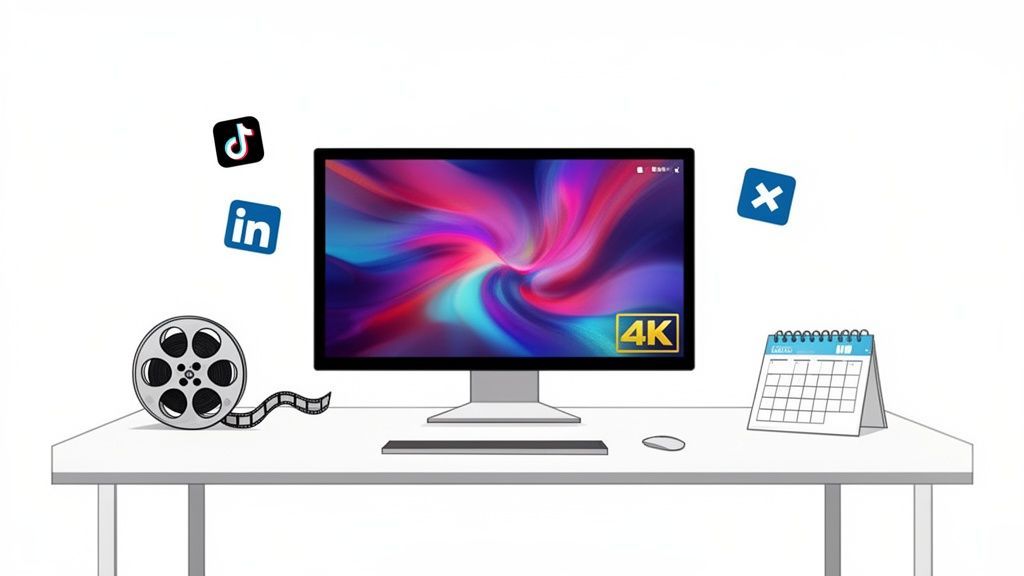
In a world flooded with content, video quality isn't just a nice-to-have; it’s a non-negotiable. 4K resolution stopped being a luxury years ago. Now, it's the standard for any creator or brand serious about looking professional. Let's be honest, 1080p just doesn't cut it anymore when your audience is watching on high-res monitors and TVs.
Grabbing your videos in their original 4K format is a savvy move for a few very practical reasons. It’s about more than just a prettier picture, it's about creating a valuable, future-proof asset you own.
Future-Proofing Your Content Library
Think of that 4K video file as your digital master tape. It holds four times the pixel data of a 1080p video, giving you a perfect source for anything you might need down the road. Five years from now, when screen tech has jumped ahead again, your 4K content will still look crisp. Those lower-res files? They’ll just look old.
Having a high-resolution archive means you never have to re-shoot or settle for subpar quality when a new project or platform emerges. It protects your creative investment for the long term.
This archival strategy is crucial. You maintain total control over your best work, completely independent of YouTube's whims, platform changes, or dodgy internet connections.
Unlocking High-Quality Editing and Repurposing
The real magic of a 4K download happens in the edit bay. All that extra resolution gives you incredible freedom. You can crop, zoom, and completely reframe a shot with zero noticeable loss in quality, something that’s simply impossible with 1080p footage.
For social media managers and creative teams, this is a massive win. One horizontal 4K video can be sliced and diced into dozens of other assets.
- TikTok and Reels: Crop a vertical slice right out of the 4K frame for a perfectly sharp, engaging short-form video.
- LinkedIn Carousels: Pull high-resolution still images from the video to create detailed, eye-catching slides.
- X (Twitter) Clips: Create punchy, short clips that stand out and stop the scroll.
If your team relies on scheduling tools like PostFast, having a master 4K file makes the entire content workflow much easier. You start with the best possible source, guaranteeing every repurposed piece looks its best on every platform. And it's not just about consumption; understanding how to create high-quality videos, perhaps with tools like AI YouTube Ads, shows just how much production standards have evolved to meet viewer expectations.
Choosing the Right 4K Download Method for Your Workflow
So, what's the best way to download a 4K YouTube video? The honest answer is: it depends entirely on what you're doing.
Are you a content creator grabbing dozens of clips for a big project, or do you just need one video for an offline presentation? Your workflow dictates the tool. The three main paths are dedicated desktop software, quick browser-based services, and powerful command-line tools. Let's break down which one makes the most sense for you.
Dedicated Desktop Software for Consistency and Power
For anyone who downloads high-resolution content regularly, dedicated desktop software is the most reliable choice. You install it once, and it just works. No slow websites, no pop-up ads, just a stable environment for getting files.
This is the go-to for marketing teams or creators who need to process videos in bulk. Imagine you need to archive a whole series of product tutorials from your company’s YouTube channel. A desktop app lets you queue up the entire playlist and leave it to run in the background. Simple.
- Stability: Installed software is far more stable than web tools, especially with massive 4K files that can easily cause a browser to time out.
- Batch Processing: Download entire playlists or even channels with just a few clicks. It's a massive time-saver.
- Extra Features: Many apps come with handy extras, like built-in video converters, basic editors, and the ability to strip out audio or subtitles.
This route gives you a dependable, feature-rich setup if downloading video is a routine part of your job.
Browser-Based Services for Quick and Easy Downloads
Online YouTube downloaders are all about convenience. There's no software to install. You just paste a video link into a website, pick your quality, and hit download. It's perfect for when you need a single video, right now, without any fuss.
But that convenience comes with a few trade-offs. Many free online services are plastered with aggressive ads, and some can be a bit sketchy on the privacy front. It's also pretty common for these sites to choke on very large 4K files or simply break when YouTube pushes an update to its backend.
The main draw of an online tool is speed for one-off tasks. It’s a great fix for a quick job, but it isn't robust enough for a demanding, professional workflow.
For instance, if a social media manager needs to grab a single clip for an urgent post, a browser tool is the fastest way to get it done. The minute you need more than that, though, you'll feel the limitations.
Command-Line Tools for Ultimate Control and Automation
On the other end of the spectrum, you have command-line tools like yt-dlp. This is, without a doubt, the most powerful and flexible option you can get. It's the preferred method for developers, data analysts, and tech-savvy creators who want surgical control over every part of the download.
With a command-line tool, you can specify the exact video and audio codecs, grab specific formats, embed metadata, and even script the whole process. This opens the door to creating automated workflows, like a script that automatically backs up your new YouTube uploads every night. For content pros who live and breathe efficiency, mastering these tools is a game-changer.
If you're looking to enhance your video asset pipeline even further, take a look at our guide on PostFast's YouTube integration.
The trade-off? The learning curve. There’s no point-and-click interface, so you need to be comfortable working in a terminal and learning the commands. But for those who put in the time, the payoff in efficiency and control is huge.
Comparing 4K YouTube Download Methods
To make the choice clearer, here’s a quick side-by-side look at how these three methods stack up against each other.
| Method | Best For | Pros | Cons |
|---|---|---|---|
| Desktop Software | Content creators, marketers, regular bulk downloads | Stable, batch processing, extra features like converting, very reliable | Often requires a paid licence, needs installation |
| Online Downloaders | Casual users, quick one-off downloads | Fast and easy, no installation required, accessible anywhere | Ad-heavy, privacy concerns, can be unstable with large files |
| Command-Line Tools | Developers, power users, automated workflows | Maximum control, scriptable, fast, free, and open-source | Steep learning curve, no graphical interface, requires setup |
Ultimately, the best tool is the one that fits how you work. For serious, repetitive tasks, desktop software or a command-line tool is a smart investment. For a one-time download, a browser-based tool will get the job done in a pinch.
Using Command Line Tools for Ultimate Control
If you want absolute, surgical precision over your downloads, nothing beats the command line. While desktop apps are simple, they can't touch the raw power of a tool like yt-dlp. This is the go-to method for developers, tech-savvy creators, and marketing agencies that need to build custom, repeatable download workflows.
Think of it like driving a manual car versus an automatic. The automatic is easy, but the manual gives you total control over every gear shift, letting you wring every bit of performance out of the engine. With the command line, you call all the shots, from the exact video and audio codecs to embedding specific metadata.
This is where command-line tools fit into the wider world of downloaders.
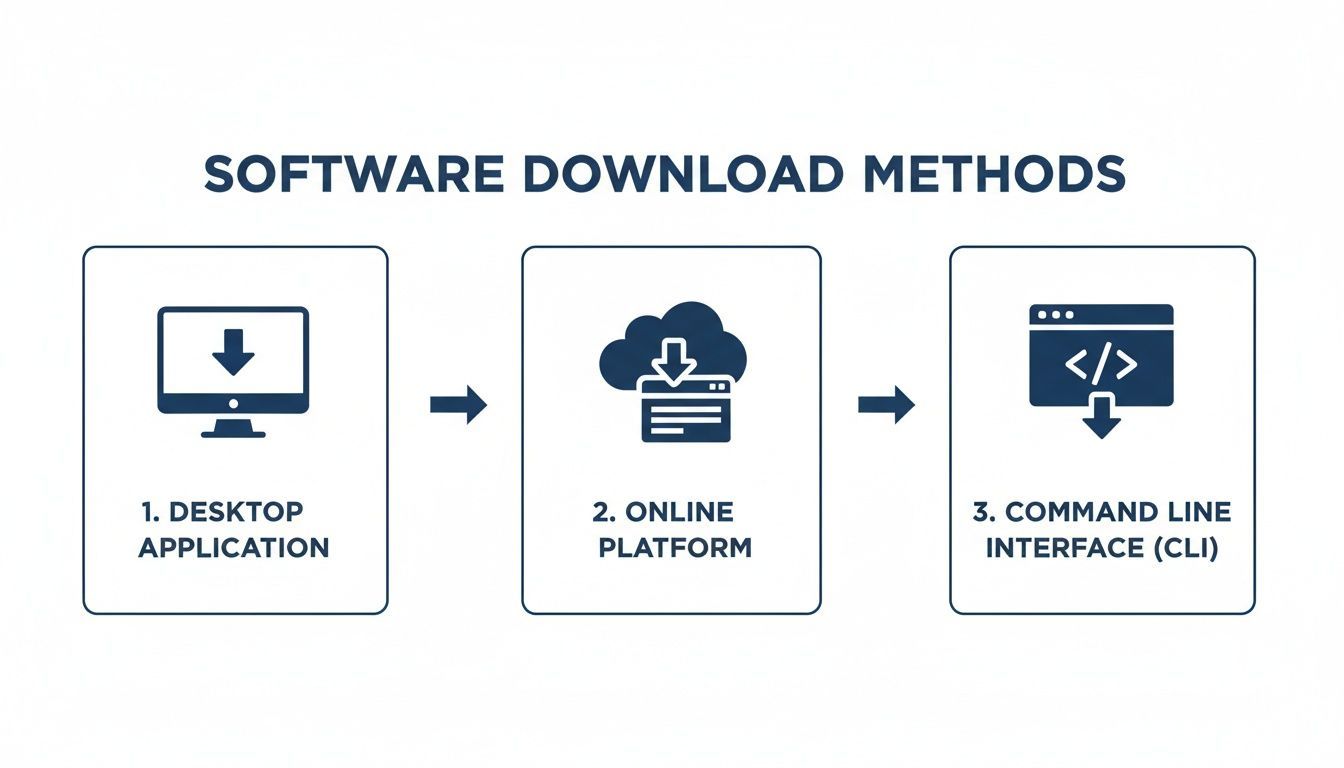
As you can see, the command-line interface (CLI) is a distinct path, built for users who favour control and automation over the point-and-click convenience of other methods.
Getting Started with yt-dlp
The best tool for the job right now is yt-dlp. It’s a fork of the original youtube-dl, and it's actively maintained, which is crucial because YouTube is always changing things on the backend. Getting it set up takes a little technical comfort, but the official documentation is clear and easy to follow.
Once it's installed on your system, you'll run it by typing commands into your terminal (on Mac/Linux) or Command Prompt (on Windows). Let's jump into some real-world examples.
Basic 4K Video Download Commands
First up, let’s grab the best possible 4K video with the best audio and combine them. This is the bread-and-butter command for anyone wanting a high-quality master copy of a video.
Just open your terminal and paste this in, replacing the URL:
yt-dlp -f "bestvideo[height>=2160]+bestaudio/best" "VIDEO_URL"
This command tells yt-dlp to find a video stream that's at least 2160p (4K) and merge it with the highest quality audio available. The /best at the end is a smart fallback; if separate 4K streams aren't available for some reason, it will just grab the best pre-packaged version YouTube offers.
The big win here is transparency. You're not just clicking a "Download 4K" button and hoping it works. You are explicitly telling the software what to grab, which guarantees a predictable, high-quality result every single time.
For any professional workflow, that kind of consistency is non-negotiable.
Advanced Commands for Creators and Agencies
The real magic of yt-dlp comes from its huge library of flags and options. This is where it becomes an absolute powerhouse for creators and agencies managing lots of content.
Maybe you need to archive an entire playlist of your 4K tutorials and want them neatly organised with all their metadata intact.
-
Download an Entire Playlist in 4K:
yt-dlp -f "bestvideo[height>=2160]+bestaudio/best" --embed-thumbnail --add-metadata "PLAYLIST_URL"This command cycles through the entire playlist, grabs each video in 4K, embeds the thumbnail as the cover art, and writes all the metadata (title, description, upload date) directly into the file's properties. -
Choose a Specific File Format: Sometimes you need a specific container. MKV is great for holding multiple subtitle tracks, while MP4 offers universal compatibility for editing software.
yt-dlp -f "bestvideo[height>=2160]+bestaudio/best" --remux-video mp4 "VIDEO_URL"The--remux-video mp4part is key. It downloads the pristine video and audio streams and simply repackages them into an MP4 container. There's no re-encoding, so you preserve 100% of the original quality.
The demand for these powerful tools is growing everywhere. In Bulgaria, for instance, an app called 'Video Downloader HD - Vidow' is ranked #6 among the top social apps on Google Play, with over 50 million downloads. This signals a huge appetite for downloading video content. When you see a downloader app sitting next to giants like TikTok, you know it's an essential tool for creators. Many use them to get source files for content schedulers like PostFast. With YouTube reaching 4.37 million users in Bulgaria and average fixed internet speeds hitting 85.36 Mbps, downloading big 4K files is no longer a chore. You can dig into more of this data over at 42matters.com.
Automating Your Workflow with Scripts
Here's the real game-changer: scripting. Because these are just text commands, you can chain them together into simple scripts to automate tedious, repetitive tasks.
Imagine you're an agency managing five YouTube channels for clients. You could write a quick script that does this every night:
- Reads a list of channel URLs from a text file.
- Checks each channel for new videos from the last 24 hours.
- Downloads any new videos in your preferred 4K format.
- Sorts the files into folders named after each client.
- Sends you a quick email to let you know it's done.
This kind of set-it-and-forget-it automation can save your team dozens of hours a month. It turns a manual chore into a background process, freeing you up to focus on creative work. Learning the command line takes a little effort upfront, but the long-term efficiency boost is massive.
Finding the Best Desktop Apps for 4K Downloads
While command-line tools offer a ton of power, let's be honest, most of us prefer a clean, visual interface. That’s where dedicated desktop apps really shine.
For creators, marketers, or anyone who regularly needs high-quality video, these apps are a straightforward and reliable solution. No need to touch a single line of code. A good desktop youtube video downloader 4k becomes a workhorse in your toolkit. You install it once, and it’s always ready to handle the massive file sizes that come with 4K resolution, something browser-based services often choke on.
Why a Dedicated App Is Worth It
The biggest win with a desktop app is reliability. Picture a marketing team needing to analyse a dozen 4K competitor ads. Instead of downloading them one by one through a clunky website, they can queue up all the links in an app and just let it run in the background.
This is called batch downloading, and it’s a massive time-saver. It lets you download entire playlists or a whole collection of videos at once. For creators backing up their own channel, this feature is a lifesaver. You can literally archive your entire content library overnight.
Another huge benefit is the built-in converter. Many of the best downloaders let you pick your output format from the get-go, converting the video to an editor-friendly MP4 or a different codec as it downloads. This cuts an extra step from your workflow, getting the content ready for your editing software or content calendar much faster.
Key Features to Look for in a 4K Downloader
Not all desktop apps are built the same. When you're weighing your options, a few features are non-negotiable for a smooth workflow.
- True 4K and 8K Support: The app has to handle modern streaming protocols to download separate video and audio streams and merge them correctly. If it only grabs 1080p, it's outdated.
- Playlist and Channel Downloads: The ability to paste a single link and grab an entire video library is a must-have for anyone managing large volumes of content.
- Subtitle Extraction: Look for options to download subtitles as separate SRT files. This is incredibly useful for repurposing content or making your videos more accessible.
- Download Speed Controls: Some of the more advanced apps let you limit bandwidth usage, so a huge download doesn't bring your entire network to a crawl.
The goal is to find a tool that fits seamlessly into your process. For a social media manager using PostFast, the ideal app lets them grab a 4K source video, convert it to a universally compatible MP4, and have it ready for scheduling across multiple platforms without any quality loss.
This need for high-quality, accessible content is reflected everywhere. In early 2025, YouTube hit an impressive 4.37 million users in Bulgaria, which is 64.9% of the entire population. This massive audience makes top-tier video a critical asset for brands and creators in the region. Tools like a youtube video downloader 4k are becoming more popular because they give people offline access to top-performing content, ready to be repurposed for TikTok, Instagram Reels, or LinkedIn. You can find more insights on Bulgaria's digital landscape over at DataReportal.
Staying Safe and Avoiding Malware
The internet is swimming with free software, and unfortunately, a lot of it isn’t safe. When you’re hunting for a desktop downloader, you have to be cautious to avoid installing malware or adware. A "free" tool bundled with junk can create way more problems than it solves.
Here’s how to pick a safe application:
- Stick to Reputable Sources: Only download software from the developer's official website. Avoid those sketchy third-party download sites, they’re often packed with bundled ads.
- Read Reviews: See what trusted tech sites or users on forums are saying. Find out what other people's experiences have been with the software before you install it.
- Check for a Privacy Policy: A legitimate developer will have a clear privacy policy explaining what data, if any, their app collects. If there’s no policy, that's a red flag.
- Consider Paid Software: While free options are tempting, a paid app is often a much safer bet. Developers who charge for their product are more likely to offer support, regular updates, and a clean, ad-free experience.
Investing a small amount in a well-regarded desktop app is a smart move. It gives you peace of mind and ensures you have a powerful, reliable tool for managing your 4K video assets, keeping your workflow efficient and your computer secure.
How to Preserve 4K Quality After Downloading
Grabbing a 4K video from YouTube is a great start, but it's only half the battle. The real challenge is making sure that gorgeous, pixel-perfect quality stays intact through your entire workflow, from storage and editing right through to the final export.
It's surprisingly easy to accidentally downgrade a video file. One wrong setting can turn a pristine 4K source into something that looks fuzzy and compressed on a big screen. A few key concepts will help you avoid that pitfall completely.
Understanding Codecs and Containers
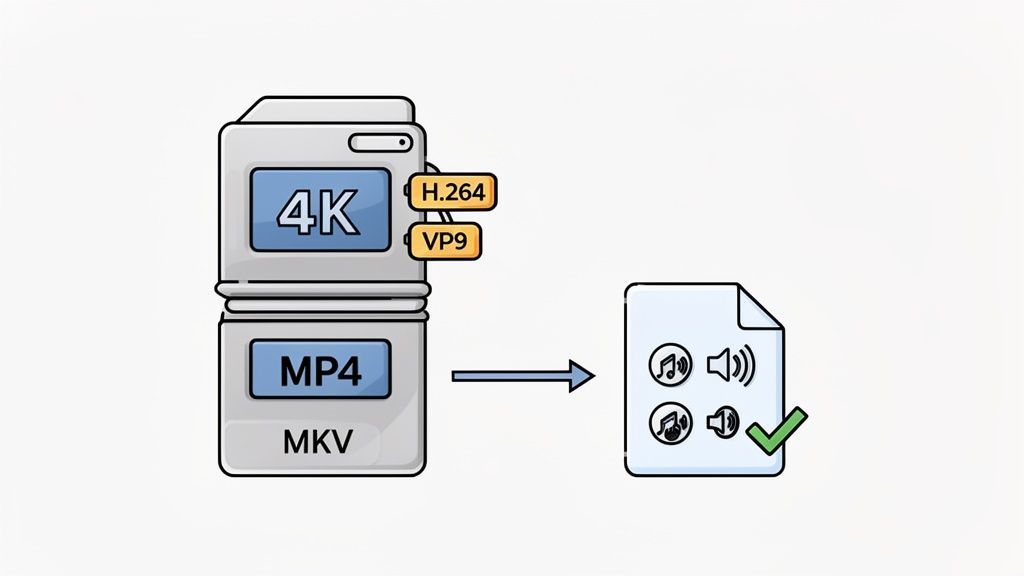
Let's quickly demystify a couple of technical terms you'll keep running into. Think of a video file like a package you're sending. The container is the box itself (like MP4 or MKV), and the codec is the method used to pack everything efficiently inside (like H.264 or VP9).
-
Containers (MP4 vs. MKV)
- MP4: This is the universal standard. It’s compatible with pretty much every editing program, social media platform, and device out there. For most creators, this is the safest, most practical choice.
- MKV: A more flexible container that can hold multiple video, audio, and subtitle tracks in a single file. It's fantastic for archival purposes but sometimes needs to be converted before you can edit it.
-
Codecs (H.264 vs. VP9)
- These are the algorithms that compress your video into a manageable file size without you noticing the quality drop. YouTube primarily uses VP9 for its 4K content because it’s incredibly efficient. H.264 (also called AVC) is another widely used standard. A good downloader grabs the video using its original codec to prevent any quality loss.
When you download a 4K video, the tool is simply taking the exact container and codec that YouTube provides. This ensures you have a perfect, bit-for-bit copy of the original file.
Why YouTube Separates Video and Audio
Ever used a basic downloader and found it only grabs 1080p, even when the original video was 4K? That’s because, for resolutions above Full HD, YouTube streams the video and audio as separate files to optimise playback.
A proper 4K downloader is smart enough to handle this. It downloads the 4K video stream (often in the VP9 codec) and the highest quality audio stream separately, then merges them back into a single, perfectly synchronised file on your computer. This process is called "muxing," and it's absolutely essential for getting true 4K downloads.
This need for offline access is growing. For instance, Bulgaria has one of the lowest online video engagement rates in the EU, with only 55% of internet users watching videos online. And yet, with 4.37 million YouTube users, the platform is clearly popular. A quality downloader helps bridge that gap for creators who need reliable access to high-resolution content for their projects.
Common Mistakes That Ruin Video Quality
The secret to preserving quality is to avoid unnecessary re-encoding. Every single time a video is re-compressed, it loses a little bit of data. Do it too many times, and the degradation becomes painfully obvious.
The golden rule: treat your downloaded 4K file as your untouchable "master" copy. Always work from a duplicate, and only re-encode once at the very end of your process.
Here are a few common traps to watch out for:
- Accidental Compression: Using a simple file converter to change an MKV to MP4 without the right settings can trigger a full re-encode, crushing the quality.
- Incorrect Export Settings: When editing, your final export settings must match the source video's resolution, frame rate, and bitrate to avoid introducing ugly compression artefacts.
- Using a Proxy Workflow Incorrectly: Proxies are amazing for smooth editing, but a simple mistake when re-linking back to the original 4K files can leave you with a final video that's disappointingly low-resolution.
By keeping these fundamentals in mind, you can ensure the 4K video you worked so hard to download stays crisp and clear. This is especially vital when you’re repurposing content for different platforms, where visual fidelity makes all the difference. For more guidance on this, check out our article on YouTube video sizes and dimensions.
Questions That Come Up When Downloading 4K Videos
Once you start pulling 4K videos, a few questions pop up, usually around legal stuff and technical glitches. Let's clear up the most common ones so you can keep your workflow smooth and responsible.
Is It Actually Legal to Download 4K YouTube Videos?
This is the big one, and the answer isn’t a simple yes or no. Technically, downloading videos goes against YouTube's terms of service unless they give you an official download button. The real decider, though, is what you plan to do with the video.
Grabbing copyrighted content you don't own to share it elsewhere is a clear no-go. But if you're a creator downloading your own work for backup, that's perfectly fine. People often mention "fair use" for personal archives or research, but it's a bit of a legal grey area. Our focus here is on legitimate uses, like creators protecting their own work.
It's also a really good idea to understand how to avoid copyright strikes on YouTube if you ever think about repurposing clips. Always play it safe and respect other creators.
Why Do Some Downloaders Only Give Me 1080p?
This is a classic headache. The issue is how YouTube serves up its high-res content. For anything sharper than 1080p, YouTube often delivers the video and audio as two separate streams.
A more basic or older downloader can only grab the combined file, which tops out at 1080p. A true youtube video downloader 4k needs to be smart enough to fetch the separate 4K video and audio streams and then stitch them back together. If your tool keeps giving you 1080p, it's a sign it can't handle YouTube's modern delivery method.
What’s the Difference Between MP4 and MKV for 4K?
Think of MP4 and MKV as containers. They're the "boxes" holding your video and audio.
- MP4 is the universal format. It just works, playing nicely on almost any device or editing software you can think of. It's the safe bet for sharing and editing.
- MKV is the flexible powerhouse. It can pack multiple audio tracks and subtitles into a single file, which is amazing for archival purposes when you want to keep everything.
For posting on social media, you’ll want an MP4. A good workflow is to download the highest quality MKV as your master copy, then export your final edit as a clean MP4. We dig deeper into this in our guide on how to download videos from YouTube.
The takeaway is simple: use MKV for a perfect master archive and MP4 for everyday editing and sharing.
How Fast Does My Internet Need to Be for 4K Downloads?
While you need a steady 25 Mbps connection to stream 4K without buffering, downloading is more about patience. A fast connection gets the job done quicker, but a slower one will still get there.
A 10-minute 4K video can easily be 1 to 2 GB. On a 100 Mbps connection, that’s just a couple of minutes. On a 20 Mbps connection, you’ll be waiting a bit longer. Given Bulgaria's median fixed internet speed is 85.36 Mbps, most people here are set up for pretty quick downloads.
Ready to manage your social media workflow more efficiently? PostFast helps you schedule and automate your high-quality content across all major platforms, saving you hours every week. Start your free 7-day trial of PostFast and see how easy content management can be.
Related articles

Best Time to Post on Social Media in 2026: 61,008 Posts Scored Against Their Own Normal
61,008 posts with clean metrics, each scored against its account's normal: Instagram 3 PM local, Facebook 3 to 5 PM, YouTube 1 PM or evenings, TikTok flat.

PostFast MCP Server for Claude, ChatGPT and Cursor: Launch Notes and Changelog (2026)
The launch note for PostFast's MCP server: npm release March 2026, ChatGPT and Claude connectors June 2026, inbox tools August 2026. Setup, tools and changelog.

Can You Schedule Posts on Bluesky? How to Schedule Bluesky Posts in 2026
Yes, with a scheduling tool: Bluesky's own app has no scheduler. What Bluesky offers, the 300-grapheme and media limits, and how to schedule with PostFast.

Can You Schedule Posts on LinkedIn? How to Schedule LinkedIn Posts for Profiles and Pages in 2026
Yes. LinkedIn schedules posts 10 minutes to 3 months ahead (1 hour on Pages). Desktop, mobile, and Page steps, plus where PostFast goes further.

How to Schedule Pinterest Pins in 2026: Pinterest's Scheduler vs PostFast, Step by Step
Two ways to schedule Pinterest Pins: Pinterest's own scheduler (30 days ahead, 10 Pins queued) and PostFast for image, video, and multi-image Pins from desktop.

Best Social Media Schedulers in 2026: 11 Tools Compared on Price, Platforms, and Automation
Eleven social media schedulers compared on September 2026 pricing, platforms, auto-publishing, and API or MCP automation, using each vendor's own pricing page.