Your Guide to Instagram Video Download HD in 2026
Learn how to master Instagram video download HD on any device. Our guide covers safe methods, quality tips, and smart ways to repurpose content.
On this page (5)
Let's be real, you're not here because you enjoy watching pixelated, blurry videos. A crisp Instagram video download in HD is not just a vanity metric; it is about making sure the content you worked so hard on actually performs when you reuse it elsewhere.
Why You Can’t Settle for Low-Quality Downloads
You have spent hours getting the lighting, cuts, and audio just right for that Reel. Then you go to repurpose it for another platform, and it looks like it was filmed on a potato. We have all been there.
This quality drop does more than just frustrate you; it hurts your brand's credibility. High-definition content signals professionalism. Low-res clips? They just look amateur.
The problem is usually screen recording or using a sketchy downloader, which adds heavy compression and strips away all the sharp details. Learning to download your Instagram videos the right way means your work looks just as good on your website or YouTube Shorts as it did on the day you posted it.
High-Quality Video Protects Your Brand Image
Every post, Reel, and Story you publish is a direct reflection of your brand. A pixelated video can instantly cheapen the professional image you have spent months or years building.
If you are not convinced quality matters, take a look at the data. With Instagram users in Bulgaria expected to hit 2,215,100 by early 2026, understanding what works is critical. The biggest user group, those aged 25-34, grew up on slick, professional content. If you're repurposing Reels to reach them, HD is non-negotiable.
Here is a quick breakdown of how video definition impacts the metrics that matter.
HD vs Standard Definition Download Impact
| Feature | Standard Definition (SD) | High Definition (HD) |
|---|---|---|
| First Impression | Looks unprofessional or dated. | Appears polished and credible. |
| Brand Perception | Can make the brand seem low-budget or careless. | Reinforces a high-quality, professional image. |
| Viewer Engagement | May cause viewers to scroll past; lower watch time. | Captures and holds attention longer. |
| Repurposing | Loses even more quality when re-uploaded elsewhere. | Maintains clarity across platforms like TikTok and YouTube. |
As you can see, settling for SD is not a small compromise. It has a real, negative effect on how people see your brand.
Think of it this way: you would not use a fuzzy, low-resolution logo on your website, so why would you accept a low-resolution video? Every asset you use adds up to create your brand's total perceived value.
The same principle applies across your entire profile, which is why many creators also look into how to upscale images for Instagram. The goal is always visual excellence.
Ultimately, treating your video assets with care pays off in audience engagement and trust. For more tips on crafting great content from the start, check out our guide on creating compelling videos for Instagram.
Downloading Instagram Videos on a Desktop
If you are working from a desktop computer, you have a couple of powerful and reliable ways to download an Instagram video in HD. While grabbing videos on your phone is convenient, a desktop gives you more control and a straight path to the highest quality file.
Let's look at two solid methods: using your browser’s built-in tools and picking a web-based downloader that will not give you a headache.
Using Browser Developer Tools
One of the cleanest ways to grab a video is to skip third-party apps entirely. Your browser's "developer tools" might sound a bit technical, but the process is surprisingly straightforward.
This trick lets you find the original video file right from the page’s code. It is my go-to for a quick, secure download because you are getting the exact high-res file Instagram is serving, with no middleman.
Here is how to do it in browsers like Chrome, Firefox, or Edge:
- Open the Instagram post with the video in a new browser tab.
- Right-click anywhere on the page (but not on the video itself) and choose "Inspect" or "Inspect Element." This opens the developer panel.
- Inside the panel, look for a tab called "Network." Click it.
- You might need to refresh the page for the network activity to show up. Once it does, you can filter the results. Look for a "Media" filter, or just type ".mp4" into the filter box.
- You should see one or more files listed that end in
.mp4. Right-click the video file and pick "Open in new tab." - The video will now be playing by itself in a new tab. Just right-click the video again and select "Save video as..." to download it to your computer.
This method is 100% secure. You are not handing a video URL or any personal data to a third-party site. You are just using tools already built into your browser.
Finding a Reliable Web-Based Downloader
If digging through developer tools is not your thing, a good web-based downloader is your next best bet. But you need to be a little careful here. The web is full of sketchy sites that are slow, plastered with pop-up ads, or worse, try to trick you into installing junk.
A trustworthy site for an Instagram video download in HD will have a few things in common:
- Clean Interface: The site should look simple, with a clear box for the video URL and a download button. Nothing more.
- No Login Required: You should never, ever have to enter your Instagram username or password.
- Minimal Ads: Some ads are expected, but if the site is drowning in aggressive pop-ups, that is a big red flag. Close the tab.
- Clear Quality Options: The best services let you choose the download quality, so you can make sure you're getting the highest resolution available.
Always be wary of sites that ask you to download a "helper application" or browser extension. These are almost always unnecessary and can be a security risk. Stick to services that do everything right there in the browser.
For creators, having these downloaded files is gold for repurposing content. Once you have your HD video, you can easily slice and dice it for other formats. If you're turning a landscape video into a vertical clip for Reels, for example, getting the dimensions right is key. You can find the correct specs in our guide to Instagram Reels sizes.
Saving Instagram Videos on Your Mobile Device
When you are away from your desk and need to grab a video file, your phone is the obvious tool for the job. Getting an Instagram video download in HD on mobile is a bit different than on a desktop, but you still have solid, secure options for both Android and iOS.
For Android users, the Google Play Store is packed with apps built for this. The catch? You have to be careful. While many are perfectly fine, others are bloated with ads or have sketchy privacy policies. The key is to vet them properly before you install anything.
Finding Safe Download Apps on Android
Always look for apps with high ratings and a massive number of downloads. I make it a habit to read the recent user reviews, specifically looking for complaints about intrusive ads, slow performance, or any security red flags.
A good app should only ever ask for the video's URL. If it asks for your Instagram login, that is an immediate deal-breaker.
The demand for these tools is huge. For example, some video downloader apps have cracked the top 10 social apps on Google Play in countries like Bulgaria, with certain ones boasting over 50 million global downloads. This just shows how many people are looking for a reliable 'Instagram video download HD' solution.
No matter the platform, the basic workflow is almost always the same: copy a link, paste it, and download the file.
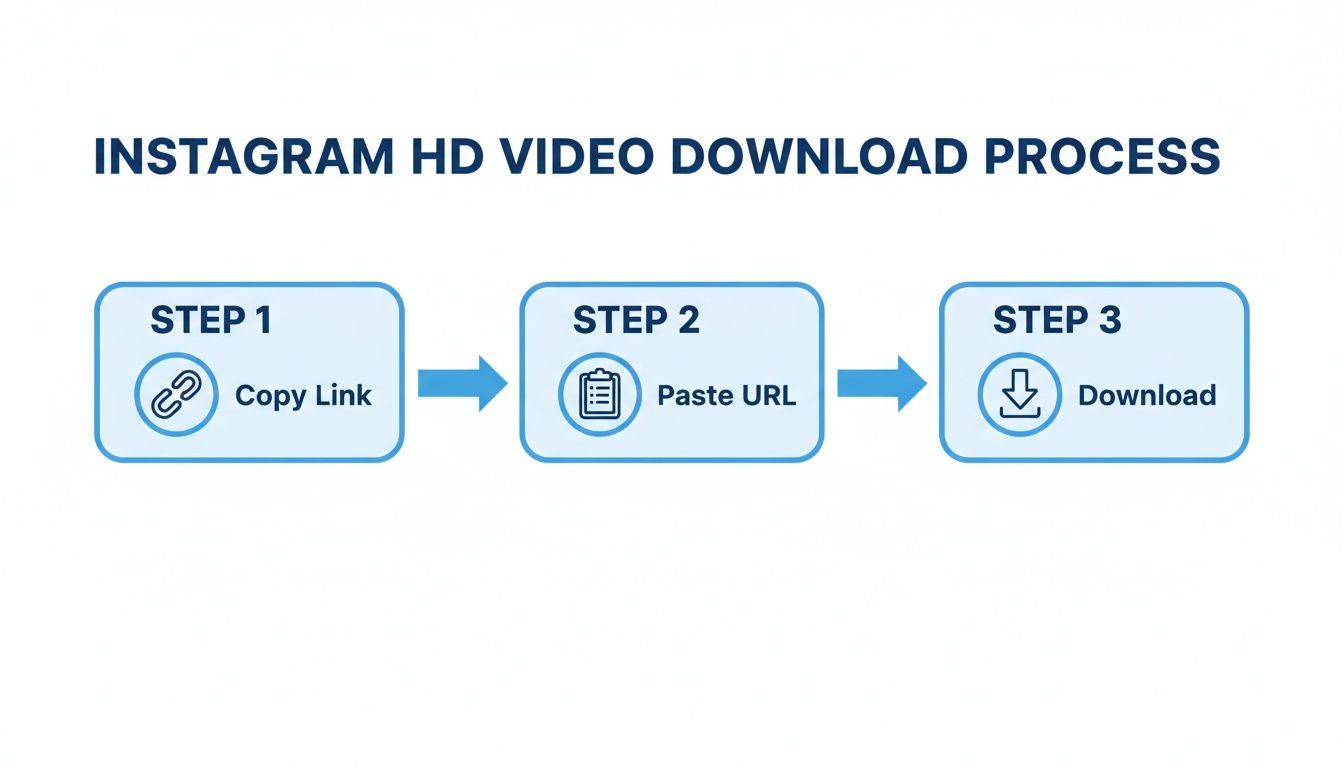
This simple three-step flow is universal. You copy the link from the Instagram app, paste it into your downloader, and save the high-quality video right to your device.
Using Shortcuts for Secure iOS Downloads
If you are on an iPhone, you have a much cleaner and more private option: the built-in Shortcuts app. This lets you build your own little download tool, giving you complete control without having to trust an unknown developer with your data.
You can find pre-made shortcuts online designed specifically for downloading Instagram videos. Once you add one to your Shortcuts library, you can run it straight from the "Share" menu inside the Instagram app.
The Shortcuts app is my go-to recommendation for iOS users. It is one of the safest methods out there because the entire process runs locally on your device. You are not sending data to some random server or putting your account security at risk.
This method is a clean, ad-free way to save videos directly to your Photos app.
Ultimately, whether you're on desktop or mobile, the core process often involves figuring out how to convert any URL to MP4 to get the video file you need. The goal is always to get the best version of the video without compromising your device’s security.
The Ethics of Repurposing Someone Else’s Video
Knowing how to grab an Instagram video download in HD is a great technical skill. But knowing when you should is far more important. Saving your own videos to use elsewhere? That is perfectly fine and a smart way to work. Downloading someone else's content to re-upload it is a completely different story.
Let's be direct: taking another creator’s video without their permission and posting it as your own is copyright infringement. It is a fast track to getting your content removed, your account flagged, and in some cases, serious legal trouble.
Being a good digital citizen is not just about rules; it is about building a reputation as a professional people want to work with.
The Right Way to Share and Collaborate
If you find a video you absolutely love and think your audience needs to see it, resist the urge to just download it. The professional approach is to simply ask for permission first. A polite, straightforward DM is usually all it takes.
Most creators are happy to have their work amplified, especially when they're credited properly. Once you get that green light, make sure you honor their work and any requests they have.
Here is a quick checklist for sharing content ethically:
- Always ask first. Send the creator a direct message. Tell them why you love their video and how you would like to share it with your audience.
- Give credit upfront. Tag the original creator’s account in the very first line of your caption and in the video itself. Do not bury their handle in a sea of hashtags.
- Be transparent. Make it obvious that you are sharing content made by someone else and celebrating their work.
Following these simple guidelines shows you respect other creators and helps build a positive, collaborative community. It is the difference between being seen as a supportive peer and someone who just takes what they want.
Reposting vs. Repurposing Your Own Work
While Instagram lets you share a post to your Story, putting it directly on your feed is trickier. If you plan on doing this, it's crucial to understand the right way to go about it. We cover the best practices in our detailed guide on reposting on Instagram.
Ultimately, the safest and most professional content to repurpose is your own. It completely removes any copyright headaches and gives you total creative control. This is where an organized workflow makes all the difference.
Instead of downloading and re-uploading your own videos, you can use a scheduler like PostFast to manage and re-share your top-performing content from one library. It's a much cleaner, safer, and more efficient way to manage your brand's assets.
A Better Way to Manage Your Video Content
Constantly downloading your own videos just to re-upload them somewhere else feels clunky because, well, it is. It is a massive time sink, but it also creates needless security risks and can degrade your video quality with every transfer. There is a much cleaner, more professional way to handle your video assets.
Instead of just grabbing files on the fly, it is time to build a smarter, more organized workflow. This simple shift takes you from one-off downloads to a long-term strategy for your best-performing content.
Shift From Downloading to Scheduling
Let's say one of your Reels just exploded and you want to get it onto TikTok or YouTube Shorts while it is still hot. The old way means an Instagram video download in HD, digging through your 'Downloads' folder, then uploading it to each platform, one by one.
A much better approach is to use a tool like PostFast to schedule it directly from a central content library. This immediately gives you a few powerful advantages:
- Saves a Ton of Time: You completely cut out the download and re-upload steps. Scheduling your content across platforms can take a few minutes, not a few hours.
- Keeps Your Quality High: Your video file stays in one place. This preserves its original quality by avoiding the extra compression cycles that happen with each download and upload.
- Keeps You Organized: Your entire content calendar, including all your repurposed videos, is laid out in one clean dashboard. No more guessing what went where.
When you make scheduling part of your workflow, you stop reacting and start planning. It is how the top creators maintain a solid presence everywhere without burning out.
Use Data to Drive Your Repurposing Strategy
So, how do you even know which videos are worth the effort of repurposing? The answer is already in your analytics. An efficient workflow does not just manage content; it connects performance data directly to your strategy.
Instead of just guessing, you can use your built-in analytics to find your top-performing videos. This data-driven approach makes sure you are only putting time into content that is already proven to connect with your audience.
For example, a platform like PostFast does not just let you schedule; it shows you the metrics behind every post. You can instantly spot which Reels got the most views or comments and add them to your cross-platform schedule with a couple of clicks. This turns your analytics from a simple report card into an actionable part of your content planning.
The Bulgarian market is a great case study. By late 2025, Instagram's user base there had grown to 1.95 million people, a 5.4% jump from the previous year. With women making up 53% of the adult ad audience, a smart creator could use an organized workflow to schedule targeted Reels and cross-post them, saving over 10 hours a week on manual tasks. You can dive deeper into digital trends in Bulgaria on DataReportal.
Ultimately, managing your video content this way is about working smarter, not harder. It is a professional system that respects your time, protects your content’s quality, and uses data to make every move count.
Frequently Asked Questions
Saving Instagram videos can bring up a lot of questions. Let's clear up the most common ones so you can handle your content the right way.
Is It Legal to Download Instagram Videos?
This is the big question, and the answer comes down to copyright.
Downloading your own videos is always fine. It is your content.
Saving someone else’s video for personal, offline viewing is a bit of a grey area. The real problem is re-uploading or sharing another person's video without their explicit permission. That is a clear copyright infringement and violates Instagram's terms of service.
The best practice is straightforward: always ask first and give clear credit if you plan to repurpose any content that is not yours.
Will Downloading a Video Lower Its Quality?
Not if you use the right tools. The goal of a proper Instagram video download in HD is to get the original file that Instagram has on its servers.
The methods we've covered, like browser developer tools or reputable web services, are designed to grab the highest resolution available. Quality loss usually happens from screen recording because you are just capturing a compressed version of the video as it plays.
For crisp, clean results, always aim to download the source MP4 file directly.
A common mistake is assuming all downloaders are the same. Some services will compress files to save their own bandwidth. Always stick to tools that explicitly offer an HD option to make sure you get the best quality possible.
Can I Download Instagram Stories and Reels?
Yes, absolutely. The process for downloading Reels is nearly identical to downloading standard feed videos, as they are both permanent posts.
Instagram Stories are different since they disappear after 24 hours. While some specialized tools are built to save active Stories, you need to be extra cautious with any service that asks you to log in with your Instagram details. Your account security always comes first.
What Is the Safest Download Method?
The safest options are always the ones that do not ask for your Instagram login information.
Using your browser's developer tools is highly secure since it involves no third-party websites. If you do go with a web-based tool, pick one that looks professional, has few ads, and only needs the public URL of the video. Any site demanding account access is a huge red flag and should be avoided.
For a truly secure and professional workflow, the best move is to manage your own content inside a dedicated platform. This lets you skip risky downloads entirely and lets you schedule and reuse your best work from one safe place.
Instead of juggling downloads, you can build a more professional workflow. With PostFast, you can schedule your video content across all major platforms from a single dashboard, saving time and keeping your content quality pristine. Try PostFast for free and see how much time you can save.
Related
Instagram scheduling with PostFast
Feed posts, Reels, Stories, carousels
How to Connect Claude to Instagram: Post, Schedule, Reply
Connect Claude to Instagram so it can schedule posts, Reels and Stories, answer comments and report post stats. Setup steps, prompts that work, and limits.
Anonymous Instagram Story Views: Will They Know?
What the poster actually sees when you view their Instagram story, which anonymous methods leave a trace, and how to check safely without risking your account.
How to View Instagram Stories Anonymously: What Still Works
Which anonymous Instagram Story methods still work and which quietly stopped. Third-party viewers, airplane mode, burner accounts, tested and compared.
A Guide to Instagram Image Download Methods for Any Device
Discover safe and effective methods for an Instagram image download on any device. Learn how to save photos for your content strategy and avoid common pitfalls.
Can ChatGPT Post to Instagram and Facebook? Yes, Here Is How
Yes, with a connected app. Use PostFast to schedule Instagram and Facebook posts, Reels and Stories from ChatGPT, with approval before publishing.